Every DevOps engineer knows the feeling of being interrupted by unexpected alerts, failed deployments, or production incidents. Investigating logs, identifying the root cause, and applying a fix can consume valuable time. AI agents are changing that workflow by continuously monitoring infrastructure, analyzing issues, recommending solutions, and even automating remediation tasks. In this guide, we'll explore how AI agents are transforming DevOps and how you can start using them in your own Linux environment.
| What It Does | Autonomously executes DevOps tasks across deployment, monitoring, and incident response |
| Best For | Infrastructure automation, CI/CD optimization, incident detection and remediation |
| Learning Curve | Medium to high, requires integration with existing tooling and workflows |
| Real Impact Timeline | 3-6 months from planning to measurable automation gains |
What AI Agents for DevOps Automation Actually Do
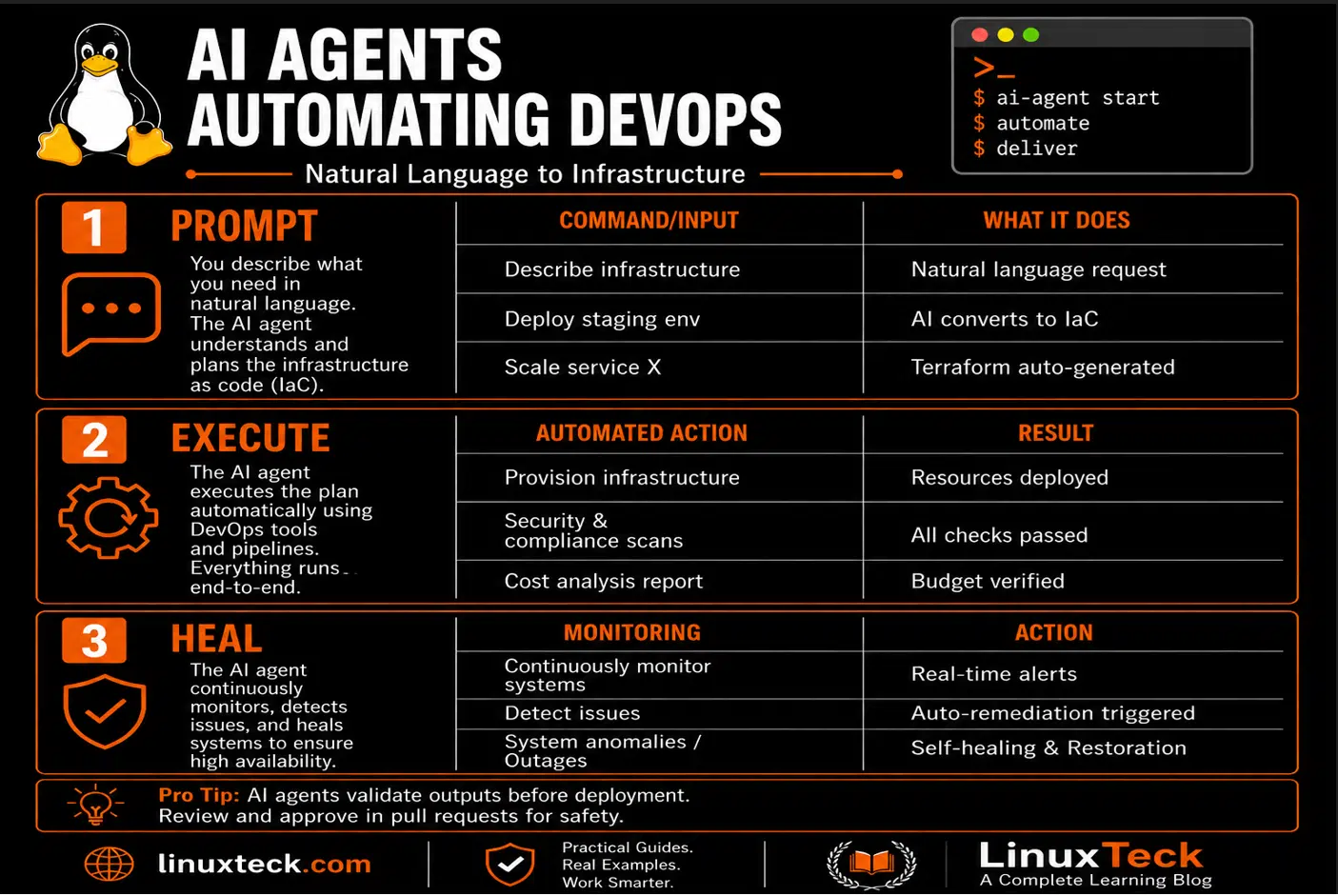
The difference between a chatbot and an AI agent is simple but critical. A chatbot waits for you to ask it something, then responds. An AI agent looks at your infrastructure continuously, identifies problems you haven't noticed yet, makes decisions about what to do, and acts on those decisions. It's autonomous in a way that matters for operations.
In DevOps, AI agents sit between your monitoring systems and your deployment pipelines. They can watch application metrics, correlate failures across logs, file tickets when something's wrong, generate fixes, test those fixes in staging, and deploy them to production. All without you typing a single command.
The critical part that most teams miss: AI agents aren't magical. If your logging is a mess, your alerting rules are vague, and your infrastructure is undocumented, an agent will be confused too. The upside is that building clean infrastructure to work with AI agents actually fixes operational debt. It forces good practices.
Key Takeaway:
How AI Agents for DevOps Automation Work Under the Hood
Most people think AI agent architecture is exotic. It's not. Let me walk through what actually happens when an agent runs and makes decisions about your infrastructure.
The Reasoning Engine
At the core is a large language model, a neural network trained on massive amounts of text. Learn more about how modern AI systems analyze infrastructure data and generate plausible solutions. This gives the agent the ability to understand natural language prompts, recognize patterns in logs, and propose fixes. It's not magic, but it's genuinely powerful. The model connects concepts even when they're not explicitly linked in training data.
Memory and Context
An agent that forgets everything after each decision is useless in production. Real agents maintain context. They remember your infrastructure topology, recent deployments, past failures, on-call schedules, and team policies. This memory system makes decisions contextual and appropriate instead of generic and risky.
Tool Integration
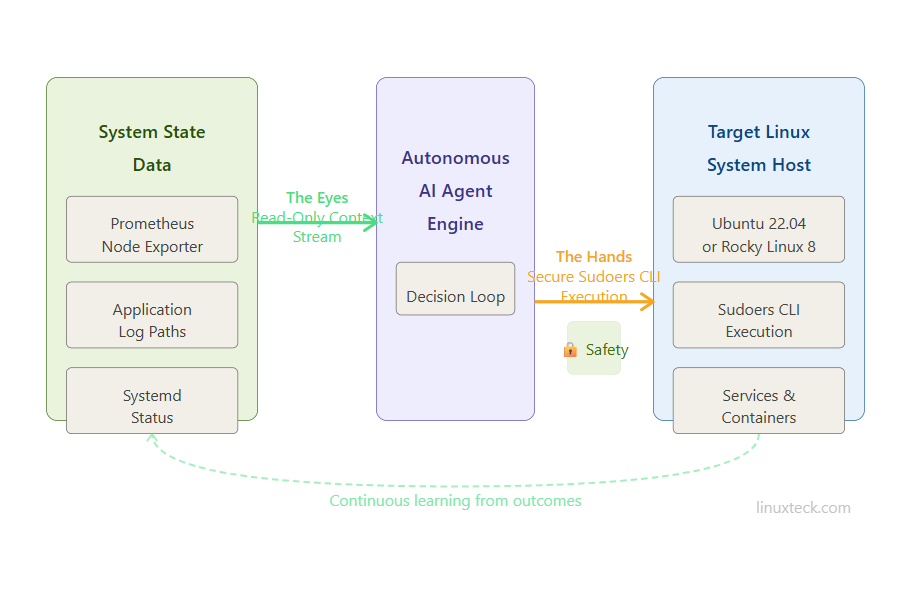
Here's what makes agents practical. An agent alone cannot fix your infrastructure. Connect it to your monitoring system, source control, deployment pipeline, ticketing system, and infrastructure as code repository, and now it can act. The agent makes decisions, but it acts through tools you control and audit.
Decision Loop
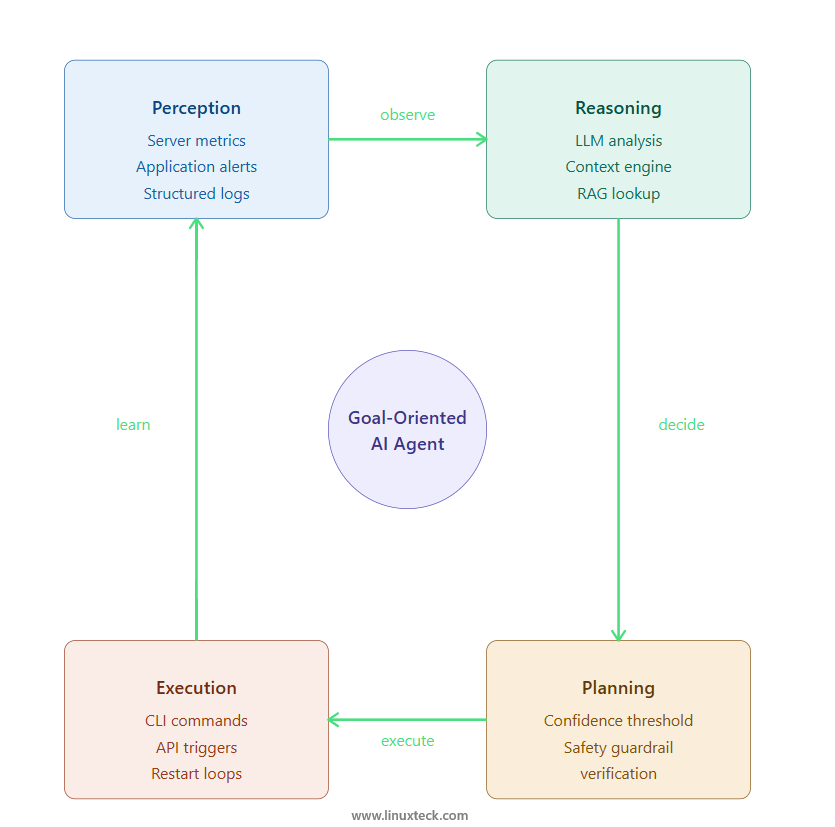
An agent observes your system state through monitoring data, makes a decision about whether action is needed, plans a sequence of steps, executes those steps through its tools, observes the results, and learns from the outcome. This loop runs continuously. If something goes wrong, the agent documents what happened and escalates to a human for review.
Why Context Matters More Than Raw AI Power:
Setting Up AI Agents for DevOps Automation on Linux
Getting AI agents working in your environment requires practical setup. It's not just enabling a feature, it's integrating systems. Here's what happens in practice on Ubuntu and Rocky Linux environments.
Prerequisites on Ubuntu 22.04 LTS
Before deploying any agent, you need clean foundations. Your monitoring stack, logging infrastructure, and infrastructure as code must be in good shape or the agent will make bad decisions.
LinuxTeck.com
sudo apt install -y curl wget jq python3-pip prometheus-node-exporter
pip3 install pyyaml requests pydantic
# Verify prerequisites (Python 3.10+ on Ubuntu 22.04)
node_exporter --version
python3 -c "import yaml, requests, pydantic; print('Dependencies OK')"
Setting Up Agent Infrastructure on Rocky Linux 8
Rocky Linux uses dnf instead of apt. The agent setup flow is similar but package names and paths differ. Important: Rocky Linux 8 doesn't have python3-pydantic in the base repos, so you must enable EPEL (Extra Packages for Enterprise Linux) first. Python 3.8 ships with Rocky 8, which is sufficient for our agent framework.
LinuxTeck.com
sudo dnf install -y curl wget jq python3-pip node_exporter
sudo dnf install -y python3-yaml python3-requests python3-pydantic
# Enable and start node exporter (Python 3.8+ on Rocky 8)
sudo systemctl enable node_exporter
sudo systemctl start node_exporter
sudo systemctl status node_exporter
Configuring Agent Permissions and Access
An agent that can't execute actions is pointless. An agent with unlimited permissions is a security nightmare. You need a middle ground. Create a restricted service account with sudo access only to specific commands.
LinuxTeck.com
sudo useradd -r -s /bin/bash -d /opt/devops-agent devops-agent
sudo mkdir -p /opt/devops-agent
sudo chown devops-agent:devops-agent /opt/devops-agent
# Configure sudo access for specific commands only
sudo tee /etc/sudoers.d/devops-agent > /dev/null <
devops-agent ALL=(ALL) NOPASSWD: /usr/bin/systemctl restart *
devops-agent ALL=(ALL) NOPASSWD: /usr/sbin/ip *
devops-agent ALL=(ALL) NOPASSWD: /usr/bin/docker *
devops-agent ALL=(ALL) NOPASSWD: /usr/bin/kubectl *
EOF
sudo chmod 0440 /etc/sudoers.d/devops-agent
Verify Agent Can Execute Tasks
Before going production, test that the agent account can actually perform required actions without password prompts.
LinuxTeck.com
sudo -u devops-agent sudo systemctl status nginx
sudo -u devops-agent sudo docker ps
sudo -u devops-agent sudo ip addr show
# If all commands execute without password prompt, permissions are correct
Production Security Warning: Sudoers Wildcards Enable Privilege Escalation:
NOPASSWD: /usr/bin/systemctl restart * and NOPASSWD: /usr/bin/docker *, which is dangerous in production. This allows the agent account to restart any service or run any docker command. If the agent's account is compromised (through a dependency vulnerability or supply chain attack), an attacker gains host-level control. In production, explicitly whitelist only the commands and arguments your agent needs. Example: devops-agent ALL=(ALL) NOPASSWD: /usr/bin/systemctl restart nginx instead of using asterisks. Audit sudoers rules monthly and remove unused permissions.
AI Agents vs Traditional Automation: Where They Differ
| Aspect | Traditional Automation (Ansible, Scripts) | AI Agents | Best Choice |
|---|---|---|---|
| Decision Making | Follows predefined rules, no judgment | Observes conditions and adapts decisions | AI Agents for complex scenarios |
| Setup Complexity | Medium, straightforward to configure | High, requires logging and monitoring setup | Traditional for simple tasks |
| Error Handling | Fails fast, requires human investigation | Investigates errors, proposes fixes | AI Agents for incident response |
| Learning from Failures | No, repeats same patterns | Yes, improves suggestions over time | AI Agents for long-term operations |
| Infrastructure Knowledge | Limited to what you explicitly configure | Understands context and relationships | AI Agents for multi-service systems |
| Response to Novel Situations | Often fails without specific playbook | Can reason through new problems | AI Agents for unpredictable issues |
When Traditional Automation Is Still Better:
Security Consideration: Audit Everything:
Red Flags: When AI Agents for DevOps Automation Break
Agent Makes Decisions with Stale Context:
grep -r "timestamp\|last_check" /var/log/devops-agent/ to verify the agent is using current data. Always ensure your monitoring data has timestamps fresh within the last 2 minutes before making infrastructure changes. See Best Linux Monitoring Tools for real-time systems.
Agent Can't Access Required Systems:
time curl https://registry.example.com/health to test latency and availability. Always configure fallback systems and test agent connectivity to all dependent services in your staging environment first. See Linux Network Administration Guide for network troubleshooting.
Agent Escalation Loop: Repeated Restart Cycles:
journalctl -u myservice -n 50 | grep -c "Started\|Stopped" to count restart cycles. Implement circuit breakers in your agent configuration. If the same service restarts more than 5 times in 10 minutes, the agent should escalate to a human instead of continuing. Read Systemd Targets: Boot Modes Explained for better service health configuration.
Frequently Asked Questions
Q: Can AI agents run on-premises without sending data to cloud APIs?
Yes, but with caveats. You can run local LLM models on your servers using tools like Ollama or vLLM, giving you full data privacy. However, local models are smaller and less capable than cloud-hosted models. Most enterprise AI agents for DevOps do use cloud APIs like OpenAI or Azure OpenAI, but they should send only sanitized infrastructure data, never actual passwords or secrets. Always encrypt traffic to cloud services and use VPN tunneling. Check Install and Secure SSH Server in Linux for secure agent communication.
Q: How do I know if the agent's suggestion is safe before it executes?
Configure a human approval gate. Your agent proposes changes but doesn't execute until a team member reviews and approves in your ticketing system. This adds a 5-10 minute delay but catches bad suggestions. Large language models trained on infrastructure patterns improve agent decision quality over time. In practice, over weeks of operation, you'll see patterns. If the agent's suggestions are consistently safe for certain types of tasks (like log cleanup), you can whitelist those and require approval only for infrastructure changes. Start conservative and relax over time based on evidence.
Q: What happens when the AI agent encounters a situation it doesn't understand?
Good agents have a confidence threshold. If confidence in the suggested action is below 70% (configurable), the agent escalates to human review instead of acting. Bad agents try anyway and make mistakes. When deploying an agent, set strict confidence thresholds initially and gradually loosen them as you gain trust. Always log low-confidence decisions so you can audit what the agent was uncertain about.
Q: How often should I update or retrain the agent on new infrastructure patterns?
Most modern AI agents for DevOps use retrieval-augmented generation (RAG), meaning they fetch current infrastructure documentation and logs in real time rather than relying on static training. This means they adapt automatically as your infrastructure changes. What you do need to maintain is documentation. Better documentation equals better agent decisions. Spend time writing clear infrastructure runbooks, and the agent will use them. See Linux Fundamentals for documentation best practices.
Q: Can an AI agent coordinate across multiple teams or services?
Yes, that's where they shine. An agent can understand that a frontend service depends on an API service which depends on a database. If the database is slow, the agent knows that restarting the frontend won't help, and suggests database tuning instead. This cross-service understanding is hard for traditional automation but natural for AI agents trained on your infrastructure topology.
Final Thoughts: When To Deploy AI Agents
AI agents for DevOps are not a replacement for good infrastructure practices. They are an amplifier of good practices. If your monitoring sucks, your logging is scattered, and nobody knows how your infrastructure really works, an AI agent will make things worse. If your monitoring is solid, your infrastructure is documented, and you have clear runbooks, an AI agent becomes genuinely valuable.
The realistic timeline is 3-6 months from planning to seeing measurable time savings. The first month is setup and integration. The second month is tuning and fixing bad suggestions. The third month is when the agent starts consistently making decisions you'd be proud of. After that, you're just maintaining it and teaching it about new infrastructure as you deploy it.
Start with low-risk use cases. Have the agent investigate alerts and suggest fixes, but don't let it execute yet. Have humans review suggestions for a month. Once you see the pattern quality is high, expand to automation. Read Linux Bash Scripting Automation 2026 for comparison of traditional automation approaches, then evaluate whether AI agents make sense for your team's specific workflows.
Further Reading on LinuxTeck:
Linux DevOps Career Guide 2026 - Understand where DevOps is heading and how AI agents fit into career growth.
Linux Server Hardening Checklist - Security for agent accounts and infrastructure that AI systems will access.
Docker Management Command Cheat Sheet - Understand container management which AI agents frequently automate.
Open Source Automation Tools 2026 - Explore alternatives and complementary tools for infrastructure automation.
LinuxTeck - Practical Linux Infrastructure Knowledge
LinuxTeck covers everything from Linux system administration to advanced security practices and modern infrastructure monitoring, written by practitioners for professionals managing Ubuntu, Rocky Linux, RHEL, and enterprise environments in production.