

How to Choose the Right Hosting for Your Website or Application
Most people buy the wrong hosting plan for one simple reason: they choose based on price or a flashy homepage instead of what their website actually needs. Some end up overpaying for cloud infrastructure a small blog will never use. Others get stuck on shared hosting long after their store or app has outgrown it. By the end of this guide, you'll know exactly which hosting option fits your website, your budget, your traffic, and your comfort level with technical setup.
Quick Recommendation
| If You're Building... | Recommended Hosting |
| Personal Blog | Shared Hosting |
| Portfolio Website | Shared Hosting |
| Small Business Website | Shared Hosting or VPS |
| WordPress Website | Shared Hosting or Managed WordPress |
| WooCommerce Store | VPS |
| Laravel or Custom App | VPS |
| SaaS Platform | Cloud Hosting |
| High-Traffic Website | Cloud Hosting |
| Agency Hosting Multiple Clients | VPS or Cloud |
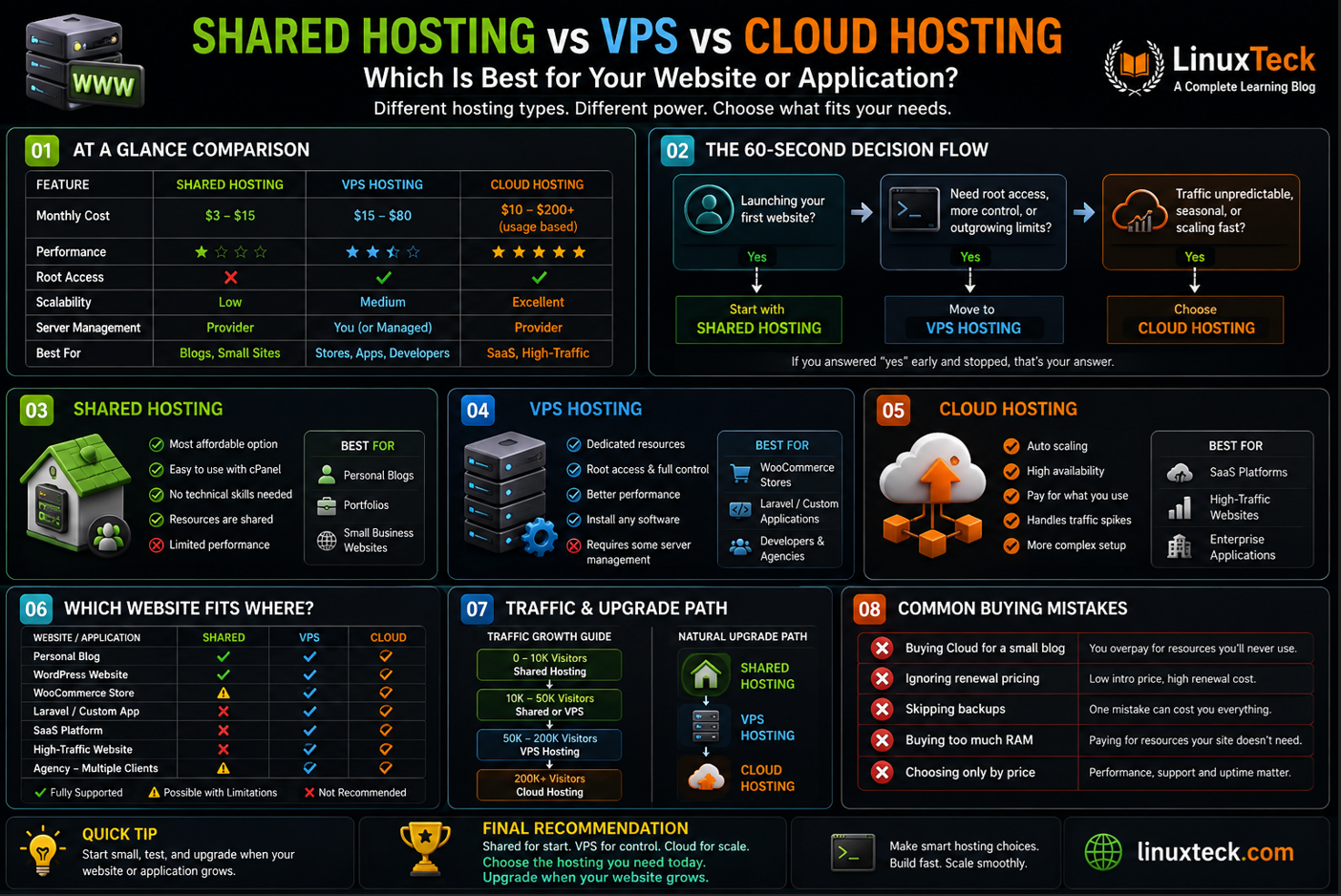
The 60-Second Decision Flowchart
↓ Yes
Start with Shared Hosting
↓ Do you need root access (full administrative control over your server), more consistent performance, or your site is outgrowing shared limits?
Move to VPS Hosting
↓ Is your traffic unpredictable, seasonal, or growing fast?
Choose Cloud Hosting
If you answered "yes" early and stopped, that's your answer. You don't need to read the rest to know where to start, though the sections below will confirm you're making the right call.
Before the detailed comparison, here's the budget picture in one table.
| Hosting Type | Typical Monthly Cost | Best For |
|---|---|---|
| Shared Hosting | $3 to $15 | Blogs, portfolios, small sites |
| VPS Hosting | $15 to $80 | Growing sites, stores, custom apps |
| Cloud Hosting | $10 to $200+, usage based | SaaS, high-traffic, unpredictable load |
Can My Website or Application Run on This Hosting?
If you already know your tech stack, this table answers the question faster than any of the above.
| Technology | Shared | VPS | Cloud |
|---|---|---|---|
| WordPress | ✓ Fully Supported | ✓ Fully Supported | ✓ Fully Supported |
| WooCommerce | ⚠ Possible with limitations | ✓ Fully Supported | ✓ Fully Supported |
| Laravel | ⚠ Possible with limitations | ✓ Fully Supported | ✓ Fully Supported |
| Node.js | ✗ Not Recommended | ✓ Fully Supported | ✓ Fully Supported |
| PHP | ✓ Fully Supported | ✓ Fully Supported | ✓ Fully Supported |
| Python (Django/Flask) | ✗ Not Recommended | ✓ Fully Supported | ✓ Fully Supported |
| Java | ✗ Not Recommended | ✓ Fully Supported | ✓ Fully Supported |
| Docker | ✗ Not Supported | ✓ Fully Supported | ✓ Fully Supported |
| Static HTML Website | ✓ Fully Supported | ✓ Fully Supported | ✓ Fully Supported |
| Git Deployment | ⚠ Possible with limitations | ✓ Fully Supported | ✓ Fully Supported |
Which Hosting Should You Choose Based on Your Website?
| Website / Application | Recommended Hosting | Why |
|---|---|---|
| Personal Blog | Shared Hosting | Lowest cost, easy to manage |
| Company Website | Shared Hosting or VPS | Depends on traffic and brand image |
| WordPress Blog | Shared Hosting | Enough for most beginners |
| WooCommerce Store | VPS | Better performance and checkout stability |
| Laravel App | VPS | Full server control for custom code |
| Node.js App | VPS or Cloud | Needs a custom runtime environment |
| SaaS Product | Cloud Hosting | Scalability and high availability |
| Learning Server Administration | VPS | Root access with full control to practice on |
| Development and Testing | VPS | Flexible, disposable environments |
| High-Traffic News Site | Cloud Hosting | Handles sudden traffic spikes |
Shared hosting is like renting a room in a large apartment building. You and many other tenants share the same building, the same water supply, and the same electricity meter. It's affordable and someone else handles the maintenance, but if your neighbor throws a huge party, you feel it too.
Advantages
✓ Lowest cost of any hosting type
✓ No technical setup, the host manages everything
✓ Comes with easy tools like cPanel and one-click WordPress installs
✓ Great for beginners with zero server experience
Disadvantages
✗ Performance can dip when other sites on the server get busy
✗ Limited control over software and configuration
✗ Harder to scale once your traffic grows
✗ No root or SSH access on most plans
Best For
✓ Personal blogs
✓ Portfolio websites
✓ Students and hobby projects
✓ Small local business websites
Not Recommended For
✗ Large e-commerce stores
✗ SaaS products
✗ Sites expecting heavy or unpredictable traffic
Typical Cost
Usually between $3 and $15 a month, often cheaper on long-term plans.
Example Providers
Common shared hosting names include Bluehost, Hostinger, and Namecheap. Most offer WordPress-optimized plans if that's what you're running.
What Is VPS Hosting?
A VPS is like moving from that shared apartment into your own condo unit. You still share the same building with others, but your unit is walled off. Nobody else can walk into your space, use your electricity, or slow down your water pressure. With a VPS, you get your own dedicated resources, so another customer's traffic spike won't slow your website down.
Advantages
✓ Dedicated CPU and RAM that other users can't touch
✓ Full root access to install and configure what you need
✓ More consistent performance under load
✓ Scales further than shared hosting without a full migration
Disadvantages
✗ Costs more than shared hosting
✗ Requires some technical know-how, or a managed plan
✗ You're responsible for security updates unless it's managed
✗ Setup takes longer than shared hosting's one-click installs
Best For
✓ Growing WordPress or WooCommerce sites
✓ Custom applications built on Laravel, Django, or Node.js
✓ Developers and agencies who want control
✓ Anyone learning server administration
Not Recommended For
✗ Complete beginners who want zero setup
✗ Sites with wildly unpredictable traffic spikes
Typical Cost
Usually between $15 and $80 a month depending on CPU, RAM, and whether it's managed or unmanaged.
Example Providers
Popular VPS options include DigitalOcean, Vultr, and Akamai Cloud (formerly Linode), along with managed platforms like Cloudways that run on top of that same infrastructure. If you're comparing specific providers, our DigitalOcean vs Vultr comparison is a good next read.
What Is Cloud Hosting?
Cloud hosting is like your website living across an entire network of buildings instead of one. If one building loses power, your business keeps running out of the others. Resources scale up automatically when you get busy, and scale back down when things quiet down, so you're not stuck paying for capacity you don't need most of the time.
Advantages
✓ Handles sudden traffic spikes automatically
✓ Strong uptime, since no single server is a single point of failure
✓ Scales instantly as your business grows
✓ Pay for what you actually use on many plans
Disadvantages
✗ Usage-based pricing can be harder to predict
✗ Can be overkill, and overpriced, for small websites
✗ Slightly steeper learning curve than shared or basic VPS
✗ More moving parts to monitor if unmanaged
Best For
✓ SaaS products and web applications
✓ E-commerce stores with seasonal or viral traffic
✓ News sites and content platforms with unpredictable spikes
✓ Businesses where downtime directly costs money
Not Recommended For
✗ Personal blogs or portfolios
✗ Anyone on a tight, fixed monthly budget
Typical Cost
Highly variable, often starting around $10 a month and scaling with usage, sometimes reaching $200 or more for high-traffic sites.
Example Providers
Well-known cloud hosting names include DigitalOcean's cloud platform, AWS, Google Cloud, and managed cloud services like Cloudways. Our Cloudways review covers whether their managed cloud pricing is worth it for smaller teams.
Not All Cloud Hosting Scales Automatically:
"Automatic scaling" doesn't mean the same thing everywhere. Cloud VPS providers such as DigitalOcean, Vultr, and Cloudways generally require you to manually resize your instance, known as vertical scaling (increasing the CPU, RAM, or storage of your existing server instead of moving to a new one), when you need more capacity. True automatic scaling, where resources adjust on their own in real time, is typically a feature of enterprise cloud platforms like AWS, Azure, and Google Cloud. Confirm which model a provider uses before assuming your traffic spikes will be handled without any action from you.
Real-World Buying Scenarios
Scenario 1: "I'm starting a personal blog."
Recommendation: Shared Hosting. Traffic is low, costs stay minimal, and there's no server management to worry about. You can always upgrade later if your blog takes off.
Scenario 2: "I'm launching an online store."
Recommendation: VPS. Checkout pages need consistent performance, and shared hosting's CPU limits tend to show up right when a sale drives extra traffic. A VPS gives you dedicated resources so checkout stays fast.
Scenario 3: "My application has unpredictable traffic."
Recommendation: Cloud Hosting. When you can't predict whether tomorrow brings 100 visitors or 100,000, cloud hosting scales automatically instead of leaving you scrambling to resize a server manually.
Scenario 4: "I'm learning server administration and want full control."
Recommendation: VPS. It's affordable enough to experiment with, and root access lets you practice real configuration without the complexity of a full cloud setup.
Scenario 5: "I host websites for multiple clients."
Recommendation: VPS or Cloud. A single VPS can host several client sites with proper isolation, and cloud hosting makes sense once you're managing enough clients that reliability becomes the priority.
Decision Matrix
| Requirement | Shared | VPS | Cloud |
|---|---|---|---|
| Cheapest | ⭐⭐⭐⭐⭐ | ⭐⭐⭐ | ⭐⭐ |
| Beginner Friendly | ⭐⭐⭐⭐⭐ | ⭐⭐⭐ | ⭐⭐ |
| Performance | ⭐⭐ | ⭐⭐⭐⭐ | ⭐⭐⭐⭐⭐ |
| Scalability | ⭐ | ⭐⭐⭐ | ⭐⭐⭐⭐⭐ |
| Root Access | ✗ | ✓ | ✓ |
| Handles Traffic Spikes | ✗ | ⭐⭐⭐ | ⭐⭐⭐⭐⭐ |
| Best Overall Value | ⭐⭐⭐⭐ | ⭐⭐⭐⭐⭐ | ⭐⭐⭐⭐ |
What About Dedicated Servers?:
Dedicated hosting sits one level above cloud in this hierarchy, giving you an entire physical server with no other tenants at all. It's built for high-traffic enterprises and strict compliance needs, not for typical growth. Most beginners and small businesses will outgrow shared and VPS long before dedicated hosting becomes necessary, if it ever does.
How Much Traffic Can Each Hosting Handle?
| Monthly Visitors | Recommended Hosting |
|---|---|
| 0 to 10,000 | Shared Hosting |
| 10,000 to 50,000 | Shared Hosting or VPS |
| 50,000 to 200,000 | VPS |
| 200,000+ | Cloud Hosting |
These numbers are general guidelines, not hard rules. A well-optimized, cached static blog can handle far more than 10,000 visitors on shared hosting, while a poorly optimized database-heavy app can struggle on VPS at a fraction of that traffic. Actual capacity depends on your caching setup, application type, image sizes, and the specific server specs your host provides.
Managed vs Unmanaged VPS
If you've decided VPS is the right fit, there's one more choice to make, and beginners often don't realize it exists.
Managed VPS
The provider handles the technical side for you:
✓ OS updates
✓ Security patches
✓ Backups
✓ Monitoring
✓ Technical support
Best for: business owners, agencies, beginners, and busy developers who'd rather pay a bit more than spend weekends patching servers.
Unmanaged VPS
You get the keys and full responsibility:
✓ Full server control
✓ You manage everything yourself
✓ Lower monthly cost
✓ Requires real Linux knowledge
Best for: Linux learners, developers, and system administrators who want to configure things exactly their way.
I've seen many website owners upgrade to VPS too early, assuming a more expensive plan would automatically fix performance problems. In quite a few of those cases, proper website optimization, like caching and image compression, made a bigger difference than the upgrade itself.
Quick Recommendation:
If you've never used a terminal before, pay for managed. If you're comfortable running commands and want to learn, unmanaged VPS is cheaper and a genuinely useful way to build real server skills.
Email Hosting Is Usually Separate:
Managed Cloud and Unmanaged VPS plans usually don't include email hosting the way shared hosting does, and many providers block outbound SMTP on Port 25 by default to fight spam. If you need a professional email address on these plans, you'll typically need a separate service such as Google Workspace, Microsoft 365, MXRoute, or another SMTP provider.
Hosting Features Checklist Before You Buy
Whichever hosting type you land on, these are the features worth confirming before you hand over your card details:
| ▸ | Free SSL Certificate – Required for security and search rankings. It should never cost extra. |
| ▸ | Daily Backups – So a bad update or hack doesn't mean starting from scratch. |
| ▸ | NVMe SSD Storage – Noticeably faster than older SATA SSD or HDD storage. |
| ▸ | Free Website Migration – Saves the hassle and risk of moving files yourself. |
| ▸ | Data Center Location – Choose one close to your audience for faster loading. |
| ▸ | 24×7 Support – Most valuable when something breaks unexpectedly. |
| ▸ | One-Click WordPress Installation – Saves setup time for WordPress sites. |
| ▸ | Free Email Hosting – Avoids paying separately for professional email. |
| ▸ | Staging Environment – Test changes safely before publishing. |
| ▸ | Malware Protection – Detects infections before they spread. |
| ▸ | Uptime Guarantee – Look for at least 99.9% uptime with compensation. |
| ▸ | Easy Upgrade Path – Scale without migrating providers. |
| ▸ | Transparent Renewal Pricing – Check renewal costs before purchasing. |
| ▸ | Money-Back Guarantee – Gives you an exit if the service isn't right. |
When Should You Upgrade?
These are the signs your current hosting plan has become the bottleneck, not your website:
| ✓ | Your site loads noticeably slower during peak hours |
| ✓ | You're regularly hitting CPU or resource limits your host warns you about. |
| ✓ | Memory errors or timeouts show up under normal traffic, not just during traffic spikes. |
| ✓ | You need SSH access to install software your control panel doesn't support. |
| ✓ | You want to run Docker, a custom runtime, or background workers. |
| ✓ | You're hosting multiple websites and shared hosting limits now apply across all of them. |
Don't Upgrade Too Early
Just as many people overpay by upgrading before they need to. The usual triggers are not actually good reasons on their own:
| ✗ | Someone recommended VPS without knowing your traffic |
| ✗ | You reached a few thousand visitors and assumed that meant you'd outgrown shared hosting |
| ✗ | You received an upgrade email from your host and took it as a signal, not a sales pitch |
| ✗ | You assume cloud hosting is always better because it sounds more advanced |
Hosting should be upgraded when there's a genuine business or technical need, like the warning signs in the section above, not because of pressure or assumption. Paying for VPS or cloud resources your site never uses is money that could go toward marketing, design, or content instead.
Common Buying Mistakes
| ✗ | Buying cloud hosting for a personal blog that gets 200 visitors a month |
| ✗ | Choosing the cheapest provider without checking uptime history or support quality |
| ✗ | Ignoring whether backups are included or cost extra |
| ✗ | Buying far more CPU and RAM than the site will ever use |
| ✗ | Not checking the renewal price, which is often much higher than the first-year discount |
| ✗ | Skipping reviews of actual customer support response times before signing a year-long contract |
Can You Upgrade Later?
Yes, and most website owners do exactly that. The typical path looks like this:
➜
VPS Hosting
➜
Cloud Hosting
You don't need to guess your future traffic on day one. Starting small and upgrading when the signs above show up is the normal, sensible path, not a sign you planned poorly. Most hosting providers offer free website migration when you upgrade, and changing providers normally does not affect your domain ownership. Usually only the DNS or nameserver settings need to be updated to point your domain at the new host. Our guide to choosing a VPS plan is the natural next step once you outgrow shared hosting.
How to Check Your Current Hosting Environment
If you already have shell access and want to confirm what you're actually paying for, a couple of quick commands will tell you your CPU count and available memory.
LinuxTeck.com
nproc
# Check memory allocation
free -h
If you're on shared hosting without terminal access, you can usually find your resource limits in your host's control panel instead. For a deeper technical breakdown of checking virtualization type, cgroup limits, and swap configuration, see our Linux system administration guide.
One thing to keep in mind: on shared hosting or in some container-based environments, free -h and nproc can report the physical host's total resources rather than your actual allocated limit. If the numbers look unrealistically high for what you're paying, that's likely why, and your control panel's resource usage graphs will be more accurate.
Questions to Ask Yourself Before Buying Hosting
Run through these before you check out. If you can answer all of them, you're ready to buy with confidence.
| ☐ | How many visitors do I expect each month? |
| ☐ | Do I need root access to install or configure software? |
| ☐ | Am I hosting a simple website or a full web application? |
| ☐ | Will I install custom software beyond what a control panel offers? |
| ☐ | Can I manage a Linux server myself, or do I need it managed for me? |
| ☐ | Is predictable monthly pricing important to me, or can I handle usage-based billing? |
| ☐ | Will my traffic realistically grow in the next 12 months? |
| ☐ | Do I need automatic scaling, or would manual upgrades be fine? |
Still Not Sure? Here's My Recommendation
Choose Shared Hosting if:
- You're launching your first website.
- You have a limited budget.
- You don't want any server management.
Choose VPS if:
- You need better, more consistent performance.
- You want root access.
- You're running WooCommerce.
- You're hosting multiple websites.
- You're learning server administration.
Choose Cloud Hosting if:
- Your traffic changes frequently.
- Your business depends on uptime.
- You're running a SaaS application.
- You need automatic or easy scalability.
There Is No Perfect Hosting Plan:
Every website starts small, and most successful websites upgraded their hosting more than once along the way. Buying the right plan for today's needs beats overpaying for resources you don't use yet. Upgrading later is normal, and it's much easier than most beginners expect, so don't let the fear of outgrowing a plan talk you into overspending now.
Hosting Recommendation Summary
Pulling everything above into three lines:
Shared Hosting: first websites, tight budgets, zero server management.
VPS Hosting: growing sites, WooCommerce, multiple client websites, learning Linux.
Cloud Hosting: SaaS, enterprise applications, unpredictable traffic.
Is VPS better than Shared Hosting?
VPS gives you dedicated resources and root access, so it's more consistent and more powerful than shared hosting. But "better" depends on your needs. If you're running a small blog with light traffic, shared hosting is often the more practical and affordable choice, not a lesser one.
Can I upgrade from Shared Hosting to VPS later?
Yes, this is the most common upgrade path and most hosts support it directly. Many providers offer free migration assistance, and you don't need to plan for VPS on day one. Start with shared hosting and move up when the signs covered in the "When Should You Upgrade?" section start showing up.
Is Cloud Hosting worth it for a small website?
Usually not. Cloud hosting is built for unpredictable or high traffic, and a small website will typically pay more for capacity it never uses. Shared hosting or a basic VPS is the better fit until your traffic or business needs genuinely require cloud-level scaling.
Which hosting is best for WordPress?
For a standard WordPress blog or small business site, shared hosting or managed WordPress hosting is usually enough and keeps setup simple. For WooCommerce stores or high-traffic WordPress sites, a VPS gives more consistent performance during checkout and traffic spikes.
Can I host multiple websites on a VPS?
Yes, a single VPS can host several websites as long as you have enough CPU, RAM, and disk space allocated across them. This is common for agencies and freelancers managing client sites. Just keep an eye on resource use per site so one site's traffic doesn't slow down the others.
Do I need root access?
Only if you plan to install custom software, configure the server yourself, or run something your control panel doesn't support out of the box. Most beginners and standard WordPress sites never need it. If you're not sure, that's usually a sign you don't need it yet.
Can I migrate my website without downtime?
In most cases, yes, if it's planned properly. The typical approach is to set up the new server, copy everything over, test it, and only then update your DNS to point to the new host. Many hosts include free migration support specifically to keep this process smooth.
Does changing hosting affect my domain name?
No, your domain name and your hosting are separate things. Switching hosting providers normally doesn't affect who owns your domain. You'll typically just update the DNS or nameserver settings so your domain points to the new server.
Final Conclusion
If your budget is very small, choose Shared Hosting.
If your website is growing, choose VPS.
If your business depends on uptime and scaling, choose Cloud Hosting.
The best hosting isn't the most expensive one, it's the one that matches your current needs. You can always upgrade later as your website or application grows. If you want to read more about how domain names and DNS work behind the scenes, Wikipedia's overview of the Domain Name System is a solid, neutral starting point.
Further Reading on LinuxTeck:
How to Choose the Right VPS Hosting Plan - a deeper walkthrough of what specs actually matter when picking a VPS provider.
Cloudways vs Vultr - a head-to-head on managed versus unmanaged cloud infrastructure pricing and performance.
DigitalOcean vs Vultr - compares two of the most popular developer-friendly cloud VPS providers.
Cloudways Review 2026 - a full look at whether the managed cloud premium is worth paying for.
DigitalOcean Review 2026 - a closer look at DigitalOcean's droplet and cloud pricing in practice.
LinuxTeck - A Complete Linux Infrastructure Blog
LinuxTeck covers everything from beginner Linux commands to advanced Linux system administration and DevOps career guidance, written by practitioners for professionals working on Ubuntu, Rocky Linux, RHEL, and enterprise Linux environments every day.


