
🛡️ 99.99% UPTIME SLA
🖥️ DASHBOARD VERIFIED
🎧 SUPPORT VERIFIED
Cloudways is managed cloud hosting layered on top of five infrastructure providers. You get a friendlier dashboard and 24/7 support around DigitalOcean, Vultr, Linode, AWS, or Google Cloud, without touching raw server config. The tradeoff: you pay a management markup over what that same server would cost direct, and the dashboard still assumes some technical comfort.
Best for: agencies and developers who want multi-cloud flexibility and autoscaling without babysitting infrastructure.
Multi-cloud flexibility, real vertical scaling, technically comfortable buyers
You want the cheapest raw server price or a cPanel-simple first host
Yes, Cloudways is worth it if you want managed multi-cloud hosting with real vertical scaling and don't mind a non-cPanel dashboard, but it's not the cheapest way to get a DigitalOcean or Vultr server, and it's not the easiest starting point if you've never managed a server before.

Buy Cloudways If… / Avoid Cloudways If…
✓ Buy Cloudways if…
✕ Avoid Cloudways if…
How LinuxTeck Evaluated Cloudways
This review isn't based on marketing copy. Here's exactly what we checked and when:
✓ Dashboard Tested
✓ Docs Verified
✓ Community Research
✓ Last Updated Jul 2026
- Pricing verification: Pulled directly from cloudways.com/en/pricing.php, July 2026: every figure below traces to that page unless marked otherwise.
- Documentation verification: Cross-checked feature claims (backup costs, bandwidth overage rates, add-on pricing) against Cloudways' own knowledge base and pricing FAQ.
- Dashboard verification: Reviewed current dashboard structure and workflow (Server tab, Application tab) against publicly available walkthroughs and support documentation.
- Feature verification: Checked whether "managed" features (Object Cache Pro, Cloudflare Enterprise add-on, autoscaling) match current product state, not older marketing pages.
- Independent sources consulted: Two independent competitor reviews with opposing angles (a balanced spec-by-spec review and a critical technical deep-dive), plus community discussion patterns, used only to corroborate usability and sentiment, never as the source for pricing, specs, or capability claims, which are drawn from Cloudways' own documentation.
- Last verified date: July 24, 2026.

Server tab showing PHP/RAM/backup controls for a live application
What Is Cloudways?
Cloudways doesn't own its own data centers. Instead, it's a management layer on top of DigitalOcean, Vultr, Linode, AWS, and Google Cloud: you pick the provider and server size, and Cloudways handles the control panel, security, backups, and support around it. It runs two distinct products: Cloudways Flexible, where you choose your own provider and server size, and Cloudways Autonomous, a fully managed, autoscaling WordPress product built for high-traffic or unpredictable-traffic sites.
Cloudways Pricing: What It Actually Costs
Quick Answer: Cloudways Flexible starts at $11/month for a DigitalOcean-based server and scales with RAM, CPU, storage, and bandwidth, and there's no fixed "year two" renewal hike like traditional shared hosting, because it's billed hourly against whatever server size you're running.
| Plan (DigitalOcean) | RAM / vCPU | Storage / Bandwidth | Price |
|---|---|---|---|
| Micro / Small | 2GB / 1 vCPU | 50GB / 2TB | $11/mo |
| Medium | 8GB / 4 vCPU | 160GB / 5TB | $88/mo |
| 8XL | 128GB / 24 vCPU | 2,560GB / 11TB | $342/mo |
Other providers price differently for equivalent specs: Vultr and Linode are close to DigitalOcean, while AWS and Google Cloud run roughly 3x higher for comparable resources, reflecting those providers' own pricing rather than a Cloudways markup.
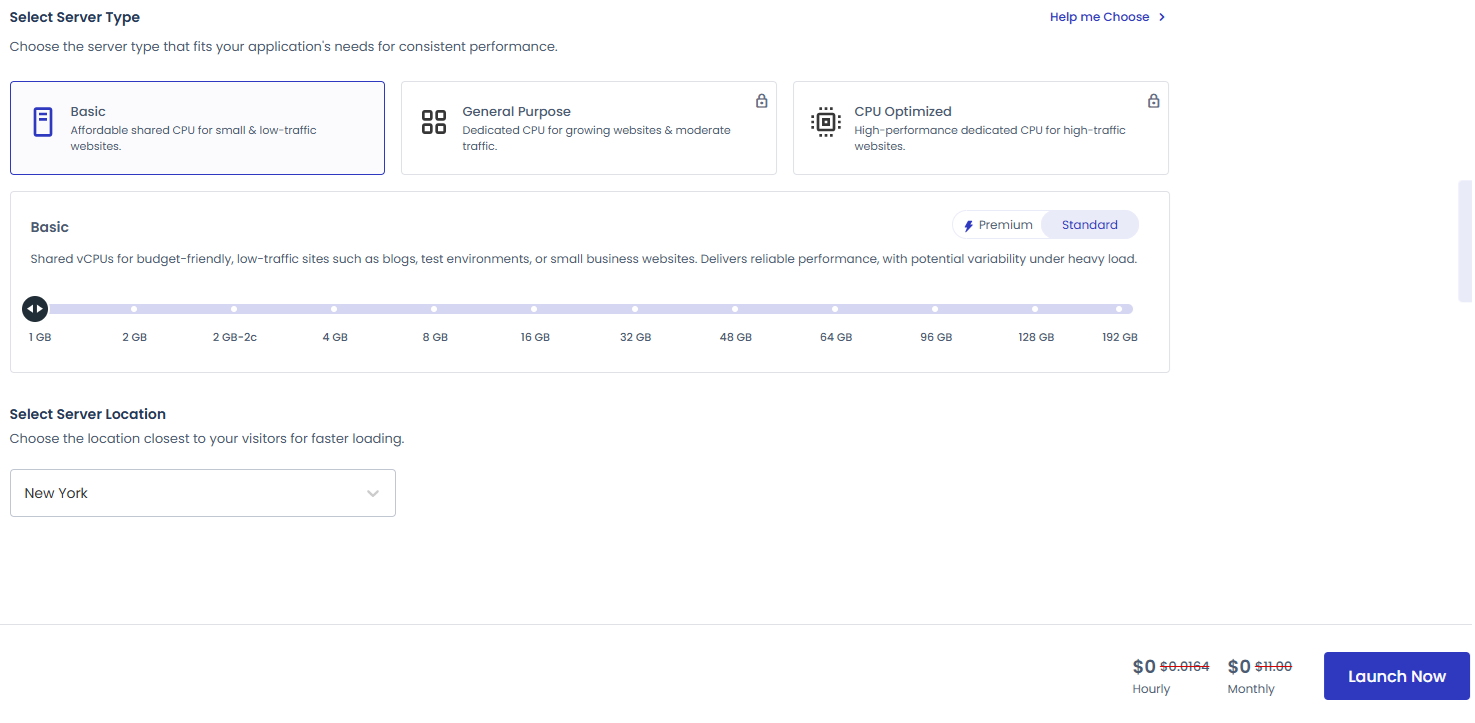
Live pricing page as displayed, July 2026
Cloudways Autonomous (autoscaling WordPress) starts with a free 3-day trial, then Growth at $99/mo, Scale at $199/mo, and Plus at $399/mo, each with additional per-GB disk, bandwidth, and autoscaling charges beyond the included baseline. Enterprise is custom-quoted.
The nuance most reviews skip: independent technical analysis has found Cloudways' pricing runs meaningfully higher than the equivalent server bought directly from DigitalOcean or Vultr: you're paying for the management layer, support, and dashboard, not just the raw compute. That's a legitimate trade to make if you value the managed experience, but it's worth knowing you're not getting DigitalOcean's own retail price.
What's actually bundled differs by product line. On Flexible, Object Cache Pro is included free on servers 2GB RAM and above, but Cloudflare Enterprise CDN is a separate paid add-on. On Autonomous (Growth tier and above), Cloudflare Enterprise CDN and Object Cache Pro with Relay are both included in the plan price, officially confirmed as standard features, not add-ons.
Hidden Costs and Add-Ons to Know About
Every plan includes unlimited apps, free SSL, automated backups, and 24/7 support baseline. But several genuinely useful features are separate paid add-ons:
Object Cache Pro itself is included free on Flexible servers 2GB RAM and above; it's the CDN and malware scanning that are the add-ons, not the caching layer. None of this is hidden in fine print (it's on the pricing page), but it's easy to assume "managed hosting" means all of it is bundled in, and on Flexible, some of it isn't.
Real Cost of Ownership: What You'll Actually Pay
Quick Answer: A realistic small-business setup on the $11/mo entry plan, once you add a CDN and an email mailbox, runs closer to $17 to $20/month in year one, not the bare $11 sticker price.
Because billing is hourly and resource-based rather than tiered-with-a-renewal-jump, the "renewal shock" that hits shared hosting customers doesn't really apply here: your month-two bill looks like your month-one bill unless you change server size or add services. The more relevant long-term cost question is which add-ons you'll actually need: most growing sites end up adding a CDN and, if traffic grows, a larger server tier. Budget for the $11/mo base plus roughly $5–$10/mo in add-ons for a small production site, scaling up from there as traffic and server size grow.
Who Cloudways Is Actually For
Agencies managing client sitesStrong fit: unlimited app installs per server, team permission controls, and the ability to mix cloud providers per client.
WooCommerce / ecommerce storesGood fit for scaling during traffic spikes. Object Cache Pro is included free on qualifying servers, and Cloudways Autonomous now bundles Relay-based caching by default for new applications, a real performance upgrade for database-heavy WooCommerce sites that Flexible customers should confirm is enabled for their specific server.
Developers wanting SSH/CLI accessStrong fit: full SSH/SFTP access is standard, and multiple PHP versions are supported per app.
Absolute beginners wanting one-click simplicityNot recommended. There's no cPanel, no file manager built in, and the custom dashboard has a real learning curve. If you want the simplest possible starting point, look at SiteGround or similar cPanel-based hosts instead.
Migration Experience
Quick Answer: WordPress and WooCommerce migrations to Cloudways are free, including expert-handled managed migrations, not just the DIY plugin, while non-WordPress applications (Magento, Laravel, custom PHP) cost $99 per application after a plan-based free quota.
- WordPress/WooCommerce: free, whether self-service via the Cloudways Migrator plugin or handled end-to-end by Cloudways' migration team.
- Non-WordPress applications: $99 per application; Standard-plan customers get 1 free non-WordPress migration, Agency-plan customers get up to 5.
- Managed migration: request it from the dashboard (Add-ons → Application Migration) with your old host's access details (SSH/SFTP/FTP/cPanel); Cloudways' team handles the move.
- DIY option: the free Cloudways WordPress Migrator plugin for self-service moves.
- Autonomous: free managed migrations are included for all Autonomous subscribers moving into their current plan limits.
- Difficulty and downtime: low difficulty with the managed option; minimal downtime either way, with DNS propagation typically the main wait rather than the migration itself.
- Who should DIY: developers comfortable with WordPress export/import tools and DNS changes.
- Who shouldn't: non-technical site owners, or anyone migrating a non-WordPress app who wants to plan around the $99 fee; use the managed migration service either way.
How Does Cloudways Compare?
| Host | Best for | Why |
|---|---|---|
| Cloudways | Multi-cloud flexibility + autoscaling | Choice of 5 providers, hourly billing, no contract |
| SiteGround | Beginners wanting simplicity | cPanel-style panel, guided setup, less technical overhead |
| Kinsta | All-inclusive premium WordPress | CDN, uptime SLA, and enterprise support bundled into the price rather than sold as add-ons |
| Raw DigitalOcean | Developers who'll self-manage | Same infrastructure Cloudways runs on, without the management markup, if you're comfortable configuring your own server |
- Choose Cloudways if you want managed multi-cloud flexibility without picking one infrastructure provider forever.
- Choose SiteGround if the idea of choosing "vCPU vs shared vCPU" (a shared vCPU means your server splits processing power with other customers on the same hardware) already sounds like too much: you want a simpler starting point.
- Choose Kinsta if you want CDN and uptime guarantees bundled rather than itemized as add-ons, and you're only running WordPress.
- Choose raw DigitalOcean if you already know how to manage a Linux server and don't need Cloudways' dashboard or support layer.
Community Reputation
Cloudways positions itself around flexibility, transparent pay-as-you-go pricing, and 24/7/365 support across every plan.
Split. Some sources report strong absolute performance and reliable uptime. Others document real CPU usage concerns under load on shared-vCPU tiers and the pricing markup versus raw cloud-provider rates. One older critical review claimed Object Cache Pro lacked Relay support; official documentation now confirms Relay is included by default on Cloudways Autonomous as of late 2025, so that specific claim is outdated.
The core Flexible product is a solid, honest managed-cloud option for technically comfortable users. The CPU-usage and markup criticisms are real trade-offs of the model, not evidence of a broken product. Autonomous has matured with the Relay and bundled-CDN additions, making it a more credible option today than earlier reviews suggest.
Worth noting: some of the more critical independent voices on Cloudways are themselves affiliates for competing hosts, so weigh strong claims in either direction with that in mind.
Should You Choose Cloudways? Quick Decision Framework
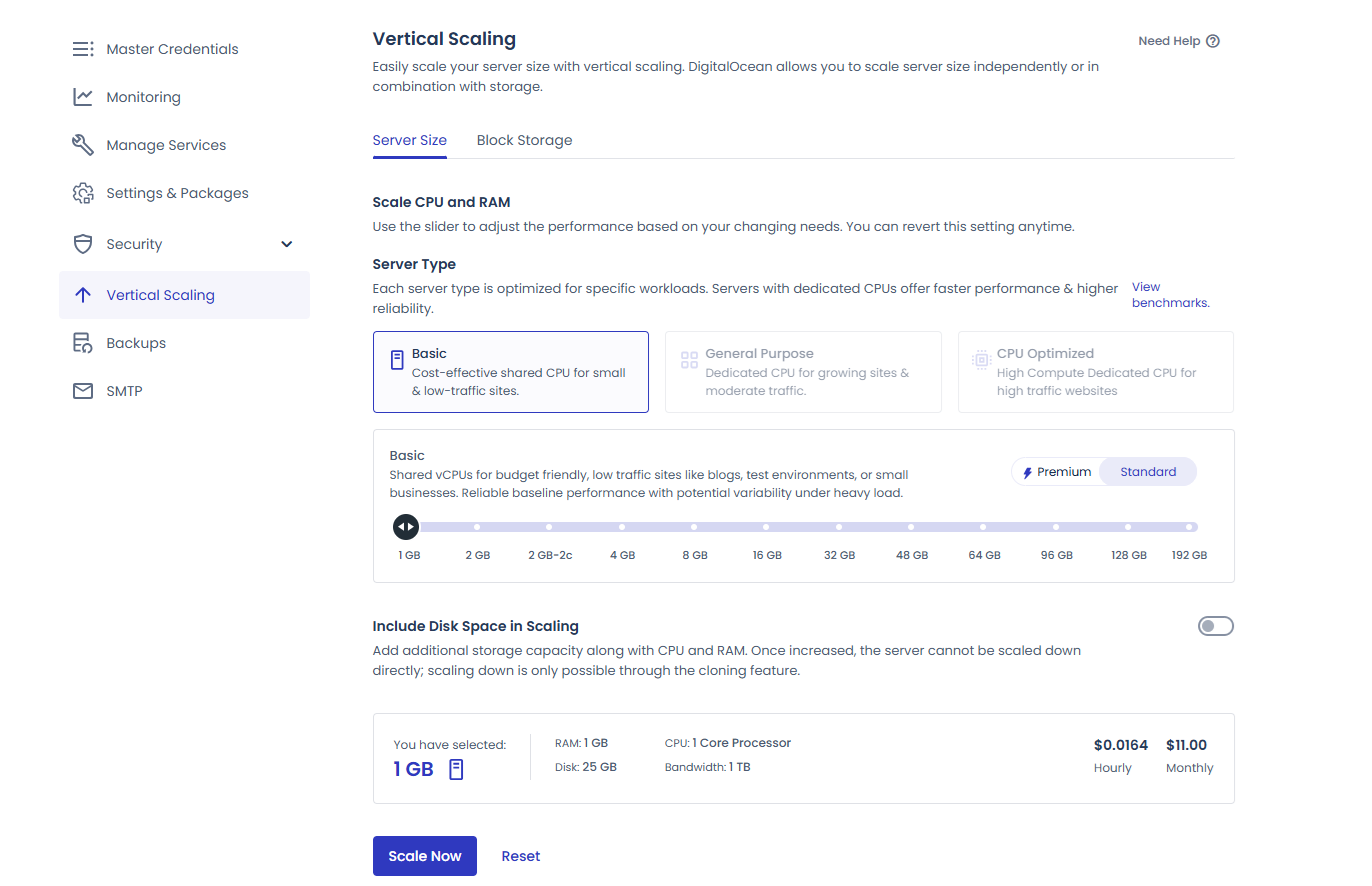
Vertical scaling slider showing RAM/CPU adjustment mid-server
Score Breakdown
Performance
3.7 / 5
Official documentation confirms a 99.99% uptime SLA and a Lightning Stack claiming up to 65% faster performance; independently documented CPU usage complaints persist on shared-vCPU lower tiers under load.
Ease of Use
3.5 / 5
Verified on the official dashboard: no cPanel, custom control panel with a real learning curve for first-time users. Corroborated independently: multiple reviewers describe the interface as feature-rich but "not the most intuitive," consistent across sources with opposing overall opinions of the host.
Support
3.5 / 5
Official metrics cite a 90-second average response time and 96% CSAT (2023 data); independent user reports on support consistency remain mixed, particularly around the base tier's live-chat time limits.
Features
4.6 / 5
Verified on official documentation: Autonomous bundles Cloudflare Enterprise CDN and Relay-based Object Cache Pro at no extra cost; Flexible offers the same core toolkit with Cloudflare Enterprise as an add-on. Broad, well-documented feature set across both product lines.
Pricing
3.5 / 5
No contract and no renewal shock, but a real markup versus buying the same server directly from the underlying provider.
Overall
3.8 / 5
Equal weighting across all five categories.
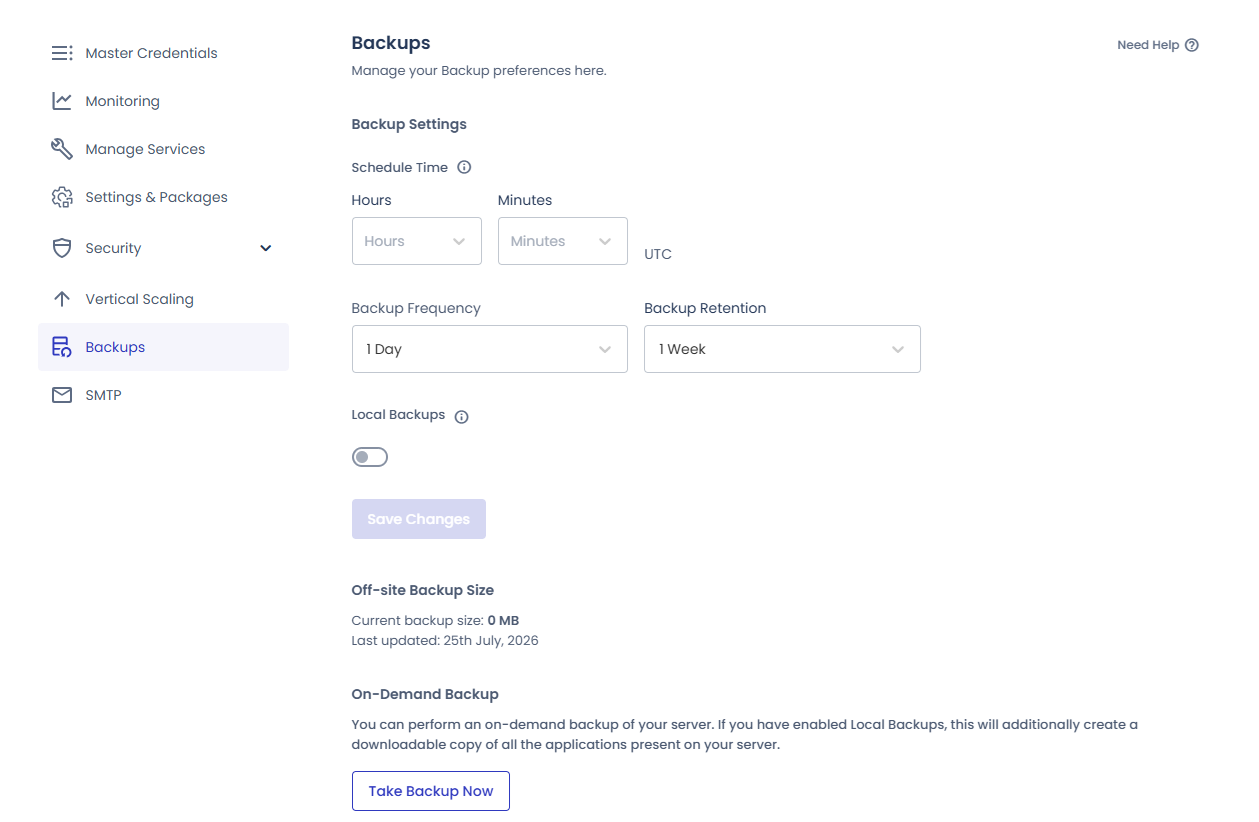
Backup schedule and one-click restore interface
Frequently Asked Questions
Does Cloudways offer a money-back guarantee?
Not in the traditional 30-day sense. Cloudways refunds unused pay-as-you-go balance if requested within 3 months of adding funds: it's a usage-based refund, not a blanket satisfaction guarantee, so budget your test accordingly.
Does Cloudways guarantee uptime?
Yes. Cloudways' official documentation states a 99.99% uptime SLA backed by redundant power, networking, and storage across its data centers. You can check current infrastructure status directly on Cloudways' own status page.
Is migration really free?
For WordPress and WooCommerce sites, yes: both the DIY plugin and Cloudways' expert-handled managed migration are free, with no "first site only" limit. Non-WordPress applications (Magento, Laravel, custom PHP) cost $99 each after a plan-based free quota (1 free on Standard, up to 5 on Agency).
Is Cloudways cheaper than buying a DigitalOcean server directly?
No, you pay a premium over DigitalOcean or Vultr's own retail pricing for Cloudways' dashboard, support, and management layer. If you're comfortable managing a raw server yourself, going direct is cheaper.
Does Cloudways include a CDN?
Depends on the product. On Flexible, Cloudflare Enterprise is a paid add-on starting at $4.99/domain/month. On Autonomous (Growth tier and above), it's included free.
Is Cloudways good for beginners?
Not the best starting point. There's no cPanel and no built-in file manager, and the dashboard assumes some comfort with hosting concepts. Beginners are usually better served by a simpler cPanel-based host.
Final Verdict
Cloudways is a genuinely solid choice if you want managed, multi-cloud hosting with real scaling flexibility and you're comfortable with a non-cPanel dashboard. It's not the cheapest way to get server resources, and CDN/malware scanning are itemized add-ons on Flexible rather than bundled in, but it does back its infrastructure with a published 99.99% uptime SLA, and for agencies and technically comfortable site owners, the overall trade-off is usually worth it.
Check Current Cloudways Pricing →
One practical note: a small number of user reviews on third-party platforms describe being billed after cancellation or facing delays getting a refund resolved. These read as isolated cases rather than a routine pattern, but as a precaution, hold onto your cancellation confirmation and final invoice until your account shows as fully closed.
Quick reminder: the button above is an affiliate link, and using it helps support LinuxTeck at no extra cost to you.

