Skip to the content
Skip to content
Top Menu
Aug 10, 2026
  • About Us
  • FAQ
  • Write For Us
  • Tech News
  • Facebook
  • Twitter
  • LinkedIn
  • Twitter
  • fa-youtube
Join to our facebook group
logo
  • Home
  • Linux
    • Distributions
      • RHEL-Centos
      • Rocky Linux
      • Ubuntu
    • LINUX COMMANDS
    • Shell Scripting
    • Cheat Sheets
      • Linux
      • Docker
    • Linux General
    • Linux Opinion
    • Troubleshooting
  • Enterprise Linux
  • Linux Interview Q & A
    • Linux Basics Q&A
    • Shell Scripting Q&A
      • Level 1: Beginner (0–1 Year)
    • Networking Q&A
  • Guides
    • Hosting
  • Linux Tips
Main Menu

Linux Tips

time command in Linux showing script execution time
QUICK LINUX TIPS : 04

How long does my script take and how much CPU does it use?

Aug 10, 2026 - by john

Try: time ./backup.sh Info: The time command shows execution time. real is wall clock time, user is CPU time for the program, and sys is CPU time for system calls. Examples: $ time ./deploy.sh $ /usr/bin/time -v ./process.py $ time tar -czf backup.tar.gz /home/data Note: Use /usr/bin/time -v for detailed resource […]

Read More
rsync command in Linux for faster backups
QUICK LINUX TIPS : 03

How do I backup files fast, only copying changes?

Aug 10, 2026 - by john

Try: rsync -avz --delete /source/ /destination/ Info: rsync only transfers changed files, making backups much faster. -a means archive, -v means verbose, and -z enables compression. Examples: $ rsync -avz /home/user/ /mnt/backup/ $ rsync -avz --delete remote:/data/ /local/backup/ $ rsync -avz --exclude='*.tmp' /src/ /dst/ Note: Use --dry-run first. A trailing slash […]

Read More
clean up old log files linux
QUICK LINUX TIPS : 02

How do I clean up old log files automatically?

Aug 10, 2026 - by john

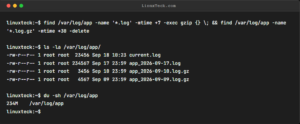
Try: sudo find /var/log -name '*.log' -mtime +30 -delete Info: Delete log files older than 30 days. The -mtime +30 finds files modified more than 30 days ago. Use sudo because /var/log files are owned by root. Examples: $ sudo find /var/log -name '*.log' -mtime +30 -delete $ find ~/Downloads -type […]

Read More
tail command in Linux showing recent log entries
QUICK LINUX TIPS : 01

Looking for the last few lines of a large log file?

Aug 10, 2026 - by john

Try: tail -20 /var/log/syslog Info: The tail command shows the last lines of a file without loading the entire content into memory. It's perfect for checking recent log entries. LinuxTeck.com linuxteck@ubuntu:~$ tail -20 /var/log/syslog Jun 26 11:52:27+0530 DEBUG reviving: failed for 'baseos', mismatched repomd. Jun 26 11:52:27+0530 DEBUG repo: downloading from […]

Read More

Trending

  • 11 df Commands in Linux (Check Disk Space Instantly)
  • Linux Network Command Cheat Sheet
  • Linux Network Administration: Guide for US IT Teams
  • Why Red Hat’s 14-Year Support Is a Big Deal
  • Learn touch Command in Linux with Examples
  • Windows Now Supports Popular Linux Coreutils Commands
  • Install Kali Linux Step by Step Guide for Beginners
  • Job Control &, fg, bg, jobs
  • DNF Guide for Beginners with 20 Examples
  • Linux Text editors Cheat Sheet
  • Popular
  • Comments
  • Tags
df command in linux with examples

11 df Commands in Linux (Check Disk Space Instantly)

Nov 13, 2019

Linux Network Command Cheat Sheet

Linux Network Command Cheat Sheet

Apr 04, 2023

Aneeshya SLearn Archiving and Compression in Linux like a Pro
muglLearn Archiving and Compression in Linux like a Pro
No tags to show

Google Add as a preferred
source on Google
  • Contact US
  • Privacy Policy
  • Terms of use
  • Affiliate Disclosure
  • Advertise
Copyright © 2026 LinuxTeck. All Rights Reserved.
Material from our website cannot be republished ONLINE or OFFLINE without our permission.
L