Skip to the content
Skip to content
Top Menu
Aug 10, 2026
  • About Us
  • FAQ
  • Write For Us
  • Tech News
  • Facebook
  • Twitter
  • LinkedIn
  • Twitter
  • fa-youtube
Join to our facebook group
logo
  • Home
  • Linux
    • Distributions
      • RHEL-Centos
      • Rocky Linux
      • Ubuntu
    • LINUX COMMANDS
    • Shell Scripting
    • Cheat Sheets
      • Linux
      • Docker
    • Linux General
    • Linux Opinion
    • Troubleshooting
  • Enterprise Linux
  • Linux Interview Q & A
    • Linux Basics Q&A
    • Shell Scripting Q&A
      • Level 1: Beginner (0–1 Year)
    • Networking Q&A
  • Guides
    • Hosting
  • Linux Tips
Main Menu

Linux Tips

time command in Linux showing script execution time
QUICK LINUX TIPS : 04

How long does my script take and how much CPU does it use?

Aug 10, 2026 - by john

Try: time ./backup.sh Info: The time command shows execution time. real is wall clock time, user is CPU time for the program, and sys is CPU time for system calls. Examples: $ time ./deploy.sh $ /usr/bin/time -v ./process.py $ time tar -czf backup.tar.gz /home/data Note: Use /usr/bin/time -v for detailed resource […]

Read More
rsync command in Linux for faster backups
QUICK LINUX TIPS : 03

How do I backup files fast, only copying changes?

Aug 10, 2026 - by john

Try: rsync -avz --delete /source/ /destination/ Info: rsync only transfers changed files, making backups much faster. -a means archive, -v means verbose, and -z enables compression. Examples: $ rsync -avz /home/user/ /mnt/backup/ $ rsync -avz --delete remote:/data/ /local/backup/ $ rsync -avz --exclude='*.tmp' /src/ /dst/ Note: Use --dry-run first. A trailing slash […]

Read More
clean up old log files linux
QUICK LINUX TIPS : 02

How do I clean up old log files automatically?

Aug 10, 2026 - by john

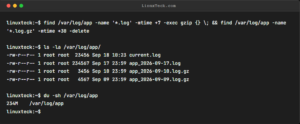
Try: sudo find /var/log -name '*.log' -mtime +30 -delete Info: Delete log files older than 30 days. The -mtime +30 finds files modified more than 30 days ago. Use sudo because /var/log files are owned by root. Examples: $ sudo find /var/log -name '*.log' -mtime +30 -delete $ find ~/Downloads -type […]

Read More
tail command in Linux showing recent log entries
QUICK LINUX TIPS : 01

Looking for the last few lines of a large log file?

Aug 10, 2026 - by john

Try: tail -20 /var/log/syslog Info: The tail command shows the last lines of a file without loading the entire content into memory. It's perfect for checking recent log entries. LinuxTeck.com linuxteck@ubuntu:~$ tail -20 /var/log/syslog Jun 26 11:52:27+0530 DEBUG reviving: failed for 'baseos', mismatched repomd. Jun 26 11:52:27+0530 DEBUG repo: downloading from […]

Read More

Popular posts

  • Cloudways vs Vultr: Which Managed VPS Hosting Wins in 2026?

    Jul 05, 2026

  • DigitalOcean vs Vultr: Discover the Best VPS for Developers

    Jul 08, 2026

  • Kinsta Review 2026: Why Paying More Could Be Worth It

    Jul 10, 2026

  • Cloudways Review 2026: Is It Worth It?

    Jul 25, 2026

  • DigitalOcean Review 2026: Should You Choose It?

    Jul 28, 2026

Google Add as a preferred
source on Google
  • Contact US
  • Privacy Policy
  • Terms of use
  • Affiliate Disclosure
  • Advertise
Copyright © 2026 LinuxTeck. All Rights Reserved.
Material from our website cannot be republished ONLINE or OFFLINE without our permission.
L