Pick the wrong desktop environment for your hardware and you will spend your first week fighting stutter, battery drain, or a login screen that keeps dumping you back to itself instead of actually using your machine. Most guides treat "which Linux desktop" as a single question. It is actually two questions stacked on top of each other: which distro base do you trust, and which desktop environment do you want sitting on top of it. Get the pairing wrong and even a solid distro feels broken.
The Linux desktop changed more between 2025 and 2026 than in the previous several years combined. Wayland stopped being the fallback and became the default, GNOME dropped X11 entirely, KDE Plasma is on the same path, and a genuinely new desktop environment showed up for the first time in a long while. That shift is exactly why the distro-plus-desktop-environment decision matters more in 2026 than it used to: the safe default from two years ago is not always the safe default now.
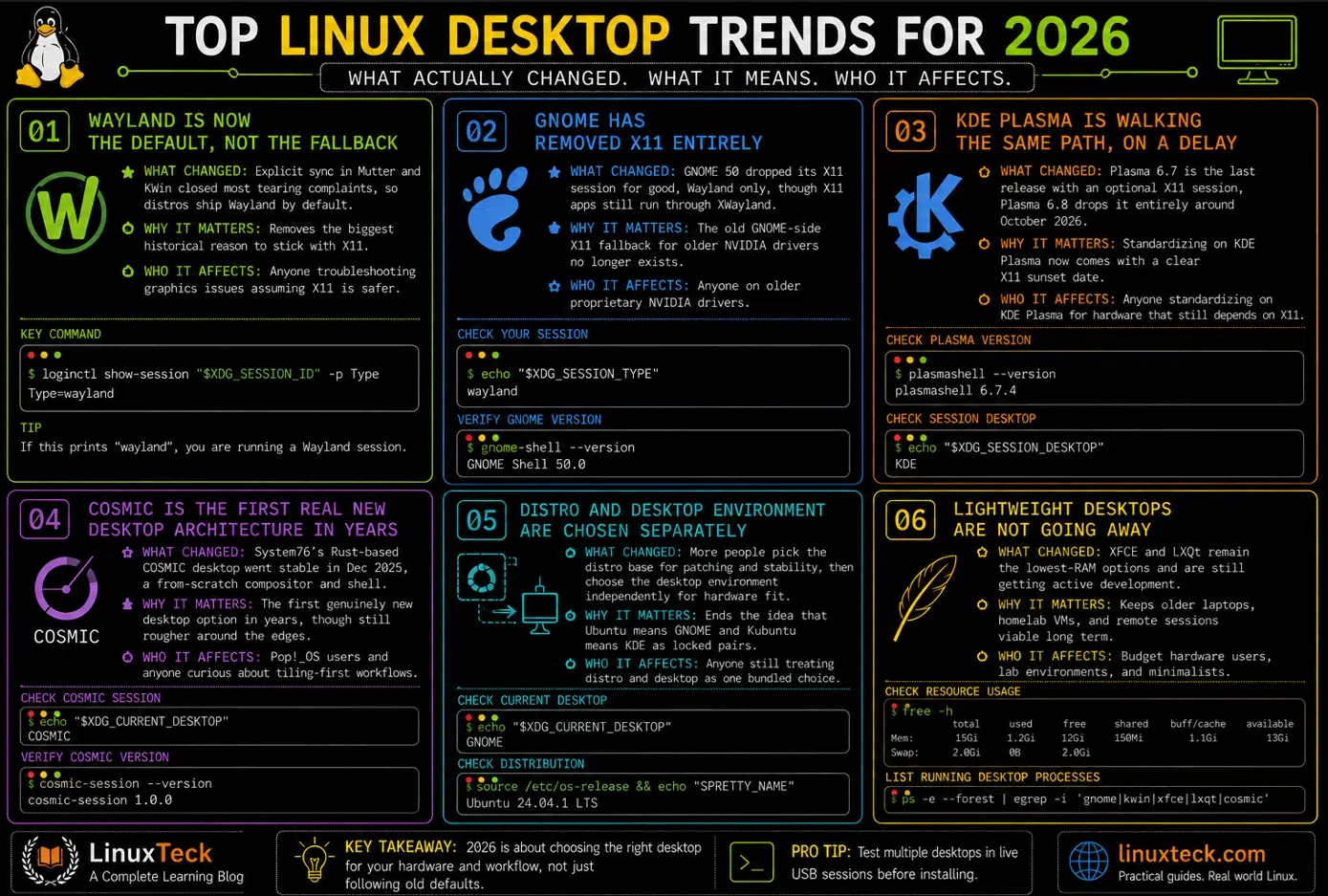
Top Linux Desktop Trends for 2026
Before the deep dive, here is the short version. These are the trends actually driving the rest of this article, scannable in under a minute.
Trend #1
Wayland Is Now the Default, Not the Fallback
What Changed: Explicit sync in Mutter and KWin closed most tearing complaints, so distros ship Wayland by default instead of X11.
Why It Matters: Removes the biggest historical reason to stick with X11.
Who It Affects: Anyone troubleshooting graphics issues assuming X11 is the safer option.
Trend #2
GNOME Has Removed X11 Entirely
What Changed: GNOME 50 dropped its X11 session for good, Wayland only, though X11 apps still run through XWayland.
Why It Matters: The old GNOME-side X11 fallback for older NVIDIA drivers no longer exists.
Who It Affects: Anyone on older proprietary NVIDIA drivers.
Trend #3
KDE Plasma Is Walking the Same Path, on a Delay
What Changed: Plasma 6.7 is confirmed as the last release with an optional X11 session, Plasma 6.8 drops it entirely around October 2026.
Why It Matters: Standardizing on KDE Plasma now comes with a clear X11 sunset date.
Who It Affects: Anyone standardizing on KDE Plasma for hardware that still depends on X11.
Trend #4
COSMIC Is the First Real New Desktop Architecture in Years
What Changed: System76's Rust-based COSMIC desktop went stable in December 2025, a from-scratch compositor and shell, not a GNOME or KDE fork.
Why It Matters: The first genuinely new desktop option in years, though still rougher around the edges.
Who It Affects: Pop!_OS users and anyone curious about tiling-first workflows.
Trend #5
Distro and Desktop Environment Are Chosen Separately
What Changed: More people pick the distro base for patching and stability, then choose the desktop environment independently for hardware fit.
Why It Matters: Ends the idea that Ubuntu means GNOME and Kubuntu means KDE as locked pairs.
Who It Affects: Anyone still treating distro and desktop as one bundled choice.
Trend #6
Lightweight Desktops Are Not Going Away
What Changed: XFCE and LXQt remain the lowest-RAM options and are still getting active development.
Why It Matters: Keeps older laptops, homelab VMs, and remote sessions viable long term.
Who It Affects: Budget hardware and self-hosted setups more than daily driver workstations.
Trend #7
Explicit Sync Is the Quiet Fix Behind "Wayland Finally Feels Smooth"
What Changed: The linux-drm-syncobj-v1 protocol landed in both major compositors.
Why It Matters: A bigger smoothness factor than any theme or panel change.
Who It Affects: Anyone who tried Wayland a year or two ago, hit tearing, and never went back.
Trend #8
Release Cadence Decides How Often Things Break, Not Desktop Choice Alone
What Changed: Ubuntu LTS and Rocky Linux freeze desktop versions for years, Fedora and openSUSE Tumbleweed ship new builds much faster.
Why It Matters: The same desktop environment behaves differently depending on how fast its host distro updates it.
Who It Affects: Anyone comparing RAM numbers or features across different distros.
Trend #9
Running Multiple Desktop Environments Side by Side Is Becoming Normal
What Changed: As Trend #5 grows more common, so does testing a second desktop environment on an existing install, and display manager conflicts are the top real-world failure mode that comes with it.
Why It Matters: Most black screens and login loops trace back to two display managers fighting over one session, not to the desktops themselves being broken.
Who It Affects: Anyone testing a second desktop environment on an existing install.
Trend #10
Gaming Performance Comes From the Graphics Stack, Not the Desktop
What Changed: Benchmarking has made it clear that frame rates depend on GPU drivers and Vulkan support, not on GNOME versus KDE Plasma.
Why It Matters: Stops people switching desktops to chase a performance gain that was actually a driver problem.
Who It Affects: Anyone who assumed a desktop swap would fix a performance issue.
Quick Recommendations
Short on time? Here's the practical answer to "Which desktop should I actually choose?"
LinuxTeck's Picks:
- Best Overall → GNOME
- Best Performance → KDE Plasma
- Best for Beginners → Cinnamon
- Best for Older Hardware → XFCE
- Most Exciting New Desktop → COSMIC
Now that the trends are laid out, here is how they play out in practice: how the pairing actually works, what to run to install and switch safely, how the desktops compare side by side, and what breaks when you get it wrong.
| Lightest DE (idle RAM) | LXQt 2.3 and XFCE 4.20, both around 1.3 to 1.4 GB idle |
| Most customizable | KDE Plasma 6.7, with per-screen virtual desktops, KWin scripting, and full panel rebuilds |
| Easiest for Windows switchers | Cinnamon 6.6 on Linux Mint |
| Best for servers running a GUI | XFCE or a minimal GNOME install on Rocky Linux / RHEL |
RAM figures throughout this article are measured on a default out-of-the-box distro spin, not a stripped-down desktop environment core, so treat them as real-world numbers rather than theoretical minimums.
The Short Answer: Distro and Desktop Environment Are Separate Decisions
This is Trend #5 in practice: distro and desktop environment are increasingly chosen as two separate decisions rather than one bundled choice. A Linux distro is the base: the package manager, the release cycle, the kernel version it ships, and how long it gets security patches. A desktop environment is the layer that sits on top and decides how you actually click around: the panel, the file manager, the settings app, the window compositor. You can run GNOME on Ubuntu, Fedora, Debian, or Arch. You can run KDE Plasma on almost anything too. The distro does not lock you into one desktop, even though most distros ship one by default and make it feel like the only option.
Where people get tripped up is assuming the "flavor" they downloaded (Ubuntu vs Kubuntu vs Xubuntu, for example) is a completely different operating system. It is not. It is the same Ubuntu base with a different desktop environment pre-installed and a different set of default apps. Once you understand that split, choosing a combo becomes a lot less mysterious.
The practical upshot is that your hardware and your workflow should drive the desktop environment choice, and your patching philosophy and package ecosystem should drive the distro choice. Trying to solve both problems with one decision is how people end up distro-hopping every few months without ever figuring out what was actually bothering them. Once you have picked a distro and settled on a desktop, our guide to the best Linux VPS hosting is worth bookmarking for when you want a clean remote environment that matches whatever you are running locally.
Key Takeaway:
How the Pairing Actually Works Under the Hood
Most comparisons stop at screenshots and a RAM number. That tells you almost nothing about why one combo feels smoother than another on your actual hardware. The real difference sits in the compositor, the session type, and how tightly the desktop environment is coupled to the distro's release model.
The Compositor Is Doing More Work Than You Think
GNOME runs on Mutter. KDE Plasma runs on KWin. XFCE and LXQt still lean on lighter, less feature-heavy compositors. In 2026, both Mutter and KWin support explicit sync through the linux-drm-syncobj-v1 protocol (Trend #7), which is the thing that finally killed most of the screen tearing complaints Wayland users had for years and pushed distros to make Wayland the default rather than the fallback (Trend #1). That single protocol change is a bigger factor in "does this desktop feel smooth" than almost anything in the theming layer.
Worth watching if you want something genuinely different rather than another GNOME or KDE flavor: System76's COSMIC desktop (Trend #4) is not built on Mutter or KWin at all. It is written from scratch in Rust with its own compositor, ships as the default on Pop!_OS, and reached its first stable release in December 2025. It is still younger and rougher around the edges than GNOME or KDE, but it is the one real architectural newcomer in this space rather than an iteration on something that already existed.
Release Cadence Changes How Often Things Break
This is Trend #8. Ubuntu LTS and Rocky Linux both freeze their desktop environment version for years at a time. That means fewer new features, but also fewer surprise regressions after a routine update. Fedora and openSUSE Tumbleweed ship newer GNOME and KDE builds much faster, which is great if you want the latest Plasma release the week it lands, and less great if a Tuesday update occasionally leaves you troubleshooting a session that worked fine on Monday. Ubuntu 24.04 LTS is still a safe, fully supported choice, but Ubuntu 26.04 LTS is now the current LTS release and ships GNOME 50 by default, so treat 24.04 as the stable option and 26.04 as the current one rather than assuming they are interchangeable.
Desktop Environments Are Not Locked to One Distro
This is the part beginners miss most. A default GNOME install and a default KDE Plasma install on the same distro base will use different amounts of RAM, different default apps, and different settings paths, but the underlying package manager, security updates, and server tooling stay identical. Switching desktop environments does not mean switching distros.
Compatibility Note:
KDE Plasma 6.7 and GNOME 50 both default to Wayland sessions now on Ubuntu 24.04 LTS and newer, and on Fedora and Rocky 9/10 spins that ship a current desktop package set. GNOME 50 has actually removed its X11 session entirely (Trend #2), so if you are on older proprietary NVIDIA drivers and need an X11 fallback, that option now only exists on the KDE Plasma side, not GNOME. Even there it has an expiration date (Trend #3): KDE has confirmed Plasma 6.7 is the last release to support X11, with Plasma 6.8 (expected around October 2026) dropping it for good. Check with this X11 vs Wayland breakdown before assuming Wayland is the problem.
The Practical Commands: Installing and Switching a Desktop Environment
Not everyone reading this needs to install another desktop environment today. If the Quick Recommendations box above already answered your question, feel free to skip ahead to the comparison table or the red flags section. What follows is for readers who want to actually test-drive a desktop environment themselves, installing or switching one on a distro you already trust, which is exactly what Trend #5 describes people doing more often.
These are the actual commands for pairing a desktop environment onto a distro you already trust, rather than reinstalling from scratch every time you want to try something different. If you have the option, test in a virtual machine first rather than your daily driver. It costs you a snapshot and twenty minutes, and it turns a bad first impression into a shrug instead of a lost afternoon. I learned this the annoying way after installing GNOME on top of an existing KDE Plasma box just to test something, and forgetting to check which display manager would win the fight. I ended up stuck in a login loop for twenty minutes before I realized SDDM and GDM were both trying to own the same session, and the fix was just picking one and disabling the other.
Installing KDE Plasma on Ubuntu 24.04 LTS
Ubuntu splits this into two options. Use kubuntu-desktop for the full suite with Kubuntu branding and default apps, or kde-plasma-desktop for just the core Plasma desktop without the extras. Either one installs alongside whatever you already have and will not remove your current desktop.
LinuxTeck.com
sudo apt update
# For full desktop suite with Kubuntu branding and apps
sudo apt install kubuntu-desktop -y
# OR for minimal Plasma desktop only
sudo apt install kde-plasma-desktop -y
# Confirm the display manager it installed
sudo systemctl status sddm
Installing KDE Plasma on Rocky Linux 9
Rocky splits Plasma into a group package. EPEL alone is not enough here, you also need the CRB (CodeReady Builder) repo enabled first, or the group install will fail on unresolved dependencies. The commands below are shown on Rocky Linux 9, which is still fully supported through 2032, but Rocky Linux 10 is now the current major release and uses the same commands.
LinuxTeck.com
sudo dnf install epel-release -y
# EPEL alone is not enough, the group install fails without CRB too
sudo dnf config-manager --set-enabled crb
# Install the full desktop group, not individual packages
sudo dnf groupinstall "KDE Plasma Workspaces" -y
# Rocky boots to text mode by default, switch that
sudo systemctl set-default graphical.target
Verify Which Desktop Environment and Session Type Is Actually Active
Do not trust what you assume you booted into, especially after testing a second desktop environment. Check it directly.
LinuxTeck.com
echo $XDG_CURRENT_DESKTOP
# Confirms Wayland vs X11
echo $XDG_SESSION_TYPE
# Cross-check against systemd-logind directly
loginctl show-session "$XDG_SESSION_ID" -p Type
Which Linux Desktop Environment Should You Choose in 2026?
Trends explain what changed industry-wide, but the table below is about you specifically: matching a desktop environment to your hardware, your workflow, how comfortable you are troubleshooting things, and how often you want to deal with updates. This is where Trend #6's lightweight options and Trend #4's newcomer land next to the two heavyweights.
| Desktop Environment | Idle RAM Usage | Customization Depth | Best Fit | Verdict |
|---|---|---|---|---|
| GNOME 50 | ~2.1 GB | Low, opinionated | Developers who want a calm, distraction-free workflow | Recommended |
| KDE Plasma 6.7 | ~2.6 GB | Very high | Power users who want full control over panels and shortcuts | Recommended |
| XFCE 4.20 | ~1.36 GB | Moderate | Older hardware, homelab boxes, remote desktop over SSH | Recommended |
| Cinnamon 6.6 | ~1.8 GB | Moderate | Windows switchers who want a familiar layout on day one | Good, watch updates |
| LXQt 2.3 | ~1.35 GB | Low | Minimal installs, aging laptops, single-purpose appliances | Efficient, fewer polish touches |
| COSMIC 1.1 | Not yet consistently benchmarked | Moderate, tiling-first | Pop!_OS users who want keyboard-driven tiling without hand-rolling a window manager | Promising, still maturing |
Performance Note:
The RAM figures above reflect a default out-of-the-box distro spin, meaning background services, indexing, and default apps included, not a bare desktop environment core. The raw DE process itself typically runs 350 MB to 1 GB lower than these numbers. If you are comparing on a minimal install with services stripped out, expect all of these figures to drop.
Enterprise Insight:
This is Trend #10 in practice. None of this changes gaming or rendering performance the way people expect. Frame rates through Steam Proton or native titles depend on your GPU driver stack and Vulkan support, not the desktop environment sitting on top. If a game runs poorly under GNOME, switching to KDE Plasma will not fix it. Check the driver layer first.
Best Practice:
If you install a second desktop environment purely to test it, remove the unused display manager afterward instead of leaving both installed. On Debian and Ubuntu, run sudo dpkg-reconfigure gdm3 (swap in sddm or lightdm depending on what is installed) rather than just disabling a service, since Debian-based systems track the active display manager in /etc/X11/default-display-manager and a plain systemctl disable will not always update that file.
Red Flags: What Breaks When You Mix Distros and Desktop Environments
Most of the pain here is predictable once you know what to look for, and it lines up directly with Trend #9: the majority of real-world breakage comes from display manager conflicts, not from the desktop environments themselves. These three cover the majority of the support threads.
Black screen or login loop after installing a second desktop environment:
Two display managers are usually fighting for the session, most often GDM and SDDM installed at the same time. Check which one is actually enabled, then fix it properly with sudo dpkg-reconfigure gdm3 (or sddm) instead of just stopping a service, since Debian and Ubuntu track the active default in /etc/X11/default-display-manager rather than through systemd alone.
Diagnostic command: systemctl status gdm sddm lightdm 2>/dev/null
For more on how session types factor into this, see this Wayland and X11 explainer.
GNOME Shell extensions stop loading after an update:
GNOME extension APIs are version-locked, and an update that bumps the shell version silently disables extensions that have not been updated to match. This is more common on rolling release distros than on Ubuntu or Rocky.
Diagnostic command: gnome-extensions list --disabled-only
More GNOME vs KDE behavior differences are covered in this desktop environment comparison.
System gets sluggish after installing multiple desktop environments:
Every extra desktop environment leaves background services, indexing daemons, and autostart entries running even when you are not using it. On lower RAM systems this shows up as swap thrashing within a few hours of uptime. Use our Linux system monitoring command cheat sheet to track which processes are actually consuming your resources before deciding to remove a desktop environment entirely.
Diagnostic command: free -h && systemctl list-units --type=service --state=running | wc -l
If you are still deciding on a base distro before adding a desktop environment, this quick start guide covers the tradeoffs before you commit.
Linux Distro and Desktop Environment Combos - FAQ
Q1: Which desktop environment should beginners choose?
For a true beginner, Linux Mint with Cinnamon is still the safest starting point. It looks and behaves close enough to Windows that there is little relearning involved, and Mint tests updates before rolling them out rather than shipping whatever GNOME or KDE released last week. Run cat /etc/os-release after installing to confirm exactly which distro and version you landed on, especially if you used a community respin. For a longer walkthrough on picking a first distro, see this beginner's guide.
Q2: Which desktop environment uses the least RAM in 2026?
XFCE 4.20 and LXQt 2.3 sit lowest, both around 1.3 to 1.4 GB idle in current benchmarks, compared to roughly 2.1 GB for GNOME 50 and 2.6 GB for KDE Plasma 6.7. On a machine with 8 GB of RAM or less, that difference is worth prioritizing. These are default out-of-the-box distro spin numbers rather than a controlled lab benchmark, so treat them as a general guide and check your own numbers with free -h right after a fresh login before opening any apps.
Q3: Can I install multiple desktop environments on the same Linux system without conflicts?
Yes, and it is common practice for testing, but you need to be deliberate about the display manager. Installing a second desktop environment package almost always pulls in a second login manager, and only one should be enabled at boot. Check what got installed with dpkg -l | grep -E 'gdm|sddm|lightdm', then run sudo dpkg-reconfigure gdm3 (or sddm) to properly set the default, since Debian and Ubuntu track this in /etc/X11/default-display-manager and a plain systemctl disable will not always stick. This is the single most common cause of login loops after trying a new desktop environment.
Q4: Does the desktop environment affect Linux gaming performance?
Barely. Frame rates depend on your GPU driver, Vulkan support, and Proton compatibility layer, not on whether you are running GNOME or KDE Plasma. Phoronix benchmarking in 2026 has shown Wayland sessions on both GNOME and KDE actually outperforming XFCE for gaming workloads due to better native GPU handoff, but the gap comes from the compositor's Wayland maturity, not the desktop environment's feature set itself.
Q5: Is KDE Plasma stable enough for daily production use in 2026?
Yes. Plasma 6.7 resolved most of the Wayland rough edges that made KDE Plasma feel less reliable a few years ago, including explicit sync support and improved multi-monitor handling. It is genuinely one of the two most mature desktop environments available now, alongside GNOME. Run plasmashell --version to confirm exactly which release you are on before troubleshooting anything version-specific.
Q6: Should I pick the distro first or the desktop environment first?
Pick the distro first if server stability, patching cadence, or enterprise support matters to you, since that decision touches everything below the desktop layer. Pick the desktop environment first if your hardware is limited and RAM usage is the deciding factor, then find a distro that packages it cleanly. Either order works as long as you treat them as two separate decisions rather than one combined choice, as covered in this RHEL vs Ubuntu comparison.
Final Thoughts: Match the Combo to Your Hardware, Not the Hype
Put the ten trends together and one message runs underneath all of them: desktop choice in 2026 is driven by workflow, hardware, and how mature Wayland has gotten, not by which desktop looks nicest in a screenshot. The distro decides how the system gets patched and packaged. The desktop environment decides how it feels to sit in front of every day. Treating them as one decision is what sends people down endless distro-hopping loops, when the actual fix was usually just swapping the desktop environment on the distro they already had running fine.
If you are starting from scratch, budget an afternoon, not a weekend. Installing a second desktop environment to test it takes minutes, and reverting is just as fast once you know which display manager to disable. There is no reason to reinstall the whole system just to try KDE Plasma against GNOME.
For the actual install steps, this Ubuntu 24.04 LTS install walkthrough and this Rocky Linux 9 install guide both cover the base distro setup before you add any desktop environment on top, and this list of developer-focused distros is a good next stop if you are choosing the base first. The best Linux desktop isn't the one with the most features. It's the one that quietly disappears into the background and lets you get your work done.
Further Reading on LinuxTeck:
KDE vs GNOME in 2026 - a deeper side by side on the two most popular desktop environments if you want the full breakdown beyond this comparison.
X11 vs Wayland Explained - useful before troubleshooting any session type issue after switching desktops.
Debian vs Ubuntu - relevant if you are still deciding on the base distro before adding a desktop environment.
Flatpak vs Snap vs AppImage - the next decision most desktop users hit once the desktop environment itself is sorted.
Best Linux Distro for Beginners - a good starting point if you are choosing your very first distro and desktop combo.
If you want to test-drive GNOME, KDE Plasma, or XFCE on a real Linux server without touching your daily machine, DigitalOcean lets you spin up a clean Ubuntu or Rocky Linux droplet in under a minute — install any desktop environment, run your comparisons, and destroy the instance when you are done.
LinuxTeck - A Complete Linux Infrastructure Blog
LinuxTeck covers everything from beginner Linux commands to advanced Linux system administration and DevOps career guidance, written by practitioners for professionals working on Ubuntu, Rocky Linux, RHEL, and enterprise Linux environments every day.
Thank you for reading and for being part of this journey. If this article saved you time, consider buying me a coffee. Every contribution helps me keep producing in-depth, practical Linux content for readers like you.

Thank you for your endless support