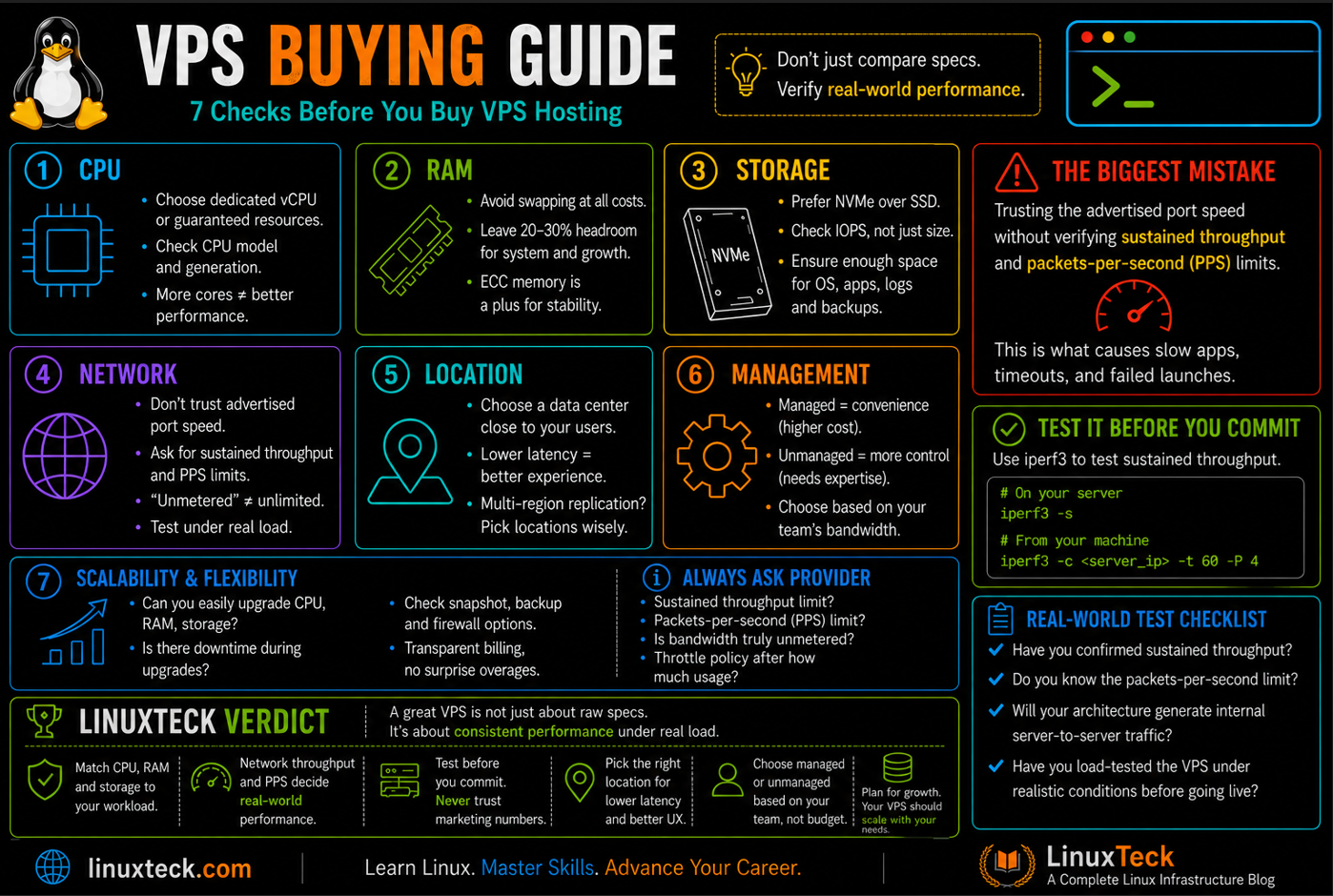
Choosing a VPS is about more than comparing CPU cores, RAM, and storage. Those specifications matter, but the right choice also depends on your workload, network requirements, data center location, management needs, scalability, and total cost.
Network capacity is one factor that is easy to overlook. For applications that generate significant traffic between users, containers, databases, APIs, or multiple servers, sustained network throughput and packet-per-second capacity can become important alongside traditional compute resources.
This guide explains how to evaluate those factors so you can choose a VPS based on your actual requirements rather than relying only on headline specifications. It also highlights network considerations that can become important as workloads grow beyond a simple single-server deployment.
If you are ready to compare actual providers after understanding these requirements, see our Best Linux VPS Hosting guide, where the same workload-based approach is applied to real VPS providers.
Why Choosing the Right VPS Hosting Is Harder Than It Looks
VPS buying advice has stayed largely frozen since the early 2010s, when the biggest differentiator between providers really was raw CPU and RAM allocation. That made sense when most VPS instances hosted a single WordPress site or a small LAMP stack. It stopped making sense once VPS instances started running API layers, internal service-to-service replication, containerized workloads, and multi-node clusters, all of which are far more sensitive to network throughput and connection handling than to raw compute.
The market has not caught up. Most major VPS providers still lead their pricing pages with vCPU count, RAM, and NVMe storage, then bury the actual port speed limit, the unmetered-but-throttled clause, or the packets-per-second cap deep in the terms of service. It is not that providers are hiding this on purpose. It is that most buyers never ask, because most buying guides never taught them to.
Quick Answer:
To choose the right VPS, match CPU, RAM, and storage to your actual workload, then verify network throughput and packet-per-second limits under real load, not just the advertised port speed. Confirm whether bandwidth is truly unmetered or silently throttled past a threshold, check the provider's data center location against your users, and decide managed versus unmanaged based on your team's operational bandwidth, not your budget alone.
What Most People Say (and Why It Is Incomplete)
The dominant advice, repeated across nearly every VPS buying guide, breaks the decision into five factors: CPU, RAM, storage type, operating system, and data center location. This is not wrong. A dynamic e-commerce site really does need more CPU headroom than a static blog. NVMe genuinely outperforms spinning disks for I/O-heavy workloads. Choosing a data center near your users really does cut latency. At their strongest, these guides are giving accurate, useful, non-controversial advice for a single-server workload with predictable traffic.
Where the standard checklist breaks down is anything beyond that simple case: clustered architectures, internal API replication, containers that burst connections, or applications where the server talks to other servers as much as it talks to end users. In those scenarios, CPU and RAM can sit comfortably under load while the actual bottleneck is somewhere else entirely: the network interface.
Common View:
Pick your VPS by matching CPU, RAM, and storage to expected traffic, then choose the closest data center and the OS you're comfortable managing.
What the Data Actually Shows
A close look at how the industry currently educates buyers reveals why this problem persists. Across the VPS hosting industry, buying guides generally frame the decision around performance, pricing, support, scalability, data center coverage, and management options, folding bandwidth into a single "performance" line item rather than breaking it out. Even the more detailed vendor guides, the ones that walk through CPU, RAM, storage type, and operating system in real depth, still describe bandwidth as one number to check against your expected traffic, without separating raw throughput from packet-handling capacity or provider-side throttling policy.
| Metric | What Buying Guides Usually Check | What Actually Determines Real Capacity |
|---|---|---|
| Network | Advertised port speed (e.g. "1 Gbps unmetered") | Sustained throughput under load, plus PPS ceiling and throttle thresholds in the TOS |
| Compute | vCPU core count | Whether cores are dedicated or oversold on a shared host |
| Storage | SSD vs NVMe label | IOPS ceiling and whether storage is local or network-attached |
Customer reviews and infrastructure discussions also show why advertised port speed should not be treated as a guaranteed sustained throughput figure. Real-world performance can be affected by provider policies, traffic limits, virtualization, network congestion, and the specific plan or host node. These details are not always visible on the main pricing page, so they are worth checking before choosing a VPS for workloads that depend on sustained network performance.
What This Means in Practice:
Treat the advertised port speed as a ceiling you will probably never actually reach, not a guarantee. Before committing to a plan, ask the provider directly what their sustained throughput and packets-per-second limits are, and whether those limits apply per VM or per physical host.
What Practitioners Are Actually Saying
When evaluating VPS providers, it is useful to look beyond the headline specifications and review the provider's network policies, acceptable-use terms, and customer experiences. Reviews and infrastructure discussions can reveal practical issues that are not always obvious from a pricing table, including traffic limits, fair-use policies, port restrictions, support procedures, and differences between advertised and sustained network performance.
The important lesson is not to treat a single review or forum comment as proof of how an entire provider operates. Instead, use these sources as signals and then verify the relevant limits for the specific VPS plan you are considering. If sustained network performance matters to your workload, ask the provider what throughput and packet-per-second limits apply, whether they are shared or dedicated, and under what circumstances traffic can be restricted.
Dangerous Misconception:
"Unmetered bandwidth" does not mean unlimited throughput. It usually means there's no hard data cap, but the provider can still throttle your port speed once you cross a usage or rate threshold they define, and that threshold is rarely on the pricing page.
What This Looks Like in a Real Deployment
Consider a multi-server application where the individual VPS instances have enough CPU and RAM, but several services also exchange data continuously between nodes. In this situation, the application can still experience slowdowns even when CPU and memory usage look healthy if the available network throughput or packet-per-second capacity becomes the limiting factor.
This is why network requirements should be evaluated alongside compute resources when planning a cluster. Database replication, API traffic between services, container communication, backups, and synchronization can all contribute to network usage. A specification sheet that looks strong on CPU and RAM does not automatically mean the VPS is suitable for a network-intensive workload.
For cluster-based deployments, check the provider's documented throughput and packet-per-second limits, determine whether private and public traffic are treated differently, and test the actual network performance where possible before committing the workload to production.
Where I Agree
The mainstream VPS checklist is not wrong so much as incomplete, and it is worth being fair about what it gets right.
CPU sizing matters. Dynamic, database-backed applications can require more compute capacity than simple static sites, and insufficient CPU or RAM can quickly become a bottleneck. Fast storage is also important for workloads with frequent reads and writes, while data-center location can have a meaningful effect on latency for users and services that depend on responsive network connections. The managed-versus-unmanaged decision is equally important because it determines how much server administration your team needs to handle.
To Be Fair:
CPU, RAM, storage, location, and management level all matter and should remain part of the VPS selection process. The point is not to replace these factors, but to evaluate them alongside networking, backups, scalability, support, security, and the requirements of your actual workload.
Where I Disagree (and Why)
Four areas deserve more attention than they usually receive in a basic VPS buying checklist. None of these factors replaces CPU, RAM, storage, or location. They add another layer to the decision when your workload has more demanding performance or operational requirements.
First, bandwidth is not a single number. When evaluating a VPS, distinguish between included data transfer, sustained network throughput, and packets-per-second capacity. A plan can provide a large data-transfer allowance while still having limits on how quickly traffic can move or how many packets it can process.
Second, "unmetered" does not automatically mean unlimited performance. Providers can define network usage through fair-use policies, traffic limits, port restrictions, or other plan-specific conditions. Before choosing a plan, check what "unmetered" means in that provider's documentation and whether any restrictions apply to sustained traffic.
Third, vCPU count is only one part of compute performance. Virtual CPU resources can differ in performance depending on the underlying hardware, virtualization model, and whether resources are shared or dedicated. If consistent compute performance matters, look for information about CPU generation, dedicated resources, performance guarantees, or benchmark results rather than comparing vCPU counts alone.
Fourth, clustered and containerized workloads change the infrastructure requirements. A single-server application may place relatively modest demands on internal networking, while a multi-server environment can generate substantial traffic between application servers, databases, containers, backups, and other services. For these workloads, network throughput, latency, packet handling, and the way private and public traffic are treated can become important design considerations.
Dangerous Assumption:
Assuming that healthy CPU and RAM dashboards mean your infrastructure has headroom. Network throughput can be the actual bottleneck while every other metric looks fine.
How to Choose VPS Hosting Based on Your Workload
Solo Developer / Hobbyist
For a personal project, development environment, small website, or low-to-moderate traffic application, start with the basics: CPU, RAM, storage, location, bandwidth, backups, and price. You usually do not need the most powerful VPS available. A provider with straightforward pricing, clear resource limits, and documentation that matches the plan can be more valuable than simply choosing the cheapest option.
Developer / Technical User
If you are deploying Docker containers, APIs, databases, development tools, or multiple applications, look beyond CPU and RAM. Check root access, operating-system choices, storage performance, networking, backups, monitoring options, and the availability of the data-center location you need. Our DigitalOcean vs Vultr comparison is a useful next step if these two developer-focused options are on your shortlist.
Small Team / Startup
For a growing application, choose a VPS that gives you room to scale without making the infrastructure unnecessarily complicated. Check how CPU and RAM can be upgraded, whether additional servers can be added in the same region, what backup and snapshot options cost, and how the provider handles support. If network-intensive workloads are expected, ask about sustained throughput and packet-per-second limits before committing.
Production / SysAdmin / SRE
For production infrastructure, evaluate the VPS as part of the wider operating environment rather than as a single server specification. Consider redundancy, backups, monitoring, recovery procedures, network performance, private networking where available, support response, and the provider's documented service limits. Test the workload under realistic conditions before moving a critical application into production.
Migration: Shared Hosting → VPS
If you are moving from shared hosting because of performance, resource, or configuration limitations, first identify the actual bottleneck. Then choose a VPS that addresses that specific limitation rather than simply buying a larger server. Before changing DNS, test the new environment with representative traffic and verify that the new provider's CPU, memory, storage, network, backup, and support characteristics meet your requirements.
When You Do Not Want to Manage the Server
A self-managed VPS is not the right choice for everyone. If you want cloud infrastructure without handling as much server administration yourself, a managed hosting platform can be a better fit. Our Cloudways vs Vultr comparison explains the difference between a managed cloud approach and a more traditional self-managed VPS.
One-Line Verdicts:
- Solo/hobbyist: Prioritize clear pricing, sensible resources, location, and simplicity.
- Developer: Compare control, storage, networking, locations, and deployment flexibility.
- Startup: Plan for scaling, backups, support, and predictable infrastructure costs.
- Production/SRE: Evaluate the complete infrastructure and test it under realistic conditions.
- Migration: Identify the existing bottleneck before choosing the new VPS.
- Managed preference: Consider managed cloud hosting when you do not want to handle server administration yourself.
How to Choose VPS Hosting - FAQ
How much RAM and CPU do I actually need for a VPS?
There is no single CPU and RAM combination that fits every VPS workload. A small website, development environment, API, database server, and multi-container application can have very different resource requirements. Start by measuring the workload you already have where possible, then choose enough CPU and RAM to handle normal usage with reasonable headroom. Check current memory usage with free -h and CPU load with uptime on a similar existing server before sizing a new one. See LinuxTeck's server hardening checklist for what to configure once the box is provisioned.
What does "unmetered bandwidth" actually mean on a VPS plan?
It typically means there's no hard data cap you'll be billed for exceeding, but it does not mean unlimited throughput. Most providers reserve the right to throttle your port speed once you cross a usage threshold defined in their acceptable use policy. Always ask for the specific throttle threshold and post-throttle speed before signing up, since these numbers are rarely on the main pricing page.
How do I test a VPS provider's real network throughput before committing?
If the provider allows you to provision a test instance or offers suitable short-term billing, run a sustained throughput test with a tool such as iperf3. Test against a server in a relevant region rather than relying only on a single speed-test snapshot. For example, iperf3 -c <target_ip> -P 4 can test multiple parallel streams. Run the test for several minutes and compare the observed results with the provider's documented network specifications. For production workloads, repeat the testing under conditions that resemble your expected traffic rather than treating one benchmark as a guarantee of future performance.
Should I choose managed or unmanaged VPS hosting?
Choose managed hosting if you want the provider to handle more of the server administration, such as operating-system maintenance, security updates, and certain support tasks. Choose an unmanaged VPS if you want greater control over the server and have the skills and time to manage the operating system, security, applications, backups, and troubleshooting yourself. Pricing and the exact responsibilities vary by provider, so compare what is actually included rather than assuming that every managed or unmanaged plan works the same way. See LinuxTeck's system administration guide if you're evaluating whether you're ready for unmanaged hosting.
What's the difference between VPS and cloud server hosting?
The terms overlap because providers use them differently. A traditional VPS generally gives you an isolated virtual server with allocated CPU, RAM, storage, and networking resources, while cloud hosting usually refers to a broader infrastructure platform designed around services such as multiple regions, scalable compute, networking, storage, and other managed components. A cloud VM can still run on a physical host, so the important question is not the label but what infrastructure, scalability, redundancy, and management capabilities the provider actually offers. For a single project, a straightforward VPS may be easier to understand and budget for; a broader cloud platform can make more sense when you need additional infrastructure services or multi-region capabilities.
How do I check if my VPS is being throttled right now?
Run a sustained transfer test with iperf3 or a large file download over several minutes and look for a repeatable reduction in throughput rather than normal short-term variation. Test from more than one suitable endpoint where possible and compare the results with the network specifications documented for your VPS plan. If you repeatedly encounter a similar ceiling under different test conditions, check the provider's traffic policies and contact support to determine whether a plan limit, routing issue, congestion, or another network constraint is responsible.
Does data center location really matter for VPS performance?
Yes, primarily for latency. A data center closer to your actual users reduces round-trip time, which matters most for real-time applications and synchronous APIs. For a globally distributed audience, consider whether the provider supports multiple regions or a CDN layer rather than trying to pick one perfect location.
Is Linux or Windows better for a VPS?
Neither operating system is universally better; the right choice depends on the software and administration requirements of your workload. Linux is a strong fit for many web applications, APIs, containers, development environments, and open-source server stacks. Windows can be the better choice when you depend on Windows-specific applications, Microsoft services, or software that requires the Windows environment. Start with LinuxTeck's Linux quick start guide if you're new to managing a Linux VPS.
Final Verdict: Choose the VPS Around Your Workload
CPU, RAM, storage, and data-center location are still fundamental VPS selection criteria, but they are not the complete picture. Depending on your workload, network throughput, packet handling, backups, scalability, management requirements, support, and total cost can also have a major impact on whether a VPS is the right fit.
For a simple website or development environment, a straightforward VPS with sensible resources may be all you need. For containerized applications, databases, APIs, multi-server deployments, or other network-intensive workloads, investigate the provider's documented network limits and test the environment where practical before committing a production workload.
Your specific next action: Write down the requirements of your workload first, including CPU, RAM, storage, location, network needs, backups, management, scalability, and budget. Then compare VPS providers against those requirements instead of choosing solely from a headline specification or the lowest introductory price.
Everything above focused on how to evaluate a VPS. The next step is deciding which provider best matches those requirements. That's a different decision, because it means applying the same evaluation framework to real hosting platforms instead of comparing specifications in isolation.
This is where LinuxTeck's Best Linux VPS Hosting guide comes in. It compares leading VPS providers using the same evaluation framework you just learned, including performance, network reliability, management options, pricing, and scalability. Instead of starting with marketing claims, you'll be able to compare providers against practical criteria that matter in real deployments.
If you already have a shortlist in mind, or a specific comparison you're trying to settle, the guides below go deeper on individual matchups and related setup decisions.
Best Linux VPS Hosting
Start here to compare leading VPS providers and build your shortlist.
Cloudways vs Vultr
Compare a managed cloud hosting approach with a more hands-on cloud infrastructure option.
DigitalOcean vs Vultr
See how two developer-focused cloud platforms compare.
Kinsta Review
See when managed WordPress hosting may make more sense than managing VPS infrastructure yourself.
Once you've chosen the provider that's right for your workload, visit our Deals section to check for the latest promotions, discounts, and offers before signing up.
LinuxTeck - A Complete Linux Infrastructure Blog
LinuxTeck covers everything from beginner Linux commands to advanced Linux system administration and DevOps career guidance, written by practitioners for professionals working on Ubuntu, Rocky Linux, RHEL, and enterprise Linux environments every day.