Most candidates walk in thinking networking interviews are about reciting the OSI model. Here's the part nobody tells you: the definition is just the warm-up. The real test is the follow-up, "okay, so what would you run next?"
In 2026 this shows up everywhere. A fintech startup in NYC, a cloud platform team in Seattle, an enterprise IT shop in Austin. Different stacks, same question underneath: can you find a broken connection on a Linux box without guessing? If the job touches servers, expect networking questions in the technical round. Almost always.
The money side is solid too. The U.S. Bureau of Labor Statistics puts the median wage for network and computer systems administrators at $99,130 (May 2025), with about 13,400 openings a year. It also notes that more of this work is moving to DevOps engineers, which is exactly why networking questions now land in DevOps and SRE loops too.
💡 The real insight:
Almost every prep list stops at "What is DNS?" and "Explain TCP vs UDP." Interviewers don't. They hand you a symptom (ping works, the site doesn't) and watch the order you check things in. Knowing the answer matters less than knowing which command proves it.
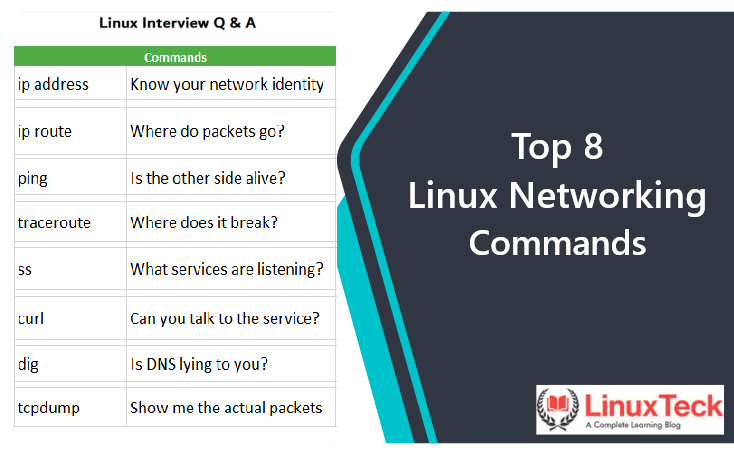
This guide covers 8 tiered questions, 3 live terminal prompts, a cheat sheet and an FAQ, all built on the core Linux networking commands you already half-know. Every answer includes a working code example you can run and memorize.
⚡ Quick Answer
Linux networking interview questions and answers test whether you can inspect interfaces, routes, DNS, sockets and firewalls with modern tools like ip, ss, dig and tcpdump, and troubleshoot one layer at a time. Sysadmin, DevOps, SRE and cloud engineering interviewers all expect it. This guide walks through beginner to senior questions, three live scripts, and a quick-reference cheat sheet.
Why Linux Networking Skills Pay $63K-$207K in the US Job Market
Networking is a multiplier skill. It doesn't get its own job title most of the time, but it quietly decides who gets paged at 2 a.m. and who fixes the outage. The ranges below come from BLS, Indeed and ZipRecruiter data published this year. For a deeper breakdown by city and seniority, see our Linux sysadmin salary guide.
| US Role |
Avg Salary (2026) |
Networking Requirement |
Key Cert |
| Network & Systems Administrator |
$63K – $155K |
IP config, DNS, DHCP, firewalls, daily troubleshooting |
Network+ N10-009 |
| DevOps Engineer |
$87K – $207K |
Ports, load balancers, container networking, TLS |
Linux+ XK0-006 |
| Site Reliability Engineer |
$114K – $152K |
Packet capture, latency, MTU, incident debugging |
Linux+ XK0-006 |
| Information Security Analyst |
$129K median |
Firewall rules, traffic analysis, segmentation |
CompTIA Security+ |
| Network Architect |
$134K median |
Routing design, subnetting, WAN and cloud VPCs |
CCNA 200-301 |
🚀 Pro Tip:
NYC, Seattle and SF teams push the top of these ranges, and they tend to grill harder on troubleshooting under pressure than on theory. Memorize the patterns in this guide before your next call.
Basic Linux Networking Interview Questions (Beginner Level)
These come up in the first five minutes. Nobody's impressed if you get them right. But fumble one and the rest of the interview gets a lot harder.
Q1
How do you check a server's IP address, interfaces and default route?
Sounds trivial. It's actually a quick check on whether you learned Linux this decade. If your hands still type ifconfig, the interviewer notices.
bash
ip -br addr show            # one line per interface: name, state, addresses
ip route show               # routing table, look for "default via ..."
ip route get 8.8.8.8        # which interface + gateway the kernel actually picks
ip -s link show dev eth0    # RX/TX counters, errors, drops

# ifconfig/route live in net-tools, which minimal RHEL/Rocky and Ubuntu images skip
✅ Interview Answer:
"I use ip -br addr for a fast overview and ip route get when I want to know the exact path the kernel will choose, because with multiple NICs the routing table alone can fool you. I also check the error and drop counters, since a link can be UP and still be dropping packets."
Q2
What's the difference between TCP and UDP, and how do you see which one a service uses?
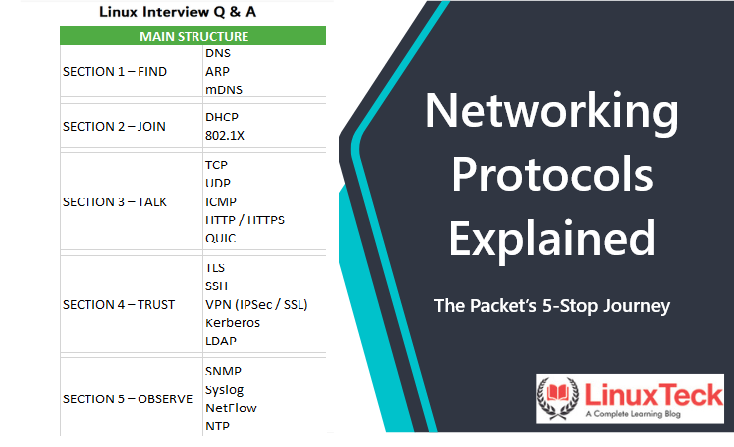
Everyone knows "TCP is reliable, UDP is fast." The interviewer wants you to prove it on a live box. Brush up on the common networking protocols first, then show the sockets.
bash
# Listening TCP + UDP sockets, numeric, with the owning process (-p needs sudo)
sudo ss -tulpn

# Just port 53, both protocols
sudo ss -tulpn 'sport = :53'

# Force DNS over TCP: proof that DNS is not "UDP only"
dig +tcp example.com A
✅ Interview Answer:
"TCP does a handshake, orders packets and retransmits, UDP just sends. I check what a service really uses with ss -tulpn. And one gotcha I always mention: DNS falls back to TCP for large responses and zone transfers, so a firewall that only allows UDP 53 will break things eventually."
Q3
dig returns the right IP but the app still connects somewhere else. Why?
This is "explain DNS" with a trap in it. dig talks to DNS directly, but applications go through the system resolver, which reads /etc/hosts first. Our DNS troubleshooting guide goes deeper.
bash
grep '^hosts:' /etc/nsswitch.conf   # lookup order, usually "files" before "dns"
getent ahosts app.internal          # resolves the way the app does
dig +short app.internal             # DNS only, skips /etc/hosts
grep app.internal /etc/hosts        # the usual culprit

# Which DNS server is the box using?
# Ubuntu (systemd-resolved): resolvectl status
# RHEL/Rocky (NetworkManager): cat /etc/resolv.conf  or  nmcli dev show
✅ Pro Move:
"When dig and the app disagree, I compare getent ahosts against dig. Usually it's a stale /etc/hosts entry someone added during a migration, or a local cache. Then I'd name the fix and who should have cleaned it up."
🔥 Pro Tip - Basics Round:
Say the command before the concept. "I'd run ss -tulpn and look for..." lands much better than a textbook definition, because it tells them you've actually done it.
This is the round that separates $85K offers from $110K-$130K ones. Less "what is it," more "it's broken, go."
Q4
The service is running, but nobody can connect. Where do you look?
Classic. systemctl status says active, users say it's down. The answer is usually the bind address or the firewall, and the ss command tells you which in about two seconds.
bash
sudo ss -tlnp 'sport = :8080'
# LISTEN 0 4096 127.0.0.1:8080 ...   <- loopback only, remote clients never get in

# Does it answer locally?
curl -sS -o /dev/null -w '%{http_code}\n' http://127.0.0.1:8080/health

# Then the firewall
sudo firewall-cmd --list-all       # RHEL/Rocky
sudo ufw status verbose            # Ubuntu
sudo nft list ruleset              # what the kernel actually has loaded
✅ Interview Answer:
"First I check the listen address with ss -tlnp. If it's 127.0.0.1, that's a config problem, not a network one. If it's 0.0.0.0 and curl works locally, I move to the host firewall, then the cloud security group. Also, 'connection refused' and 'timeout' mean different things, so I ask which one the user saw."
Q5
Is 10.0.5.200 in the same subnet as 10.0.4.0/23? Prove it.
Subnetting still gets asked, and doing it on a whiteboard is fine. Writing it as a tiny function is better, because it shows you understand the mask instead of memorizing a table. A /23 covers 10.0.4.0 to 10.0.5.255.
bash
#!/bin/bash
set -euo pipefail

ip2int() {
  local a b c d
  IFS=. read -r a b c d <<< "$1"
  echo $(( (a << 24) | (b << 16) | (c << 8) | d ))
}

in_subnet() {    # usage: in_subnet 10.0.5.200 10.0.4.0/23
  local ip net prefix mask
  ip=$(ip2int "$1")
  net=$(ip2int "${2%/*}")
  prefix="${2#*/}"
  mask=$(( prefix == 0 ? 0 : (0xFFFFFFFF << (32 - prefix)) & 0xFFFFFFFF ))
  (( (ip & mask) == (net & mask) ))
}

if in_subnet 10.0.5.200 10.0.4.0/23; then echo "same subnet"; else echo "needs a router"; fi
✅ Interview Answer:
"Yes. A /23 masks off 9 host bits, so the range runs 10.0.4.0 through 10.0.5.255 with 510 usable hosts. I AND both addresses with the mask and compare. This matters in practice when someone sets a /24 on one host and /23 on another, and half the traffic goes to the gateway for no obvious reason."
Q6
You opened port 443 and it worked. After a reboot it's closed again. What happened?
Runtime vs permanent rules. It trips up a lot of people on RHEL-family boxes. If firewall-cmd is new to you, practice this one twice.
bash
# RHEL / Rocky (firewalld)
sudo firewall-cmd --add-service=https              # runtime only, lost on reload/reboot
sudo firewall-cmd --permanent --add-service=https  # written to config
sudo firewall-cmd --reload
sudo firewall-cmd --list-services
# Already tested at runtime? Save it all in one go:
sudo firewall-cmd --runtime-to-permanent

# Ubuntu (ufw rules persist by default)
sudo ufw allow 443/tcp
sudo ufw status numbered
✅ Interview Answer:
"The rule was added to the runtime config only. I test at runtime first so a bad rule can't lock me out, then commit with --runtime-to-permanent. On a fleet I'd put it in Ansible so nobody's hand-editing firewalls on prod."
🔥 Pro Tip - Intermediate Round:
Always ask "refused or timed out?" before you answer. A refusal means something answered with a reset, a timeout means packets are being dropped. That one question makes you sound like you've done on-call.
Advanced Linux Networking Interview Questions (Senior / SRE Level)
$130K+ roles. Here they want to see you debug safely on production, explain what you found, and not make the outage worse while doing it.
Q7
Ping works, small requests work, but big HTTPS responses just hang. Go.
This smells like an MTU problem. Often a VPN or tunnel shrinks the path, and somebody blocked the ICMP messages that would normally tell the sender to use smaller packets. Plenty of candidates stall here, so it's a great one to own.
bash
ping -c 3 api.partner.example                 # small packets, fine
curl -v --max-time 10 https://api.partner.example   # stalls mid-TLS or mid-body

# Don't-Fragment probes: 1472 bytes + 28 bytes of IP/ICMP headers = 1500
ping -c 3 -M do -s 1472 api.partner.example
ping -c 3 -M do -s 1372 api.partner.example  # works? the path is smaller than 1500

tracepath -n api.partner.example             # shows pmtu hop by hop
ip link show dev eth0 | grep -o 'mtu [0-9]*'
✅ Interview Answer:
"Small packets working while large ones hang is my MTU alarm. I probe with ping -M do at decreasing sizes and confirm with tracepath. The fix is either allowing ICMP 'fragmentation needed' through, lowering the interface MTU, or MSS clamping on the tunnel. I'd push for the first one, because blocking all ICMP is usually what caused it."
Q8
Connections to a backend fail randomly. How do you capture traffic on prod without hurting it?
Anyone can type tcpdump. The senior signal is bounding the capture (filter, packet count, snap length) so you don't fill a disk or spike CPU on a box that's already struggling.
bash
# Bounded: 2000 packets max, headers only (-s 128), no name lookups (-nn)
sudo tcpdump -i eth0 -nn -s 128 -c 2000 -w /tmp/api-443.pcap \
  'tcp port 443 and host 10.20.1.15'

# SYNs with no ACK flag: count them, then look for missing SYN-ACK replies (timeouts)
sudo tcpdump -nn -r /tmp/api-443.pcap 'tcp[tcpflags] & (tcp-syn|tcp-ack) == tcp-syn'

# RSTs: something actively refused or killed the connection
sudo tcpdump -nn -r /tmp/api-443.pcap 'tcp[tcpflags] & tcp-rst != 0'
✅ Interview Answer:
"I always cap the capture with a filter, -c and a small snaplen, write to a file, and read it offline. Then I look for SYNs that never got a SYN-ACK, which points at drops, versus RSTs, which point at the backend or a load balancer refusing. On a HIPAA or SOC2 box I'd also make sure I'm not capturing payloads I'm not allowed to keep."
🔥 Pro Tip - Advanced Round:
Narrate the blast radius. Before any command on prod, say what it could break and how you'd limit it. A bounded tcpdump -c with a filter says "senior" louder than any buzzword.
Live Coding Round - Scripts You Must Write on the Spot
Shared terminal, someone watching, maybe 15 minutes. These three are small enough to write under pressure and show real networking sense. Practice them on a plain cloud VM with full root, not a managed host that hides the network layer (our Cloudways review explains where managed hosting fits and where it doesn't).
Live Prompt 1: "Check a list of host:port pairs and exit non-zero if any are down"
bash
#!/bin/bash
# check-ports.sh - report unreachable host:port pairs
set -euo pipefail

TARGETS=("db01.internal:5432" "cache01.internal:6379" "example.com:443")
TIMEOUT=3
failed=0

for target in "${TARGETS[@]}"; do
  host="${target%:*}"
  port="${target##*:}"
  # /dev/tcp is built into bash, so no nc/telnet needed on minimal images
  if timeout "$TIMEOUT" bash -c 'exec 3<>"/dev/tcp/$1/$2"' _ "$host" "$port" 2>/dev/null; then
    echo "OK    $host:$port"
  else
    echo "FAIL  $host:$port"
    failed=$((failed + 1))
  fi
done

echo "$failed of ${#TARGETS[@]} checks failed"
exit $(( failed > 0 ? 1 : 0 ))
Talk through it: "I pass host and port as arguments to the inner shell instead of splicing them into the string, and timeout stops a filtered port from hanging the whole run."
Live Prompt 2: "Show the top 5 remote IPs by established TCP connections"
bash
#!/bin/bash
# top-talkers.sh - who is holding the most connections to this box?
set -euo pipefail

# -H drops the header; with a state filter, column 4 is Peer:Port
ss -Htn state established \
  | awk '{ peer = $4
           sub(/:[0-9]+$/, "", peer)     # strip the port
           gsub(/^\[|\]$/, "", peer)     # strip IPv6 brackets
           sub(/^::ffff:/, "", peer)     # IPv4-mapped IPv6 to plain IPv4
           print peer }' \
  | sort | uniq -c | sort -rn | head -n 5
Production addition: swap established for time-wait to spot a client that opens a new connection per request instead of reusing them.
Live Prompt 3: "A server can't reach the internet. Script your triage, layer by layer"
bash
#!/bin/bash
# net-triage.sh - check each layer in order, stop at the first hard failure
set -euo pipefail

TEST_HOST="${1:-example.com}"

step() { printf '%-8s %s\n' "$1" "$2"; }

route=$(ip route show default | head -n 1)
iface=$(echo "$route" | awk '{for (i = 1; i <= NF; i++) if ($i == "dev") {print $(i+1); exit}}')
gw=$(echo "$route" | awk '{for (i = 1; i <= NF; i++) if ($i == "via") {print $(i+1); exit}}')

[[ -n "$iface" ]] || { step "ROUTE" "no default route"; exit 1; }
step "LINK" "$(ip -br link show dev "$iface")"

if [[ -n "$gw" ]] && ping -c 1 -W 2 "$gw" > /dev/null 2>&1; then
  step "GATEWAY" "$gw answers"
else
  step "GATEWAY" "${gw:-none} silent (could just be ICMP blocked)"
fi

if ip_addr=$(getent hosts "$TEST_HOST" | awk '{print $1; exit}') && [[ -n "$ip_addr" ]]; then
  step "DNS" "$TEST_HOST -> $ip_addr"
else
  step "DNS" "cannot resolve $TEST_HOST"
  exit 2
fi

code=$(curl -sS -o /dev/null -w '%{http_code}' --max-time 5 "https://$TEST_HOST") || code="000"
step "HTTPS" "status $code"
Talk through it: "A silent gateway isn't fatal because plenty of routers drop ICMP, so I warn and keep going. DNS failing is a hard stop, since everything after it depends on a name resolving."
🔥 Pro Tip - Live Coding Round:
Get it working first, then harden it out loud. "Next I'd add a timeout, then make the target list come from a file." Interviewers score the thinking, not just the final diff. And yes, run bash -n before you hit enter.
Linux Networking Concepts Cheat Sheet - Interview Quick Reference
Bookmark this Linux networking interview questions and answers cheat sheet before your next technical screen.
| Concept |
Syntax / Command |
When to Use |
Interview Level |
| Interfaces & IPs |
ip -br addr |
First look at any box |
Beginner |
| Route decision |
ip route get 8.8.8.8 |
Which NIC and gateway a packet will use |
Beginner |
| Name resolution |
getent ahosts host |
Resolve like the app does, /etc/hosts included |
Beginner |
| Listening sockets |
sudo ss -tulpn |
What's open, on which address, by which process |
Intermediate |
| Port to process |
sudo ss -tlnp 'sport = :8080' |
"Address already in use" errors |
Intermediate |
| Persistent firewall rule |
firewall-cmd --permanent --add-service=https |
Rules that must survive a reboot (RHEL/Rocky) |
Intermediate |
| Path + loss report |
mtr -rwc 50 host |
Where latency or packet loss starts |
Intermediate |
| MTU probe |
ping -M do -s 1472 host |
Big transfers hang, small ones work |
Advanced |
| Bounded capture |
tcpdump -nn -c 2000 -w out.pcap 'port 443' |
Proving drops vs resets on production |
Advanced |
FAQ - Linux Networking Interviews 2026
Are Linux networking skills still relevant in 2026 if everything runs in the cloud?
More than ever, honestly. VPCs, security groups and load balancers are the same routing, subnet and firewall ideas with a web console on top. That's why Linux networking interview questions and answers keep showing up in cloud and DevOps loops. When a container can't reach its database, someone still has to open a shell and run ss and dig.
What's the single most important thing to know for a networking interview?
A troubleshooting order you can say out loud. Link, IP, route, gateway, DNS, port, firewall, app. If you work through that sequence calmly and name the command at each step, you'll handle most scenario questions even when you don't know the root cause right away.
How many networking questions come up in a DevOps or SRE interview?
There's no fixed count. It depends heavily on the team. Most loops don't have a separate "networking round," though. Instead the questions hide inside a broken-service scenario, so you might answer five networking questions without anyone calling them that. Prepare for scenarios, not a quiz.
Does CompTIA Linux+ test networking?
Yes. The current Linux+ exam, XK0-006, covers network configuration (hosts, DNS, interfaces, tools), firewalls and network troubleshooting. If you want deeper protocol and subnetting coverage, Network+ N10-009 is the vendor-neutral networking cert. Our best Linux certifications for 2026 guide compares them side by side.
Can I land a networking-heavy Linux job without a CCNA or networking background?
Yes, if you can show the work. Spin up two small cloud VMs, break things on purpose (wrong subnet, blocked port, bad /etc/hosts entry) and fix them with the commands above. Use a plain VM where you have full root, since you need to touch interfaces, routes and firewall rules yourself. Write up two or three of these fixes and bring them to the interview.
Conclusion - You Already Think in Layers
The engineers who ace these rounds aren't doing anything magical. They just check things in the same order every time.
Definitions get you through the door. Knowing which command proves your theory, and what to run next, gets you the offer.
This week: run the three live scripts on a real VM, practice the MTU probe with ping -M do, and read up on networking skills for DevOps. You're closer than you think.
⭐ Key Takeaways
- →Use
ip and ss, not ifconfig and netstat
- →When dig and the app disagree, check /etc/hosts with
getent
- →"Refused" and "timed out" point to different problems, so always ask which
- →Bound every production capture: filter,
-c, small snaplen
- →Linux networking fluency = $63K–$207K US salary range in 2026
$ ss -tulpn | grep your-next-offer
Keep Learning With LinuxTeck
A complete learning blog for US developers, sysadmins, and engineers preparing for $100K+ Linux roles. New interview guides every week.