Networking Protocols Explained: what really happens when you type google.com into your browser and press Enter. Half a second later, a webpage appears.
That half second is one of the most complex sequences in computing. Dozens of protocols fire in a precise order. Packets travel across routers, get authenticated, encrypted, and monitored — all before you see a single pixel.
Most engineers use these protocols every day without fully understanding what is happening under the hood. That is fine for casual use. But if you are preparing for a Linux admin interview, moving into DevOps, or aiming for an SRE role, you need to be able to explain this journey confidently — from first packet to final delivery.
This guide on Networking Protocols Explained helps you understand how DNS, TCP, TLS, and monitoring fit together in real production systems.
This post breaks that story into 5 stops. By the end, you will not just know the protocol names — you will understand what each one does, why it exists, and how to talk about it in an interview or on a production system.
Networking Protocols Explained: The Complete Packet Journey
ARP
mDNS
Before a single byte of data can travel, your device needs to solve one fundamental problem: it knows the name, but not the address. You typed google.com — but the network routes by IP address, not names. This stop is where that translation happens.
The internet's phonebook. When you enter a hostname, your device asks a DNS server: "What IP address belongs to this name?" The DNS server looks up the answer and replies with the IP. Without DNS, you would need to memorize the IP address of every website you visit.
dig google.com +short

dig @8.8.8.8 yoursite.comDNS gives you the IP. But on a local network, devices communicate by MAC address — the physical hardware ID of each network card. ARP bridges that final gap: it broadcasts to the local network asking "Who has this IP address? Tell me your MAC."
arp -n

ip neigh show
mDNS handles local device discovery without needing a central DNS server. When you connect a printer or smart device to your home network, mDNS is how other devices find it automatically. It broadcasts to the local segment — no configuration required.
"If ping works to an IP but fails to a hostname, DNS is the problem — not the network. Use dig to verify what your DNS server is returning and whether it matches the expected IP."
A website loads on some servers but not others after a migration. Root cause: DNS TTL caching. One server still holds the old IP. Run dig on both and compare results instantly.
802.1X
Your device now knows where it is going. But it still needs to officially join the network — get an IP address, know the gateway, and prove it is allowed to be there. This is where network onboarding happens.
When your device connects to a network, it does not yet have an IP address. DHCP solves this automatically. Your device broadcasts a request: "I just joined — can someone give me an IP?" The DHCP server responds with an IP address, subnet mask, default gateway, and DNS server. All in one exchange.
ip address show

nmcli device showIn enterprise networks, just having the right cable is not enough. 802.1X enforces authentication at the switch port level — before your device is allowed any network access at all. It is the security guard at the door. Common in corporate Wi-Fi and wired office networks.
DHCP issues are one of the most common causes of "server has no IP" tickets. Know the DHCP lease lifecycle — Discover, Offer, Request, Acknowledge (DORA). If a server has a 169.254.x.x address, DHCP failed and it self-assigned. That is your first clue.
New VM spun up but has no network connectivity. Check ip address show — it shows a 169.254.x.x address. DHCP did not respond. Either the DHCP server is down, the VM is on the wrong VLAN, or the DHCP lease pool is exhausted.
UDP
ICMP
HTTP / HTTPS
QUIC
Address known, network joined. Now packets actually need to travel. This stop is the engine room — the protocols here decide how data moves, how reliably, and at what speed. This is also the layer you interact with most directly in Linux networking commands.
ICMP is the protocol behind ping and traceroute. It is how network devices send error messages and operational information. Not for carrying data — purely for diagnostics and control.
ping -c 4 8.8.8.8

traceroute google.com
HTTP is the application-layer protocol for web communication. HTTPS is the same thing wrapped in TLS encryption. When you test whether a web service is responding, you are working at the HTTP layer — which is why curl is so essential.
curl -I https://example.com

curl -v http://localhost:8080
QUIC is the protocol behind HTTP/3. It runs over UDP instead of TCP, which eliminates the overhead of TCP's 3-way handshake. It builds encryption directly into the transport layer and handles multiple streams without one slow stream blocking the others. Google, Cloudflare, and most modern CDNs use it. Worth knowing for SRE interviews.
"The classic question is TCP vs UDP. The deeper answer is: TCP guarantees delivery and order at the cost of speed. UDP trades reliability for low latency. The real skill is knowing which your application uses — and what breaks when packets are lost."
ss --listening --tcp --udp --numeric --processes

tcpdump -i eth0 port 443

curl -I http://yourapp.comSSH
VPN (IPSec / SSL)
Kerberos
LDAP
Data is moving. Now the question is: is it moving safely? Can anyone intercept it? Does the receiver know it is really you? This stop is the security checkpoint — encryption, authentication, and identity verification.
TLS is the encryption layer that makes HTTPS work. Every modern website uses it. TLS establishes an encrypted tunnel — even if someone intercepts the traffic, they see only scrambled data. Certificates verify identity. When your browser shows the padlock icon, TLS is doing its job.
SSH is how Linux admins access remote servers securely. It provides an encrypted command-line session across an untrusted network. Every Linux admin uses SSH daily. Key-based authentication eliminates passwords entirely — far more secure and convenient.
ssh user@server-ip

ssh -i key.pem user@hostA VPN creates an encrypted tunnel across an untrusted network. IPSec operates at the network layer — encrypting packets themselves. SSL/TLS VPNs work at the application layer. In enterprise environments, VPNs connect remote workers to internal networks and link office locations securely.
Kerberos handles ticket-based authentication in enterprise environments — Active Directory runs on it. LDAP is the directory service for storing and querying user and group information. Together they form the backbone of enterprise identity management.
"TLS and SSH are both encrypted — but for different things. TLS protects data in transit for web applications. SSH protects your administrative access to the server itself. Both are non-negotiable in production. If SSH is misconfigured, you can lose access to your entire fleet."
An application throws TLS handshake errors. First check: is the certificate expired? Second: is the hostname matching the certificate's CN or SAN field? Third: are the intermediate certificates complete in the chain? curl -v https://yoursite.com shows you the full TLS handshake in real time.
Syslog
NetFlow
NTP
The packet has arrived. Job done — right? Not quite. In production systems, the journey never really ends. How do you know everything is still working? How do you catch a problem before users do? That is what this final stop is about. Observability is what separates reactive firefighting from proactive engineering — and it is a core SRE skill.
SNMP polls devices and collects metrics — CPU load, bandwidth usage, interface errors, memory. It is how network monitoring tools like Nagios, Zabbix, and Prometheus exporters gather data from routers, switches, and servers. Think of it as a health check broadcast for your infrastructure.
Syslog is the standard for collecting and shipping system and application logs to a central location. Every Linux server generates syslog events. Tools like rsyslog, journald, and Elasticsearch/Kibana stacks are built on this foundation. When an incident happens at 3am, Syslog is where you find the truth.
journalctl -xe

tail -f /var/log/syslog
NetFlow captures metadata about every traffic flow — source, destination, ports, bytes, duration. Not the content of packets, but the pattern of who is talking to whom and how much. Invaluable for capacity planning, anomaly detection, and security investigations. Modern equivalents include IPFIX and sFlow.
NTP synchronizes clocks across all devices in your network. This sounds trivial until it breaks. Distributed systems, log correlation, TLS certificates, Kerberos authentication — all depend on accurate time. A clock drift of just a few minutes can break authentication entirely and make log analysis impossible.
timedatectl status

chronyc tracking"Observability is the difference between knowing your system is broken versus discovering it from a user tweet. SNMP gives you metrics, Syslog gives you events, NetFlow gives you traffic patterns. Together they give you the full picture. An SRE without observability is flying blind."
A Kerberos authentication failure surfaces at 9am. The root cause: NTP drifted by 8 minutes overnight. Kerberos has a strict 5-minute clock skew tolerance. All authentication breaks silently. The fix: restart the NTP service and force a time sync. Without centralized syslog, this would take hours to diagnose.
Quick Reference
Every time you make a network request, all five stops happen — often in milliseconds. Here is the complete picture in one table.
Interview Drill — Say These Out Loud
These cover the most commonly asked networking protocol questions in Linux admin, DevOps, and SRE interviews. Practice explaining each one in your own words.
Networking is not Definitions. It is a Story.
Most engineers learn networking as a list of acronyms. DNS does this. TCP does that. And they pass the quiz. But they struggle when something breaks in production because they never built the mental model of how all these pieces connect.
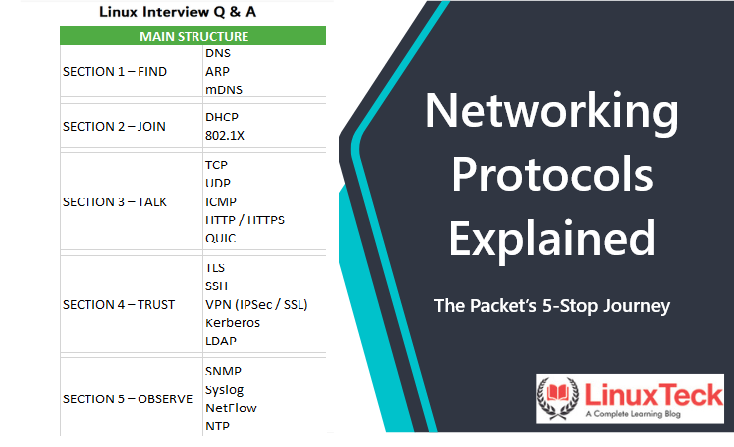
The 5-stop framework gives you that model:
- →FIND — your device needs to know where it is going
- →JOIN — it needs to officially be part of the network
- →TALK — data has to actually move
- →TRUST — that data has to be safe and verified
- →OBSERVE — you need to know it is all still working
The next time something breaks, you will not be randomly typing commands hoping for a result. You will be moving through these stops methodically, eliminating each layer until you find the real cause. That is what interviewers are testing for. That is what production systems demand.
Strong fundamentals build strong engineers. And strong engineers understand the journey, not just the destination.
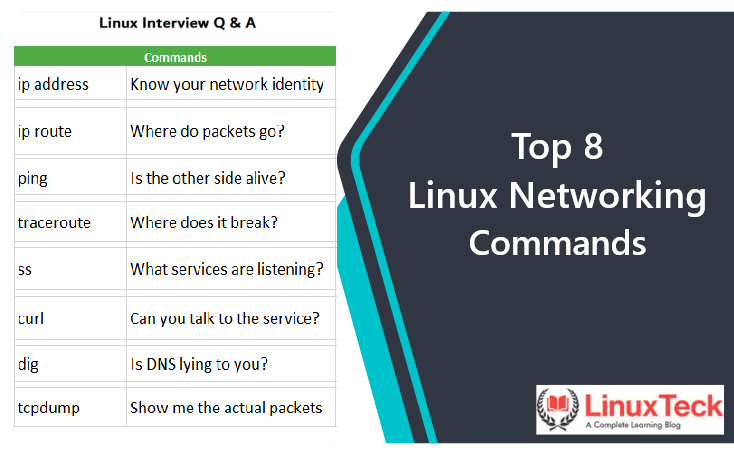
Learn more in our detailed guide on Top 8 Linux networking commands.
For official protocol documentation, see the RFC Editor.
Keep Learning With LinuxTeck
A complete learning blog for Linux beginners, sysadmins, SREs, and everyone preparing to level up. Practical, honest, and built for real-world use.