Fedora is perfect for developers who are tired of fighting their operating system to get work done. I switched my main dev laptop to Fedora right after the Fedora 44 release, mostly out of curiosity about the new Nix packaging support, and I ended up staying because the workflow just got out of my way. No third party repo hunting, no waiting six months for a toolchain update, no fighting the package manager to get a working container setup. Fedora is perfect for developers who want that kind of low maintenance setup without giving up control. That is the short version of why Fedora keeps showing up on developer machines even though it never markets itself as "the developer distro."
Fedora Linux 44 shipped on April 28, 2026, and it is the version most developers are running right now. It launched with GNOME 50 on the Workstation edition and KDE Plasma 6.6 on the KDE spin, though KDE users who keep up with updates are already on Plasma 6.7, which the Fedora KDE SIG pushed out as an in-place update in mid-June. It also dropped X11 sessions entirely in favor of Wayland only. If you want the full changelog straight from the source, the official Fedora 44 release announcement covers every edition in detail.
What matters for this article is narrower than a full release rundown though. It is why Fedora specifically works so well once you are writing code, running containers, and shipping software on it every day, not just browsing the web on it.
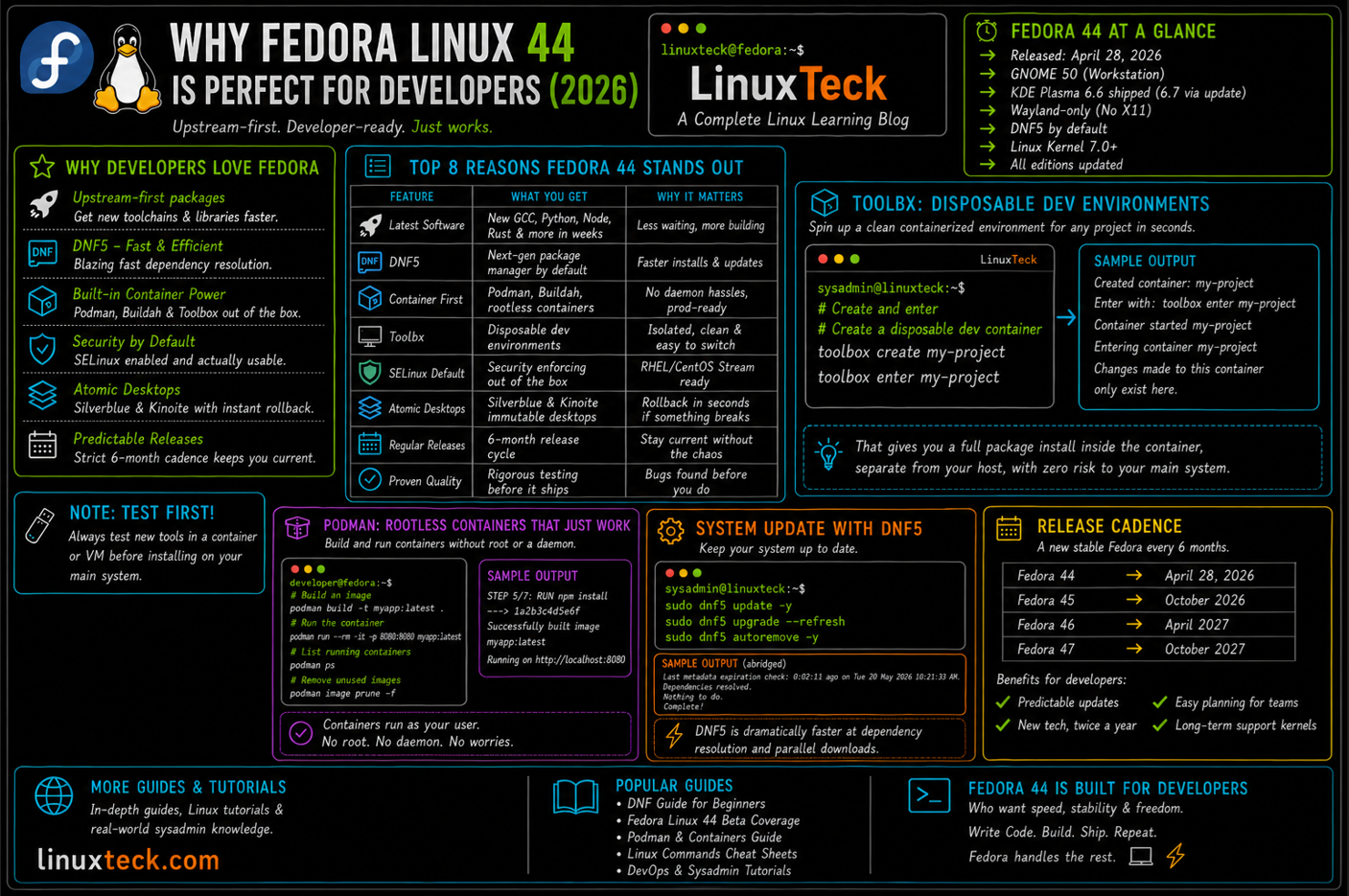
Why Developers Keep Picking Fedora:
- Upstream-first packaging means you get new language runtimes, compilers, and libraries months before other distros catch up. See our Fedora 44 beta coverage for what landed early.
- DNF5 as the default package manager is noticeably faster at dependency resolution than the old DNF4 stack.
- Toolbx, Fedora's built in wrapper around Podman, gives you disposable, containerized dev environments without touching your base OS.
- SELinux is on by default and actually usable, which matters the moment you deploy to RHEL or CentOS Stream in production.
- Silverblue and Kinoite give you an image based, atomic desktop with instant rollback if an update breaks something.
- A strict six month release cadence keeps the gap between what ships and what upstream projects actually released small.
You do not need all six of these to get value out of Fedora. Most developers end up caring most about two or three of them, usually the package freshness and the container tooling, and the rest becomes background convenience they stop noticing after the first week.
Fedora Is Perfect for Developers, So Why the Debate?
Short answer: yes, for most day to day development work. Fedora is perfect for developers who want current language runtimes, real container tooling, and a security model that mirrors production, without wading into rolling release instability. It is not perfect for someone who wants to install an OS once and never think about it again, and the section below on tradeoffs covers exactly where it falls short.
Package Freshness Without the Chaos
Rolling release distros like Arch give you the newest packages the day they are cut, but you also inherit whatever breakage ships with them. Fedora takes a middle path. New GCC, new Python, new Node, new Rust toolchains land within weeks of upstream release, but they go through Fedora's build and testing pipeline first. You are not the first person hitting a given bug, someone in the Fedora QA process usually already has.
This is also where DNF earns its keep. Fedora has shipped DNF5 as the default since Fedora 41, and by Fedora 44 the early rough edges from that switch are gone. Dependency resolution that used to take several seconds on a big install now finishes almost instantly. If you are scripting environment setup or CI images, that speed difference adds up fast.
Containers Are Not an Afterthought
Podman and Buildah were built by Red Hat engineers and landed in Fedora first, and it shows. Rootless containers work out of the box, no daemon babysitting required, and the tooling assumes you know what a Containerfile is rather than treating containers as an advanced topic. Pair that with toolbx, Fedora's built in tool for spinning up a disposable containerized shell, and you can drop into an isolated Fedora, Ubuntu, or Arch userspace for a single project without ever polluting your host system:
LinuxTeck
toolbox create my-project
toolbox enter my-project
Enter with: toolbox enter my-project
Container started my-project
Entering container my-project
Changes made to this container only exist here. Are you doing experiments?
That gives you a full package install target you can throw away when the project is done. Check our container command cheat sheet if you are coming from a pure Docker background, most of it maps directly, and here is a minimal Podman example to confirm it works:
LinuxTeck
podman run --rm -it fedora:44 bash
Getting image source signatures
Copying blob done
Writing manifest to image destination
[root@a1b2c3d4e5f6 /]#
Wayland Actually Works Now
Fedora dropped the default GNOME on X11 session back in Fedora 41, and Fedora 44 continues that direction, tightening up what remains of the legacy stack so Wayland is effectively the only supported path. That sounds scary until you realize Fedora has been pushing Wayland as default since version 25 back in 2016, so this was less a sudden jump and more the final step in a long, deliberate rollout. Screen sharing, HiDPI scaling, and multi monitor setups that used to be rough edges are solid now. If you are curious about what changed under the hood, we broke it down in our X11 vs Wayland comparison.
SELinux Stops Being a Surprise
A lot of developers meet SELinux for the first time in a production incident, usually a service that mysteriously cannot write to a directory it should have access to. Running Fedora as your daily driver means you meet SELinux early, in a low stakes environment, and you learn to read audit logs and write policy exceptions before it costs you an on call page. That familiarity transfers directly if your production stack runs RHEL, Rocky Linux, or AlmaLinux, all of which inherit the same SELinux model.
Atomic Desktops for Maximum Reliability
Silverblue and Kinoite are Fedora's image based variants. Instead of updating packages in place, the whole OS image updates as a unit and the previous image stays bootable. If an update breaks your GPU drivers or your login manager, you reboot into the last known good image and keep working while you sort it out. It is a genuinely different mental model from traditional package management, closer to how mobile OS updates work, and it removes an entire category of "why is my laptop broken this morning" incidents.
Apple Silicon Is Not Left Out
If your dev machine is an M series Mac and you want a native Linux option rather than a VM, the Fedora Asahi Remix targets that hardware directly. Graphics acceleration, audio, and most peripherals work now in a way they simply did not a couple of years ago. We covered the current state of that project in our Fedora Asahi Remix write-up, worth a read before you commit a wipe.
Where Fedora Falls Short
Fedora is perfect for developers who value freshness and control, but none of this makes it universally correct. The six month release cycle means you are reinstalling or upgrading twice a year whether you want to or not, and each major version drops support roughly thirteen months after release, so staying current is not optional long term. Bleeding edge packages also cut both ways. The same freshness that gets you the newest compiler sometimes means a desktop app crashes a little more often than it would on a slower moving distro, GNOME and KDE both included.
Proprietary codecs and drivers are the other common friction point. RPM Fusion, a community repository that ships software Fedora cannot legally include by default, needs to be added manually before video playback or certain hardware acceleration works the way it does out of the box on Ubuntu:
LinuxTeck
sudo dnf install https://download1.rpmfusion.org/free/fedora/rpmfusion-free-release-$(rpm -E %fedora).noarch.rpm https://download1.rpmfusion.org/nonfree/fedora/rpmfusion-nonfree-release-$(rpm -E %fedora).noarch.rpm
Dependencies resolved.
Installing:
rpmfusion-free-release noarch 44-1 @commandline
rpmfusion-nonfree-release noarch 44-1 @commandline
Complete!
NVIDIA users hit a similar speed bump. Proprietary NVIDIA drivers on Fedora usually mean pulling in RPM Fusion, letting akmod rebuild the kernel module, and occasionally signing that module yourself if Secure Boot is enabled. It works, but it is not zero configuration the way it is on distros that bundle the driver directly. If your priority is a machine you set up once and never think about again, something with a longer support window and less driver friction might suit you better. We compare the tradeoffs across several options in our best Linux distros for developers roundup.
Running Fedora Past Your Laptop
A lot of developers who like Fedora locally end up wanting the same experience on a remote box for CI runners, staging environments, or a always on dev server. For that use case, look at Fedora CoreOS specifically. It is the minimal, auto-updating, container-focused edition built for exactly this job rather than a desktop cut down to fit a server. If you are shopping for that kind of VPS, our comparisons of DigitalOcean vs Vultr and Cloudways vs Vultr walk through pricing and performance for exactly that use case, and both providers support Fedora images. If you would rather skip infrastructure entirely, our Kinsta review covers a managed option worth a look for smaller projects.
Note:
If you are building out a full dev to production pipeline rather than just picking a laptop distro, our Linux DevOps career guide and essential Git commands guide are good next stops after you get Fedora installed and configured.
Conclusion
Fedora earns its spot on developer machines by staying close to upstream without turning updates into a gamble, and by treating containers and rollback safety as core features rather than bolt ons. It is not the easiest distro to leave on autopilot, but if you touch a terminal daily it tends to get out of your way fast. Drop me your feedback or comments below. Feel free to share this article with others if you like it.
Thank you for reading!
To explore all our Linux guides and tutorials, check out our Fedora category archive.
Questions I Get Asked About This All the Time
Is Fedora stable enough for daily development work, or does the six month cycle break things?
In practice it is stable for daily use. Fedora runs packages through its own QA and bodhi update gating before they hit stable repos, so you are rarely the first person to hit a given regression. The six month cycle mostly means version upgrades twice a year, not constant breakage in between.
Should I use Fedora Workstation or one of the atomic variants like Silverblue for development?
Workstation is the safer starting point if you are new to Fedora, since package installs and system tweaks work the traditional way. Silverblue is worth it once you specifically want rollback protection and you are comfortable doing most of your actual coding inside toolbx containers rather than on the base image.
Does Fedora work well for web development that needs Node, Python, and Docker all at once?
Yes, and this is where it tends to shine. Fresh language runtimes are usually available shortly after upstream releases them, and Podman plus toolbx let you keep each project's dependencies isolated instead of fighting version conflicts on one shared system Python or Node install.
Why does video playback or certain codecs not work right after a fresh Fedora install?
Fedora ships only free and open licensed codecs by default due to legal restrictions in the US. Most people add RPM Fusion right after install to get proprietary codec support, at which point playback for most formats and sites works normally.
How different is SELinux troubleshooting on Fedora compared to production RHEL or Rocky Linux servers?
It is close enough to be genuinely useful practice. The policy model, audit log format, and the general workflow of checking denials and adjusting booleans or contexts is the same family across Fedora, RHEL, Rocky, and AlmaLinux, so habits you build on a Fedora desktop transfer directly to server work.
Can I run Fedora on an M series Apple Silicon Mac as my main development machine?
Yes, through the Fedora Asahi Remix project, which targets Apple Silicon hardware directly rather than running inside a VM. Core functionality including graphics and audio has matured significantly, though it is still worth checking current hardware support notes for your specific Mac model before committing to a full wipe.
Explore LinuxTeck for practical guides covering Rocky Linux, RHEL, AlmaLinux, Ubuntu, Debian, Fedora, Linux administration, shell scripting, networking, and enterprise Linux technologies.