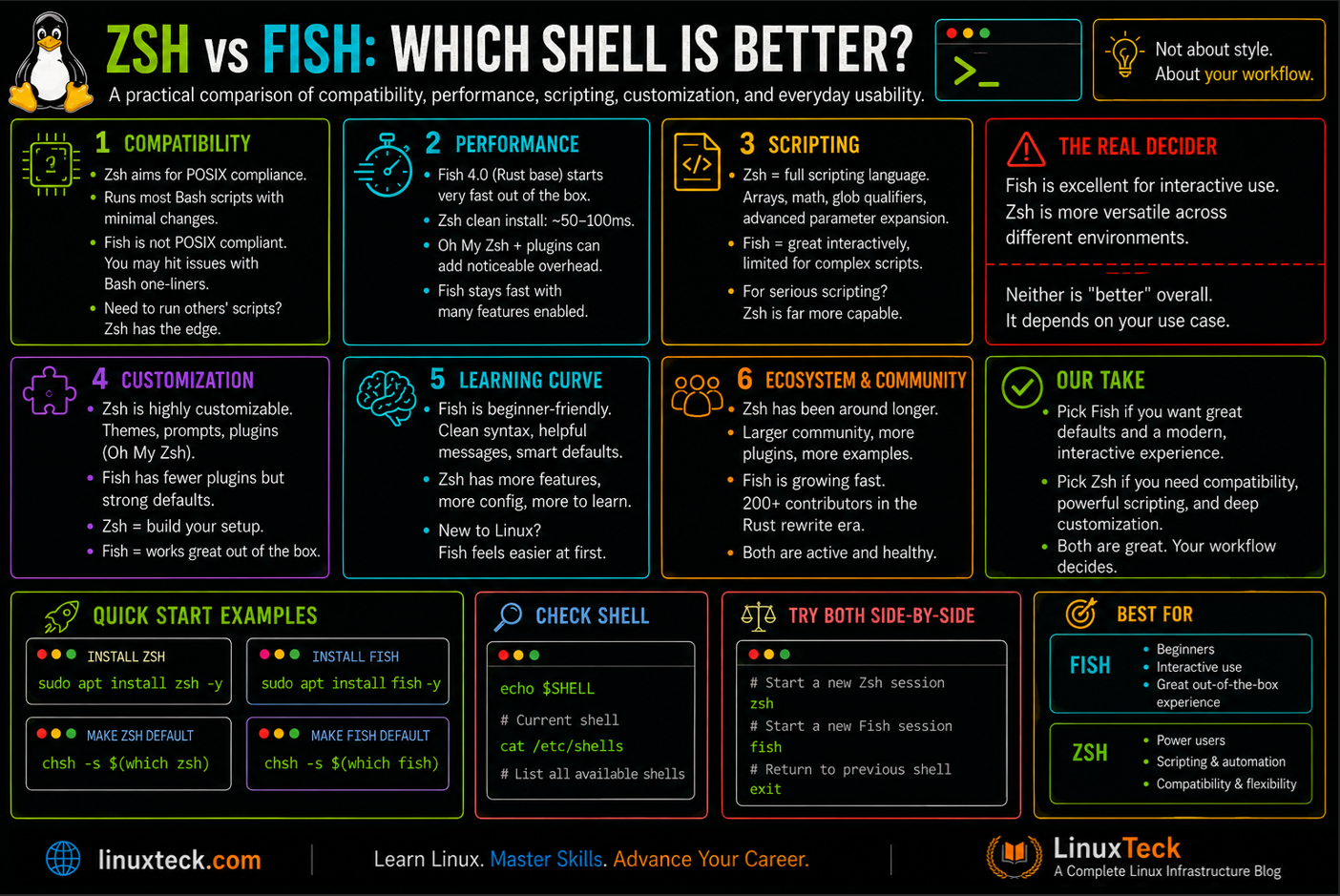
Zsh and Fish are two popular alternatives to Bash for interactive terminal use, but they take different approaches. Zsh focuses on flexibility and customization, while Fish emphasizes a polished experience with useful features built in.
Our LinuxTeck community discussion showed a similar split: some prefer Fish for its simplicity, others choose Zsh for compatibility and customization, while many still stick with Bash because it is familiar and widely available. :contentReference[oaicite:0]{index=0}
So which shell should you actually use? In this comparison, we look at compatibility, performance, scripting, customization, and everyday usability to see where Zsh and Fish each make the most sense.
Why This Debate Exists
The Zsh vs Fish argument resurfaced hard after Fish shipped version 4.0 on February 27, 2025, its first release with zero C++ in the codebase. The maintainers spent roughly two years porting 57,000 lines of C++ into about 75,000 lines of Rust, and by the time 4.0 went stable the project had picked up over 200 contributors during the rewrite window, according to the team's own rewrite retrospective. That is a real signal of project health, not a marketing line, and it changed how people talk about Fish's long-term viability.
Zsh has not faced the same pressure to prove its long-term viability, mainly because it already has something Fish does not: default-install status on every Mac sold since Catalina in 2019. That adoption did not happen for technical reasons. Apple moved away from Bash specifically to avoid GPLv3 licensing, and Zsh was the shell they picked as the replacement, as Apple's own support documentation confirms is still the default today. That single decision put Zsh in front of every developer who bought a Mac for the past several years, and it is the biggest reason Zsh still dominates dotfiles repos on GitHub regardless of which shell is technically "better."
So you have one shell riding a decade of default-install momentum and one shell that just proved it can survive a ground-up rewrite without losing its user base. That is the actual context behind every "which shell" thread you will find in 2026, not just a stylistic preference.
What Most People Say (and Why It Is Incomplete)
The most common take is "Fish for beginners, Zsh for power users." It is not wrong exactly, but it skips the part that actually matters for anyone running Linux day to day: what you are going to run the shell for. Fish's out-of-the-box autosuggestions and syntax highlighting genuinely do make it more approachable, and its config language is more readable than Zsh's. What that framing misses is that Fish is not POSIX compliant by design, and if your daily work involves reading other people's Bash one-liners or pasting snippets from documentation, you will hit friction Zsh users never see.
The counter-argument, "Zsh has Oh My Zsh so it does everything Fish does," is also half true. Oh My Zsh can replicate most of Fish's interactive features through plugins like zsh-autosuggestions and zsh-syntax-highlighting, but you are assembling that experience yourself, plugin by plugin, and every plugin you add is another thing that can slow down your shell or conflict with another one.
Common View:
Fish is for people who want good defaults immediately. Zsh is for people who want full control and are willing to configure it.
What the Data Actually Shows
Startup speed is where most of the internet argument lives, and it is also the most misreported number in this comparison. Zsh startup time is highly configuration-dependent: plugins, completion initialization, version managers, themes, and other startup hooks can add significant overhead, so any single number below is a benchmark result tied to a specific setup, not a universal figure for "Zsh" as a whole. A vanilla Zsh install with no framework starts in roughly 50 to 100 milliseconds, which is close to Bash. The slowdown people complain about almost never comes from Zsh itself. It comes from a heavy Oh My Zsh config with synchronous plugin loading, an uncached compinit call, or a version manager like nvm getting sourced on every single shell launch.
| Metric | Finding | Source | Year |
|---|---|---|---|
| Bare Zsh startup | 50-100ms, no framework | romkatv/zsh-bench community benchmark | 2026 |
| Plugin-heavy Oh My Zsh | 500-1,000ms with git, docker, kubectl plugins loaded synchronously | Independent shell benchmark testing, cross-referenced with zprof profiling writeups | 2025-2026 |
| Zinit-optimized Zsh | 100-200ms with turbo mode deferred loading | romkatv/zsh-bench, community reproductions | 2026 |
| Fish 4.0 rewrite scope | 57k lines C++ ported to ~75k lines Rust, 200+ contributors during the effort | Fish Shell official blog, "Fish 4.0: The Fish of Theseus" | 2025 |
The Fish team has been unusually honest about their own rewrite's limits, and this matters because it counters a lot of hype you will see repeated in forum threads. In their own post-mortem, the developers stated plainly that execution time is only slightly better after the Rust port, and memory usage actually has a marginally higher floor at rest. The real win from the rewrite is maintainability. The old C++ codebase had a shrinking pool of contributors, and the Rust version has already attracted far more pull requests since the port finished.
What This Means for Practitioners:
If your Zsh feels slow, the fix is almost never switching shells. It is auditing your .zshrc with zmodload zsh/zprof and cutting whatever plugin is eating the time, the same way you would profile any other slow process on Linux. Fish's speed reputation is about consistency out of the box, not raw benchmark numbers against a well-tuned Zsh setup.
Community Perspective
Here is what practitioners are actually saying once you get past the surface-level "which is better" threads. LinuxTeck ran an informal poll on this exact question in its own community, and the pattern that came back matched what shows up across the wider Linux forums: a large share of respondents have not moved off Bash at all, citing decades of muscle memory and the simple fact that it is guaranteed to be available on any machine they touch. Among people who had switched to something else, Zsh paired with Oh My Zsh was the most common setup by a wide margin, usually layered with fzf and a handful of plugins.
Fish users in that same poll were consistently positive about the day-one experience, but the same specific friction point kept resurfacing: tools that assume Bash. Several respondents described building custom wrapper functions just to get Node Version Manager working under Fish, since nvm's setup script expects Bash or Zsh syntax. Others pointed out that heredoc syntax, a common pattern in shell scripts and something AI coding tools frequently generate, does not work the same way in Fish, which caused enough friction that a few people reported falling back toward Zsh specifically because their tooling assumed Bash-compatible defaults.
The most consistent real-world split in the poll was not Zsh versus Fish at all, it was work versus personal. Multiple respondents described running Fish or a heavily customized Zsh setup on their own machine while standardizing on plain Bash at their job, specifically because company scripts and CI systems were written assuming Bash was the shell running them. That lines up with the dual-shell pattern discussed earlier in this article: it is not a theoretical compromise, it is what a meaningful share of working engineers are already doing.
Common Misconception:
A lot of newer Fish users assume the Rust rewrite fixed POSIX compatibility. It did not, and it was never meant to. Fish is still not POSIX compliant by design, so tool installers that pipe a Bash script into your shell, and CI systems that assume sh-style syntax, will still break under Fish without a compatibility shim. It is also worth noting that major distribution documentation, including the Arch and Gentoo wikis, explicitly warns against setting Fish as root's login shell for exactly this reason, since system tooling on most distributions still assumes a POSIX-compatible shell is running.
Operational Realities and Field Lessons
Across production environments running Rocky Linux, RHEL, or Ubuntu, the most common operational failure with Fish is not the shell itself, it is syntax bleed. A local interactive shell choice becomes an incident when non-POSIX constructs, like Fish's native loop or conditional syntax, accidentally get copied into shared automation hooks, breaking CI/CD pipelines or server deployment scripts.
The practical takeaway for infrastructure teams is simple: run whatever interactive shell boosts your personal productivity locally, but write every repository script, Ansible playbook, and server-side automation path in Bash or sh, since those are what portable, POSIX-oriented tooling actually expects.
Where I Agree
Fish really is friendlier for a first-time terminal user. The default config gives you syntax highlighting and history-based autosuggestions with zero setup, and that is a legitimate win for onboarding new engineers who have never lived in a terminal before.
Zsh's plugin ecosystem is genuinely larger, and that is not just a numbers game. Completions for tools like kubectl, helm, and aws, the kind you lean on daily once you start building out real DevOps and networking skills, are frequently hand-tuned in the Zsh ecosystem, while Fish tends to auto-generate completions from man pages, which is convenient but noticeably less precise for complex CLIs.
The Rust rewrite genuinely was a milestone. A project surviving a full language migration without fragmenting its user base or stalling releases is rare, and it is a fair reason to trust Fish's long-term maintenance story more than you might have two years ago.
Zsh being slow by default in a lot of real-world configs is also a fair criticism. The tooling to fix it exists, but most people never touch zprof and just live with the lag.
To Be Fair:
Fish's usability advantage on day one is real, and Zsh's default experience is genuinely rougher unless you invest time in it.
Where I Disagree (and Why)
The claim that Fish is meaningfully faster than Zsh does not hold up against current benchmarks. A well-configured Zsh setup using zinit, or zsh4humans while it was still under active development, lands in the same 50 to 200 millisecond range as Fish. The speed complaint is really a complaint about default Oh My Zsh configs, not about Zsh as a shell.
I also disagree with treating POSIX incompatibility as a minor footnote. It is the single biggest practical cost of choosing Fish, and it does not go away with better tooling. Every install script that says "paste this into your terminal," every CI runner that defaults to sh, and every coworker's Bash snippet is a small tax you pay every time you are on Fish, and you either maintain a Bash fallback or translate syntax manually.
The idea that Zsh's ecosystem size is purely an advantage is also incomplete. A larger plugin ecosystem means more abandoned plugins, more version conflicts, and more surface area for the exact startup slowdowns that give Zsh its bad reputation. Fish's smaller, more curated plugin set avoids a lot of that mess by design.
Finally, I think the "just switch entirely" framing that dominates most comparison posts is wrong for anyone doing serious infrastructure work. The dual-shell pattern, Fish for interactivity and Bash or Zsh for anything scripted, is underrepresented in most coverage of this topic, and it solves the actual problem better than picking a single winner.
Dangerous Assumption:
Assuming your Fish daily driver setup will "just work" the day you need to run an inherited Bash deployment script under pressure. Test that path before you need it, not during an incident.
Practical Recommendation by Audience
Solo Developer / Hobbyist
Go with Fish. You get a good experience with almost no setup, and you are unlikely to be pasting inherited Bash scripts into production every day. Watch out for tutorials that assume Bash syntax, since you will need to translate the occasional snippet.
Small Team / Startup
Zsh is the safer shared default, mainly because it is macOS's out-of-the-box shell and keeps onboarding friction low across mixed hardware. If your team is small enough that everyone can agree on Fish and nobody minds the occasional syntax translation, it is a fine choice too. What to watch out for is dotfiles drift once the team grows past a handful of people.
Enterprise Sysadmin / SRE
Use Bash or sh for production automation and portable scripts, since those are what CI runners, config management tools, and inherited scripts on systems you do not fully control actually expect. Zsh or Bash both work fine as your interactive login shell depending on the environment and team standards, but Fish's non-POSIX design makes it a liability if it ends up running your automation by accident. If you want Fish's interactive features, run it on your workstation and keep your scripting strictly in Bash or sh.
Migration Scenario (Zsh to Fish or Fish to Zsh)
Do not migrate cold. Run the new shell as your interactive login shell for two to three weeks while keeping your old one available, and specifically test any install scripts, CI hooks, or SSH automation you rely on, using the same checklist mindset as our Linux system administration guide. Most migration regret comes from discovering compatibility gaps mid-task rather than during a calm evaluation period.
| Feature / Scenario | Zsh | Fish | LinuxTeck Verdict |
|---|---|---|---|
| Default startup speed | 50-100ms bare, slower with Oh My Zsh unless tuned | Consistently fast out of the box | Tie once Zsh is tuned |
| POSIX compatibility | Not POSIX-compliant by default; can emulate POSIX shell behavior | Not POSIX-compliant by design | Neither |
| Out-of-the-box experience | Requires a framework or plugins | Syntax highlighting and autosuggestions built in | Fish wins |
| Plugin and completion ecosystem | Larger, hand-tuned completions for major DevOps tools | Smaller, auto-generated completions from man pages | Zsh wins |
| macOS default | Yes, since Catalina in 2019 | No, manual install required | Zsh wins |
If you are testing either shell setup on a fresh box before committing on your main machine, spinning up a cheap VPS is the least risky way to break things without consequences. We put DigitalOcean through its paces here, and its snapshot feature in particular makes it trivial to roll back a droplet before you touch your dotfiles, which is worth doing before any shell migration.
One-Line Verdict Per Audience:
Solo devs: Fish. Small teams: Zsh by default, Fish if everyone agrees. Enterprise and SRE: Zsh or Bash only. Migrations: run both in parallel first.
Zsh vs Fish — FAQ
Is Fish shell POSIX compliant?
No, and this is by design, not an oversight. Fish uses its own scripting syntax and does not follow POSIX shell conventions, which means Bash-specific constructs like [[ ]] conditionals or $() command substitution written for Bash may need adjustment. If you rely heavily on Bash conditional syntax day to day, factor that translation cost into your decision.
Is Zsh faster than Fish in 2026?
Neither shell has a decisive speed edge once Zsh is configured properly. A bare Zsh install starts in roughly 50-100ms, and with a tool like zinit's turbo mode it stays in the 100-200ms range even with plugins loaded. Fish's advantage is consistency without any tuning effort, not a raw speed win.
Can I use Fish for shell scripts?
You can, but most practitioners do not recommend it for anything meant to run outside your own machine. Fish scripts are not portable to systems expecting sh or Bash, so production automation, CI pipelines, and anything you might hand off to a colleague are safer written in Bash. See our guide to Bash scripting fundamentals if you are keeping scripts portable.
Why is Oh My Zsh so much slower than Fish?
It usually is not the framework itself, it is unoptimized defaults. Auto-update checks, uncached compinit calls, and synchronously-loaded version managers like nvm are the most common culprits. Profiling with zmodload zsh/zprof at the top of your .zshrc and zprof at the bottom will show you exactly which line is costing you time.
What changed in Fish 4.0?
Fish 4.0, released February 27, 2025, replaced the entire C++ codebase with Rust after roughly two years of gradual porting work. Functionally the shell behaves almost identically for end users, but it brought a new keybinding notation, better terminal integration through OSC 133 sequences, and a more sustainable contributor pipeline going forward.
Should I switch from Bash to Zsh or Fish?
Keep Bash for scripting regardless of which interactive shell you pick, since it remains the closest thing to a universal standard across servers and containers. For your interactive daily driver, Zsh is the safer default if you are on a Mac or need broad plugin support, while Fish suits anyone who wants a modern feel without any setup. Our Bash scripting overview covers why it still matters even if you switch your daily shell.
Does switching shells break my SSH workflow?
Not if you configure it correctly, but it is worth testing before you rely on it under pressure. Your local interactive shell choice does not affect what runs on a remote server unless you explicitly change the remote user's shell. Review our passwordless SSH setup guide and our SSH troubleshooting guide before assuming everything just works.
Can I run Fish and Zsh at the same time?
Yes, and a growing number of practitioners do exactly this. Run Fish as your interactive login shell for daily typing, and keep a Zsh or Bash environment available for scripts, automation, and anything that needs strict compatibility. Tools like chsh let you set your default shell, while scripts can still declare #!/bin/bash at the top regardless of what you type commands in day to day.
Can I set Fish as root's login shell?
It is not recommended. Major distribution documentation, including the Arch and Gentoo wikis, explicitly advises against using it as root's shell, since system maintenance tools and package manager hooks across most distributions assume a POSIX-compatible shell is running. Keep root on Bash or Zsh even if your regular user account runs Fish, and see our sudo configuration guide if you are deciding how to structure privileged access instead.
Does Fish support heredoc syntax?
Not the same way Bash does, and this trips people up more often now that AI coding assistants frequently generate <<EOF heredoc blocks by default. Fish does not support Bash-style heredocs, so scripts or snippets that rely on them need to be rewritten in Fish's own syntax or executed with Bash instead: run them through bash script.sh explicitly, or add a #!/bin/bash shebang and execute the file directly rather than sourcing it into your interactive shell.
Final Verdict: Zsh for Flexibility, Fish for Comfort
My confidence level on this one is high. If your priority is a familiar, highly customizable interactive shell with a mature ecosystem, Zsh is the safer choice. If you want a polished terminal experience with minimal configuration, Fish is hard to beat. For portable scripts and automation, keep using Bash or sh regardless of which interactive shell you choose, that division of labor is what actually holds up in production.
Over the next 12 to 18 months, expect Fish's Rust foundation to keep paying off in contributor velocity and faster feature turnaround, while Zsh's ecosystem keeps solving its own speed complaints through better plugin managers rather than any change to the shell's core. Neither project looks likely to lose relevance, and the dual-shell pattern is likely to become more common as more people realize they do not have to pick just one.
If you are undecided, the one concrete action worth taking today is running zmodload zsh/zprof in your current .zshrc before you blame the shell for a slow terminal. Fix what is actually broken first, then decide if you still want to switch. And if your scripting fundamentals are shaky either way, our Bash scripting guide and conditional statements guide are the right place to shore that up before you touch either shell's config.
What To Read Next:
If you are leaning Zsh and want it running fast and clean from day one, start with our Bash scripting fundamentals guide and our Bash quoting rules guide, since a solid Bash foundation makes Zsh configuration much easier to reason about.
If you are testing a shell migration and want to isolate the risk, our shell scripting environment setup guide walks through building an isolated environment before you touch your main machine.
If your terminal habits go beyond just the shell prompt, check our terminal tricks to work faster and our piece on why the terminal makes you a better engineer.
If you are automating anything beyond interactive use, our guide to systemd timers versus cron is a natural next step once your shell setup is stable.
LinuxTeck - A Complete Linux Infrastructure Blog
LinuxTeck covers everything from beginner Linux commands to advanced Linux system administration and DevOps career guidance, written by practitioners for professionals working on Ubuntu, Rocky Linux, RHEL, and enterprise Linux environments every day.
Support My Work
Thank you for reading and for being part of this journey. If this article saved you time, consider buying me a coffee. Every contribution helps me keep producing in-depth, practical Linux content for readers like you.

Thank you for your endless support