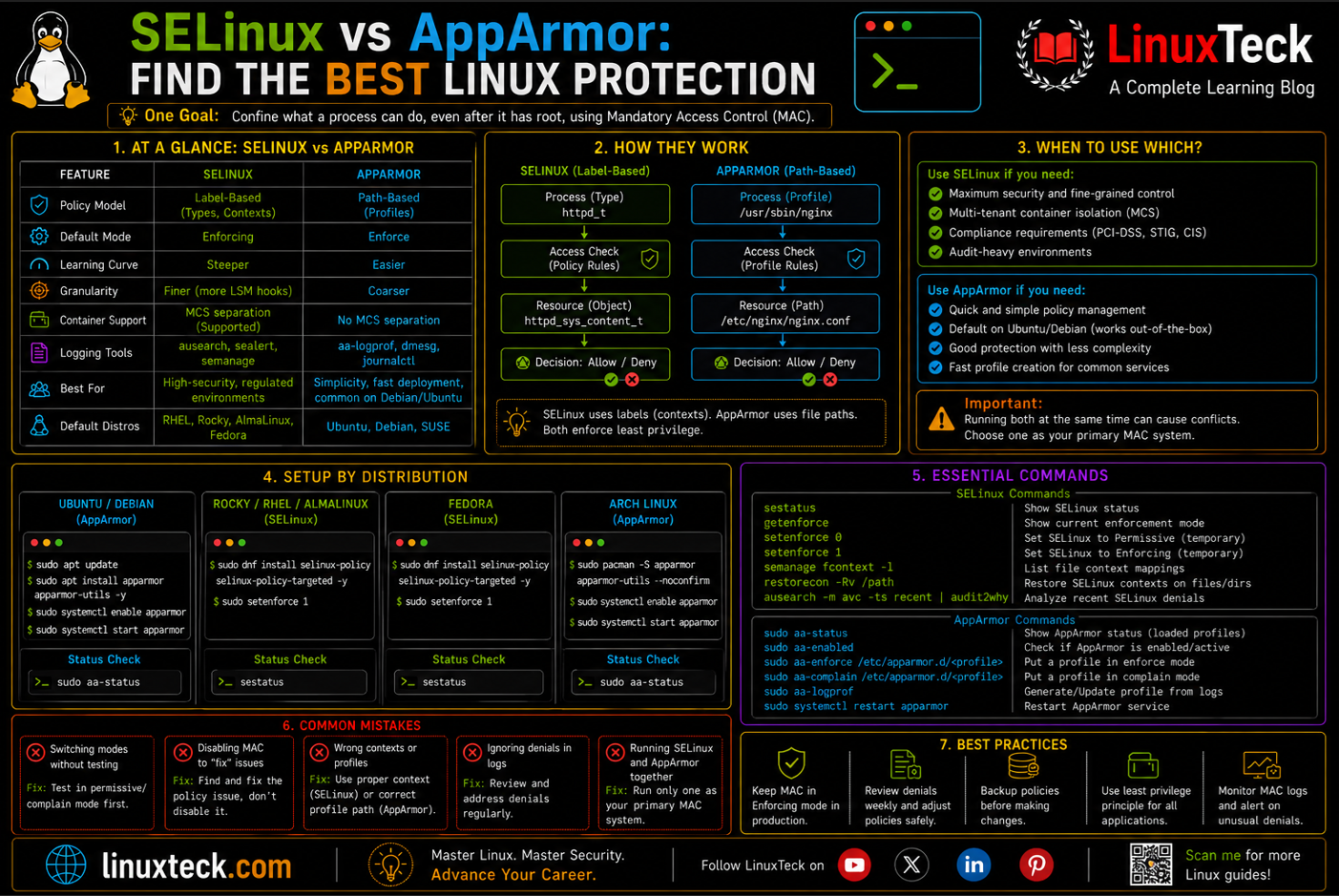
Linux provides several security mechanisms to control what applications, services, and users are allowed to do. Two of the most widely used mandatory access control systems are SELinux and AppArmor.
Both can strengthen Linux security by restricting unauthorized access, but they use different approaches and are commonly associated with different Linux distributions. Understanding how SELinux and AppArmor work, where they differ, and when to use each one can help you choose the right security model for your server or application.
| Metric | Value | Source | Relevance |
|---|---|---|---|
| LSM hooks covered | 217 (SELinux) vs 80 (AppArmor) | apparmor.net, Linux v6.19 | Shows mediation depth gap between the two frameworks |
| Default distro split | RHEL/Rocky/Fedora = SELinux, Ubuntu/Debian/SUSE = AppArmor | TechTarget | Tells you which one you already have running today |
| Container isolation model | SELinux supports MCS separation, AppArmor does not | Red Hat blog | Matters directly for multi-tenant Docker or Podman hosts |
| Rule model | Label based vs path based | FDC Servers | Drives how you write, test, and debug policy |
What This Guide Covers:
- How SELinux labels and AppArmor paths actually differ under the hood
- A side by side comparison you can use to justify a decision to a team lead
- Setup steps across Ubuntu, Rocky/RHEL/AlmaLinux, Fedora, and Arch
- Six real production failures and the exact fix for each
- A validation script that tells you PASS or FAIL, not "looks fine"
- A monitoring cadence you can hand to a junior sysadmin without babysitting it
Both frameworks do the same job on paper. They confine what a process can touch even after it has root, using Mandatory Access Control instead of the discretionary permissions you already know from chmod. Where they split is enforcement model, tooling maturity, and how forgiving they are when you get a rule wrong.
This guide treats both as production tools, not as an academic comparison. Expect real commands, real failure modes, and an honest answer on which one to run depending on what distro you're already standing on.
SELinux vs AppArmor: Side by Side
Use this table the way you'd use it in an architecture review. If you're inheriting a fleet that's already Ubuntu or already RHEL, most of this decision has already been made for you. This is mainly useful for greenfield builds or when you're deciding whether to fight the default.
| Category | SELinux | AppArmor | Winner | Notes |
|---|---|---|---|---|
| Policy model | Label based, type enforcement | Path based profiles | SELinux | Labels survive file renames, paths do not |
| Learning curve | Steep, real learning investment | Readable profiles, easier to reason about | AppArmor | A junior engineer can read an AppArmor profile in minutes |
| Container isolation | MCS separates containers by default | No container to container separation | SELinux | Big deal for multi-tenant Kubernetes nodes |
| Debugging tooling | audit2allow, sealert, setroubleshoot | aa-genprof, aa-logprof | Tie | Both are workable once you know the workflow |
| Runtime overhead | Slightly higher on label heavy workloads | Lower, fewer LSM hook crossings | AppArmor | Difference is small on modern hardware, still measurable at scale |
Tip:
Don't fight the distro default unless you have a specific reason. Running SELinux on Ubuntu or AppArmor on RHEL means you lose vendor tested policies and inherit a maintenance burden nobody on your team signed up for.
Environment and Prerequisites
| # | Environment / Distro | Type |
|---|---|---|
| 1 | Ubuntu 24.04 / 26.04 LTS | AppArmor default |
| 2 | Rocky Linux 9 / 10, RHEL 9 / 10, AlmaLinux 9 / 10 | SELinux default |
| 3 | Fedora 44 | SELinux default, enforcing out of the box |
| 4 | Arch Linux | Neither installed by default, manual setup required |
| 5 | Root or sudo access | Required for all steps below |
| Requirement | Details | Status |
|---|---|---|
| Kernel with LSM support | Ships enabled on every mainstream distro for well over a decade | REQUIRED |
| policycoreutils-python-utils / apparmor-utils | Provides semanage, audit2allow, aa-genprof, aa-logprof | REQUIRED |
| auditd | Needed to capture AVC denials for review | OPTIONAL |
| Staging environment | Test enforcing mode before touching production | REQUIRED |
Warning:
Never flip a production node straight from disabled to enforcing without a staging test first. A single missing rule for a background cron job or a mail relay can silently break a workflow nobody checks until end of month.
If you're building this on a bare VPS rather than a managed platform, pair this with our server hardening checklist before you go further, and confirm sudo access is scoped correctly using our sudo configuration guide.
Architecture Overview
Both frameworks sit at the same layer of the kernel, they just answer a different question when a process asks for access.
MAC ENFORCEMENT PATH

  USER SPACE PROCESS
        |
        v
  +----------------------------+
  |   SYSTEM CALL (open/exec)  |
  +----------------------------+
        |
        v
  +----------------------------+
  |   LSM HOOK IN KERNEL       |
  +----------------------------+
        |
   -----+-----
   |         |
   v         v
 SELinux   AppArmor
 label:    path:
 checks    matches
 context   profile
   |         |
   v         v
 ALLOW / DENY -> logged to audit.log or dmesg

  key ports/paths referenced by policy:
  /etc/selinux/config   /etc/apparmor.d/
  semanage port -l      aa-status
Engineer note:
Both systems only mediate what the kernel already intercepts. If a process talks directly to hardware through a path neither framework watches, MAC will not save you. This is why MAC always sits alongside firewalling and patching, never in place of them.
Step-by-Step Setup
Step 1 - Check What You're Already Running
Don't assume. Confirm which framework is active before you change anything.
Ubuntu 24.04 / 26.04 LTS
Rocky Linux 9 / 10 - RHEL 9 / 10 - AlmaLinux 9 / 10
Step 2 - Install the Toolchain on Arch
Arch ships with neither framework by default, so this is the one distro where you're building from zero.
Arch Linux
Installing the package is not enough on Arch's default kernel. AppArmor has to be listed as an active LSM at boot, so add it to the kernel command line and rebuild GRUB before it will actually mediate anything.
Arch Linux
Step 3 - Put SELinux in Permissive Before Enforcing
On Rocky, RHEL, and Fedora, permissive mode logs denials without blocking them, giving you a safe window to catch surprises.
Rocky Linux 9 / 10 - RHEL 9 / 10 - Fedora 44
Warning:
SELINUX=disabled, moving to permissive or enforcing needs a full filesystem relabel first. Run sudo touch /.autorelabel and reboot before you touch anything else, or services can fail to start on the next boot. Also worth knowing: upstream is in the process of deprecating runtime SELinux disable through /etc/selinux/config entirely, so on newer kernels the supported way to fully disable it going forward is the selinux=0 GRUB kernel parameter, not the config file.Step 4 - Build and Load a Real Profile
On Ubuntu, aa-genprof watches an application and builds a profile from its actual behavior instead of you writing rules blind.
Ubuntu 24.04 / 26.04 LTS
Step 5 - Set the SELinux Context on Custom Paths
Moving a web root outside the standard path is the number one cause of unexplained 403s on RHEL family systems.
Rocky Linux 9 / 10 - RHEL 9 / 10 - AlmaLinux 9 / 10
Production Pitfalls and Fixes
Silent Permissive Mode on RHEL Family Servers
Environment: Rocky Linux 9, RHEL 9, AlmaLinux 9, discovered during a compliance audit.
Failure pattern: Someone runs setenforce 0 during a deploy to unblock a stuck task and never flips it back. It survives for months because getenforce is rarely checked outside of an audit.
AppArmor Profile in Complain Mode Forever
Environment: Ubuntu 24.04 LTS, Docker host running a custom API service.
Failure pattern: A profile gets left in complain mode during initial testing and nobody promotes it to enforce, so the protection provides zero blocking, only logging that nobody reads.
Wrong SELinux Port Label Blocks a Custom Listener
Environment: RHEL 9, application team moved a web service from port 80 to 8088.
Failure pattern: The firewall opens fine, the service starts fine, but SELinux blocks the bind because port 8088 was never associated with http_port_t. The service crashes with a permission denied that looks like a code bug.
Container Escape Risk From a Missing AppArmor Profile
Environment: Ubuntu 24.04, Docker 26, multi-tenant CI runner.
Failure pattern: Docker's default AppArmor profile is broad by design and does not separate containers from each other the way SELinux MCS does. A compromised build job on one tenant's container had a much wider blast radius than the team expected.
Backup Script Silently Fails Under SELinux
Environment: AlmaLinux 9, nightly cron backup writing to a mounted NFS share.
Failure pattern: Cron exits with status 0 even though the copy fails partway through, because the AVC denial happens mid write and the script does not check for it. Nobody noticed until a restore test failed.
Overly Broad Custom Policy Defeats the Purpose
Environment: Any distro, junior engineer under deadline pressure.
Failure pattern: Instead of fixing the specific rule that's blocking an app, someone runs audit2allow -a -M mypol against a huge denial log and installs a policy that grants far more than the app needs.
Post-Action Validation Script
Run this after any change to either framework. It checks status, mode, and recent denials in one pass instead of you jumping between five commands.
Usage:
Save this as mac-check.sh, wire it into your post-deploy hook, and fail the pipeline on a FAIL result instead of catching it during a manual audit weeks later.
The AppArmor branch now checks actual enforced profile counts with aa-status --json, so a profile stuck in complain mode won't slip through as a false PASS. This requires jq to be installed on the host running the check.
Final Verdict and Best Practices
If you're already on RHEL, Rocky, AlmaLinux, or Fedora, stay on SELinux. The container isolation and audit depth are worth the steeper learning curve, especially once compliance is part of the conversation. If you're on Ubuntu, Debian, or SUSE, AppArmor is the right default and fighting it rarely pays off.
A short list of habits that separate teams that get burned from teams that don't: never leave a box in permissive or complain mode past a staging test, scope every custom policy to the exact denial instead of the whole log, and run the validation script from Section 07 as part of your normal deploy pipeline instead of as a one-off audit task.
If you'd rather not own this layer yourself, that's a legitimate call too. Managed platforms often ship a hardened MAC baseline out of the box, which is worth weighing against the setup time above. Our Cloudways review breaks down what comes pre-hardened on a managed stack versus what you'd still need to configure yourself on a bare VPS.
Security and Compliance
CIS Benchmark Aligned
PCI DSS Relevant
SOC 2 Control Support
Rocky Linux 9 / 10 - RHEL 9 / 10
Ubuntu 24.04 / 26.04 LTS
Compliance Auditing Note:
For CIS Benchmark or SOC 2 reporting, forward these AVC and AppArmor denial events straight to your centralized log collector or SIEM. A clean 30 day window with zero unexplained denials is typically the bar external auditors expect to see.
Whichever framework you're running, tie the denial log into whatever you already use for alerting. If you haven't picked a stack for that yet, our roundup of Linux monitoring tools and the broader Linux security tools list are a good starting point. It's also worth checking your policy against current attack patterns in our Linux security threats overview. For the official kernel side of this, the semanage man page covers every option this guide touched on.
Monitoring and Maintenance Checklist
Neither framework is set and forget. Denials pile up quietly, and policy drift is real once more than one person touches the box.
On Alert:
- Check
getenforceoraa-statusthe moment an app throws an unexplained permission error - Pull the last hour of AVC or AppArmor denials before assuming it's a code bug
Weekly:
- Review
/var/log/audit/audit.logor the AppArmor journal for new denial patterns - Confirm no profile was left in complain mode after a deploy
Monthly:
- Diff current policy against the last known good baseline
- Run the validation script from Section 07 across the whole fleet, not just one host
Quarterly:
- Re-run the full audit checklist against your compliance framework
- Revisit any custom policy written under deadline pressure and tighten scope where possible
- Re-evaluate custom policy modules against major OS releases and distribution updates
- Audit custom port bindings with
semanage port -land prune deprecated service entries
Questions I Get Asked About This All the Time
My app works fine until I put SELinux in enforcing mode. What's the fastest way to find out why?
sudo ausearch -m avc -ts recent right after the failure and look for the denied action. Nine times out of ten it's a context that never got labeled after a file move.Can I run AppArmor on RHEL or SELinux on Ubuntu?
Is it safe to just disable SELinux entirely when something breaks?
Why does my app work after a fresh install but break after I move the data directory?
mv across filesystems, or into a directory with a different default context, leaves the wrong label behind. Run restorecon -Rv on the new path.Does AppArmor protect Docker containers by default?
How do I know if a custom SELinux policy I installed is too permissive?
.te file from audit2allow line by line. If it grants access to types the app has no business touching, like shadow_t or unrelated log directories, scope it down manually before loading it.What is the actual performance cost of running either of these in production?
I inherited a server and don't know if MAC is even configured. Where do I start?
Conclusion
Neither framework is objectively better. SELinux gives you 217 LSM hooks of coverage and real container separation, which matters if you're running RHEL, Rocky, or Fedora and handling anything close to regulated data. AppArmor gives you a profile you can actually read in five minutes, which matters just as much when the person maintaining it isn't a security specialist.
The long-term trend is convergence, not divergence. AppArmor's maintainers have said publicly they're actively working to close the mediation coverage gap, and SELinux tooling keeps getting friendlier with each release. We wouldn't put a specific number on how fast that gap is closing, but the direction is clear enough that it shouldn't be the deciding factor in your choice today.
Where the tools are converging fastest is container tooling. Both frameworks now ship with better default Docker and Podman integration than they did even two years ago, and the gap in day to day usability for containerized workloads is smaller than the raw feature comparison suggests.
If you're standing up a new fleet, don't overthink it, stick with whatever your distro ships and get comfortable with its tooling before you consider switching. Pair this with our guide on RHEL vs Ubuntu Server if you're still choosing a base distro, our firewalld command reference to close the loop on network level hardening, and our broader Linux system administration guide if you're building this hardening work into a bigger playbook. Today's action item: run Step 0 from this guide on one production box and confirm you actually know what mode it's in.
This guide walked through how SELinux and AppArmor differ in architecture, setup, and real production failure modes across Ubuntu, Rocky Linux, RHEL, Fedora, and Arch.
LinuxTeck's Enterprise Linux category focuses on production-ready Linux skills including:
SELinux, AppArmor, Mandatory Access Control,
Linux hardening, container security, and compliance auditing.
Support My Work
Thank you for reading and for being part of this journey. If this article saved you time, consider buying me a coffee. Every contribution helps me keep producing in-depth, practical Linux content for readers like you.

Thank you for your endless support