
🛡️ TIERED UPTIME SLA (99.50–99.99%)
🖥️ SIGNUP & PRICING PAGE VERIFIED
🎧 SUPPORT CHANNELS VERIFIED
Verpex is a strong budget option if you choose the right product. We've been using Verpex for more than a year, giving us real-world experience with performance, migrations, and support. For this review, we also created a dedicated test environment and ran our own performance and load tests. Our experience has been strong overall, but renewal pricing and product-level differences are worth understanding before buying.
🌍 9 Data Centers
🛡️ 30-Day Refund (eligible hosting plans, excl. VPS/dedicated/domains)
♾️ Free, Uncapped Migrations
Best for: solo sites, small businesses, and agencies juggling several client migrations who want cPanel hosting with upfront renewal transparency.
EXPERT REVIEW
- ✓ 1+ year real-world Verpex experience
- ✓ Dedicated test environment
- ✓ Independent performance & load testing
Web Hosting$0.60/mo →
Reseller Hosting$14.74/mo →
VPS Hosting$9.99/mo →
Managed WordPress$19.50/mo →
Why Choose Verpex
- ✓ Solo sites and small businesses on a budget
- ✓ Agencies managing several client migrations
- ✓ Small WooCommerce or ecommerce stores
- ✓ Buyers who want a real refund window to test hosting
- ✕ You want low renewal prices after the promotional discount ends
- ✕ You need dedicated CPU/RAM rather than shared CloudLinux limits
- ✕ You require 24/7 phone support for custom setups
- ✕ You're testing VPS or dedicated tiers where refund coverage is limited
Most hosting reviews can tell you what a provider offers. The more useful question is what happens after you actually use it.
We've been using Verpex for more than a year, managing real websites and dealing with the things that matter after signup: performance, migrations, and support. For this review, we also built a dedicated test environment and ran our own performance and load tests.
The result? Verpex has been a strong budget option in our experience. Performance and support have been good, and migrations have been straightforward. The main things to watch are renewal pricing and choosing the right Verpex product for your requirements.
Our verdict: Yes, but choose the right plan for your workload.

Is Verpex Worth It in 2026?
Short answer: yes, for the right buyer.
Verpex is a low-cost host that doesn't hide the renewal price the way some budget hosts do, and in our own use it's performed reliably. It's attractive if you want cheap entry pricing without giving up NVMe storage, LiteSpeed, and uncapped free migrations, the kind of specs you'd normally expect to pay more for.
It benefits solo site owners, small businesses, and agencies managing several client sites most, since the pricing scales well and the migration policy has no cap. The main weakness is that the Shared/cPanel plans this review focuses on don't include one-click staging, that's a manual process here, and the uptime guarantee itself is tiered rather than flat across every plan.
If you need one-click staging as part of your regular workflow, guaranteed dedicated resources, or a refund option on VPS/dedicated tiers, you'll want to look at a different Verpex product or a different host entirely, both covered later in this review.
Our Experience With Verpex
Most hosting reviews come from a short trial account, tested for a few days and never touched again. Ours is different. LinuxTeck has used Verpex's reseller hosting for more than a year, alongside additional Verpex hosting accounts, to manage multiple websites, including client sites.
That means our view of Verpex comes from everyday operational work, not just a first impression: opening support tickets, using live chat, running migrations, working inside cPanel and WHM, and handling DNS, SSL, WordPress installs, and day-to-day resource management. We don't disclose client names or confidential account details here, but that real-world usage is what shapes the opinions in this review, not a single sandbox trial.
For this specific review, we also built a dedicated Verpex test environment (verpextest01.linuxteck.com) so we could run controlled performance and reliability checks separate from any live account. The sections below are organized so you can always tell what we tested ourselves, what we verified from Verpex directly, and what comes from independent or community sources.
How We Tested Verpex
Here's exactly what got checked, where the evidence for each claim comes from, and when.
ℹ Officially Verified
🌐 Independent / Community
Last Updated Aug 13, 2026
LinuxTeck tested directly:
- Performance and load behavior on our dedicated test environment (verpextest01.linuxteck.com)
- Day-to-day cPanel/WHM management across more than a year of real hosting use
- Live chat and support ticket interactions
- Migrations run on our own accounts
- The cPanel-based dashboard flow, since Verpex doesn't use a custom dashboard the way some managed hosts do
Officially verified against Verpex's own sources:
- Current pricing and renewal rates
- Plan limits (RAM/CPU/storage)
- Refund policy scope
- SLA and uptime guarantee terms
- Data center availability
- Backup policy
Independent / community evidence, not LinuxTeck's own testing:
- Third-party uptime monitoring
- Trustpilot rating and review sentiment (4.7/5 from 1,493 reviews, as displayed on Trustpilot at time of writing)
Verpex Performance
✓ LinuxTeck Tested
| Test Environment | |
|---|---|
| Test environment | verpextest01.linuxteck.com |
| CMS | WordPress |
| PHP version | 8 |
| Web server | LiteSpeed |
| Theme | Custom Theme |
| Plugins | 15 active plugins |
| Caching | NIL |
| CDN | NIL |
| Test location | Columbus, USA |
| Test date | 16 August 2026 |
We tested the same WordPress environment with Google PageSpeed Insights and GTmetrix, using the results below as separate indicators rather than treating any single score as the complete performance verdict. Actual performance can vary by Verpex plan, server location, website configuration, and workload, so your results may differ from those shown here.
Google PageSpeed Insights
We checked the test site with Google PageSpeed Insights on both mobile and desktop. The test returned 90/100 on mobile and 99/100 on desktop.

PageSpeed Insights, Mobile

PageSpeed Insights, Desktop
Tool: Google PageSpeed Insights · URL tested: verpextest01.linuxteck.com
GTmetrix Performance Grade
We also tested the same environment with GTmetrix, which returned an A performance grade. The report recorded 100% Performance, 98% Structure, 632 ms Largest Contentful Paint, 28 ms Total Blocking Time, and 0 Cumulative Layout Shift.
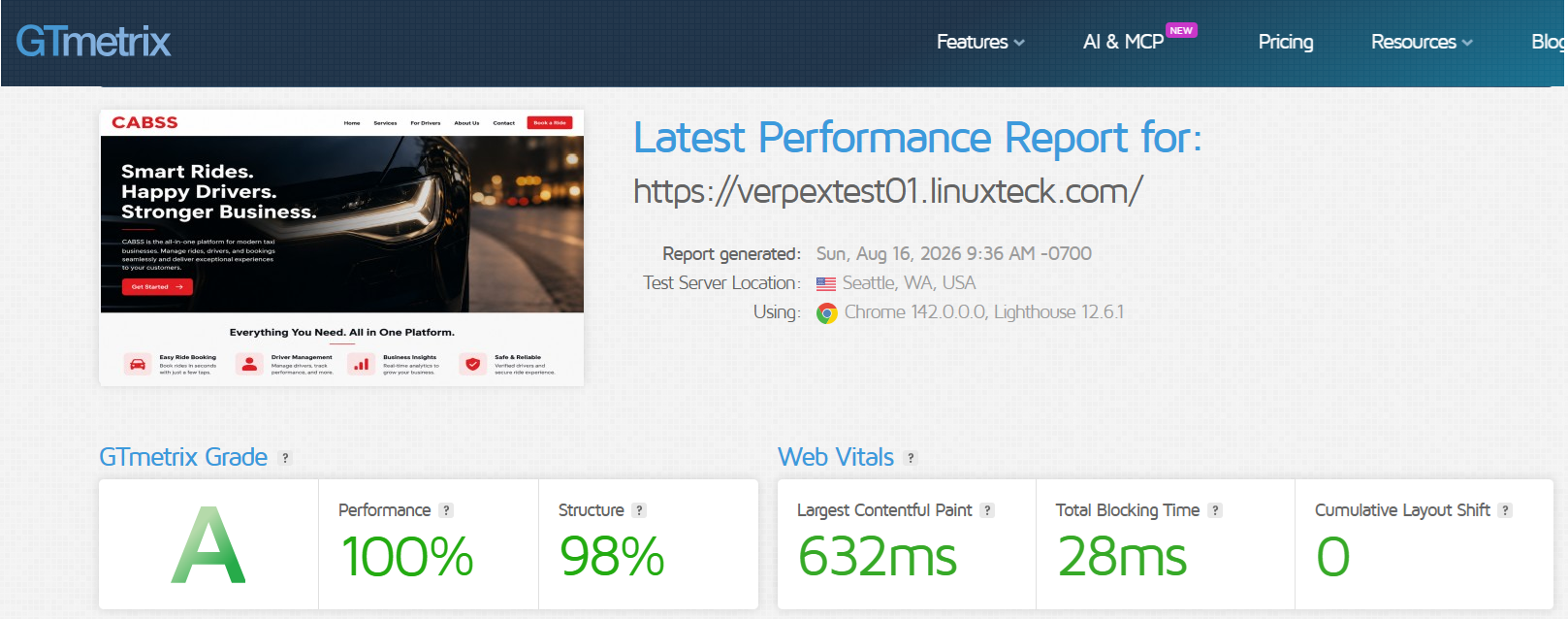
Tool: GTmetrix · URL tested: verpextest01.linuxteck.com
Our Take on Verpex Speed
These results are encouraging for this specific test environment. Desktop PageSpeed performance was particularly strong, and GTmetrix returned a full A grade with low Total Blocking Time and zero Cumulative Layout Shift, both good signs for how stable the page felt while loading. That said, this reflects one WordPress installation with one theme, one plugin set, and no caching or CDN layered on. Actual performance on a different site, theme, plugin combination, or hosting plan can vary.
Uptime and Reliability
ℹ Officially Verified 🌐 Independent / Community
Verpex SLA: Verpex's published guarantee is tiered, with Bronze carrying a 99.50% uptime guarantee and Silver and Gold carrying 99.99%. That's a contractual commitment, not a measurement of day-to-day availability, so we also look at independent monitoring.
LinuxTeck monitoring: We set up independent monitoring for a dedicated Verpex test environment and are tracking both uptime and response time. The results below show what our monitor recorded for this test environment.
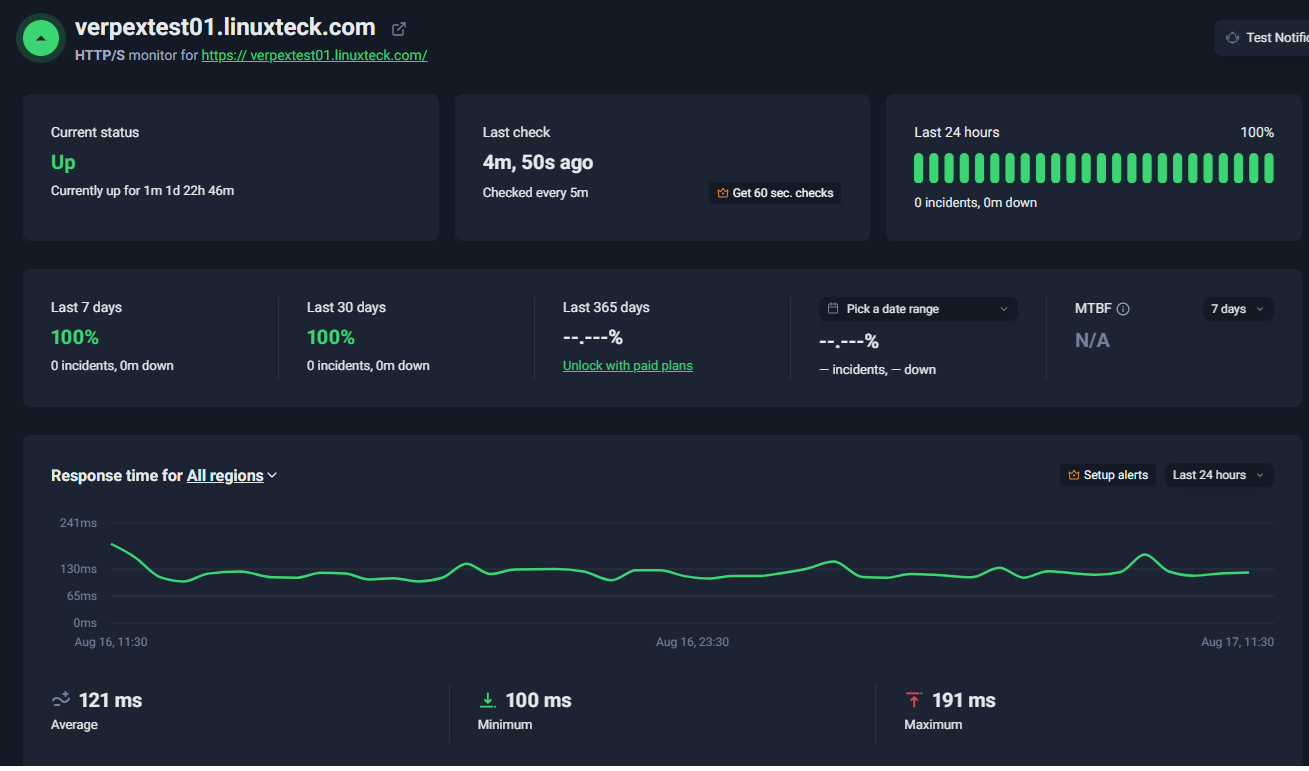
Independent uptime monitoring data for Verpex, captured Aug 13, 2026
Our monitoring result: The test environment recorded 100% uptime during the monitored period, with 0 incidents and 0 minutes of downtime. Average monitored response time was 121 ms, with a 100 ms minimum and 191 ms maximum.
Load Testing
50 Virtual Users, 33,430 Requests
✓ LinuxTeck Tested
PageSpeed and GTmetrix measure how fast a single page loads. To see how the environment holds up under concurrent traffic, we used k6 to simulate up to 50 virtual users accessing the WordPress test environment at the same time. The test ran for approximately 27 minutes against verpextest01.linuxteck.com, from Columbus, USA, on August 16, 2026.
Over that run, the environment handled 33,430 total requests with 0 HTTP failures, reaching a peak of 24.11 requests per second and a 135 ms P95 response time.
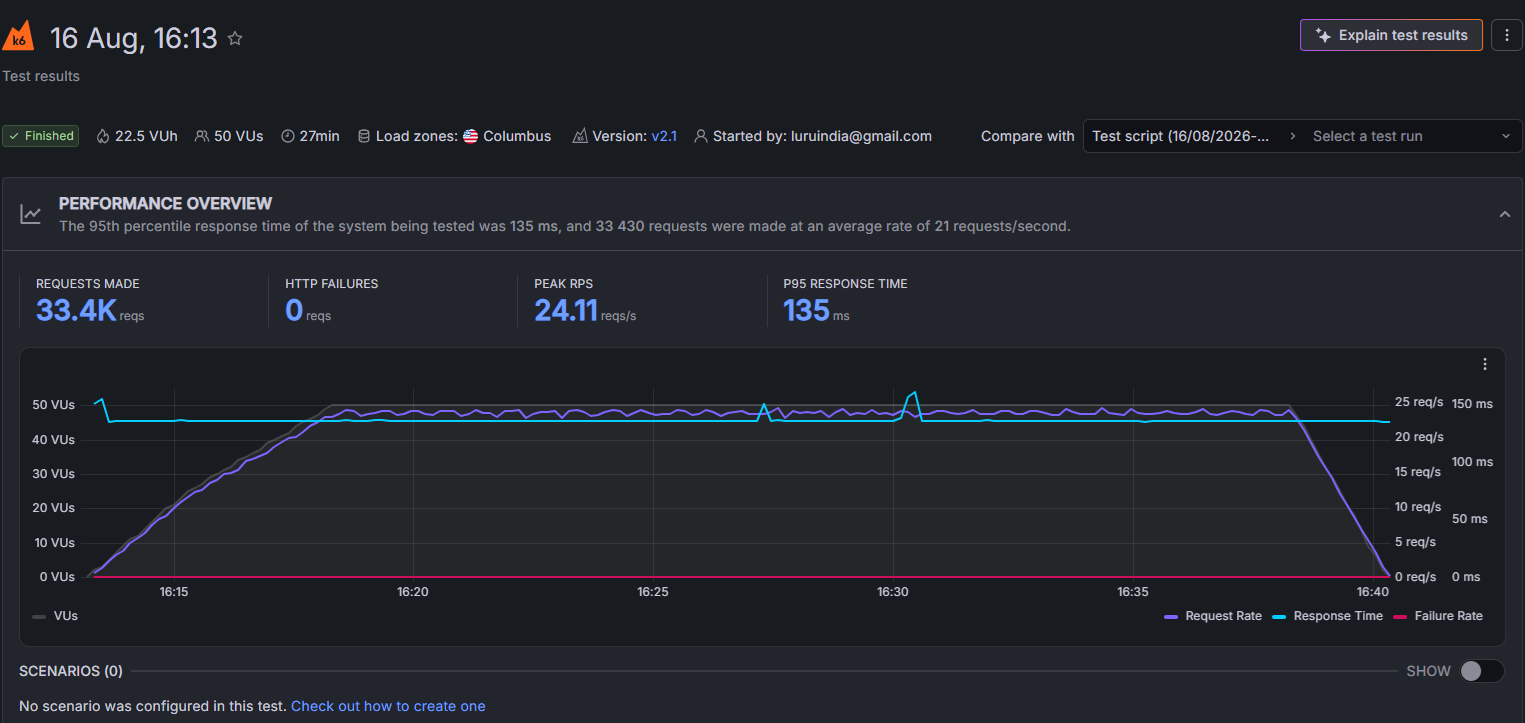
k6 load test result, verpextest01.linuxteck.com, August 16, 2026
What the Load Test Tells Us
0 HTTP failures means every request in this run completed successfully, none timed out or errored out. A 135 ms P95 means 95% of measured responses came back in 135 ms or less. The 24.11 req/s figure is the peak rate the environment sustained during the test, not an average. Put together, the environment stayed responsive through the full run while being exercised with up to 50 simulated concurrent users.
This is an encouraging result for this specific test environment on this specific day, but it's not a claim about every Verpex server, plan, WordPress site, or WooCommerce store, and it's not a guarantee for real-world traffic patterns like a sale event or a viral spike. It tells us how this environment behaved under this k6 workload, nothing more, nothing less.
What Verpex Is Like to Use
✓ LinuxTeck Tested
Setup
Sign-up follows the familiar cPanel hosting flow: choose a plan, select a billing term, complete payment, and access the account. WordPress can be installed through Softaculous, while cPanel handles the routine tasks most site owners need, including domains, DNS, email, SSL, files, and databases. For normal use, no command-line or SSH knowledge is required.
Daily Management
Day-to-day account management, DNS, SSL, email, files, databases, domains, and resource monitoring, all happens inside cPanel. We've used this interface on our own accounts for more than a year, and it's the part you'll actually be in most often after setup, so it's worth knowing it stays fairly self-contained: most routine changes don't require support tickets or leaving the panel.
Support
We have more than a year of real experience with Verpex support, across both live chat and support tickets, from managing our own hosting and reseller accounts. In the cases we've handled, issues were generally resolved without unnecessary back-and-forth. That's our own experience specifically, not a claim about every customer's experience. Verpex states support is available 24/7 across chat, phone, and ticket.

Tool: Live chat and ticket log · Test: Structured support test on Verpex support portal
Migration
Verpex handles migrations through its own support team rather than a self-service tool, which matters most if you're a site owner or agency moving an existing website over. Here's what the process looks like:
What a Beginner, an Agency, and a Developer Would Each Notice
BeginnerA familiar cPanel interface, Softaculous for a standard WordPress setup, and no command-line knowledge needed for normal use.
AgencyThe ability to manage multiple websites from cPanel/WHM, a migration process that doesn't cap at one site, and account management that stays practical at scale.
DeveloperSSH, Git, and WP-CLI access on shared plans, more than most budget hosts offer at this price point.
First Month and Renewal Pricing
Your first invoice is where the intro price and the ongoing price start to diverge. On the 12-month term, Bronze starts at $3.00/mo and renews at $6.00/mo. That renewal price, not the intro rate, is what you should check and budget around before buying, and it's worth confirming the current figure on Verpex's pricing page, since pricing can change according to Verpex's own terms.
Resource Limitations
Verpex caps "Entry Processes" per cPanel account as part of its hosting resource limits, 30 on Bronze/Silver, 35 on Gold. For a typical site, this is unlikely to be a factor. It becomes more relevant for resource-heavy WordPress or WooCommerce sites, traffic spikes, or high-concurrency workloads, where it can surface as intermittent errors under load rather than the site going down entirely. If you find yourself repeatedly approaching these limits, that's a sign to review your plan or consider moving to a higher tier or VPS.
Long-Term Fit
Verpex can remain a good fit as your site grows, as long as the plan you're on still matches what the site actually needs. That's worth reviewing periodically, both your resource usage and the renewal price, rather than assuming either stays static. If shared hosting starts feeling restrictive, Verpex's own VPS, Managed Linux VPS, and reseller lines are there as a next step. If you decide to leave Verpex altogether, take a fresh backup before cancelling, there's no lock-in contract on standard hosting plans.
Features and Security
ℹ Officially Verified ⚠ Plan-Dependent / Unconfirmed
What's Included
Across the Shared/cPanel plans this review focuses on, Verpex includes NVMe storage, a LiteSpeed web server with LSCache available, free SSL, daily backups, and free, uncapped migrations. cPanel is the control panel throughout, with Softaculous handling one-click WordPress installs. For developers, SSH access, Git support, and WP-CLI are included even on shared plans. Email, DNS management, and SSL issuance are all handled inside the same cPanel interface.
Security
Here's what's actually running behind the site, broken down by layer, rather than a marketing list.
Account Isolation: CloudLinux + CageFS
Officially Verified: the shared/cPanel environment this review covers runs on CloudLinux with CageFS account isolation. In practice, this means hosting accounts on the same server are isolated from one another, so one account's resource usage or a compromised script is less likely to directly affect another account. It's a hosting-level isolation layer, not a replacement for WordPress-level security (updates, plugin hygiene, strong passwords).
Malware / Security Layer
Plan-Dependent / Unconfirmed: Verpex's marketing references malware scanning and firewall protection at the hosting layer, naming tools such as Monarx and Imunify360 in places. What it does, per Verpex: scans for and flags malicious activity at the server level. We haven't independently confirmed that both tools are included together on every shared/reseller configuration, so treat this as Verpex's stated feature set rather than something we tested directly, confirm the exact toolset on your specific plan before buying.
SSL
Officially Verified: free SSL is included and automatically provisioned, so a standard WordPress site shouldn't need manual certificate management. SSL encrypts traffic between the browser and the server; it doesn't protect against malware, vulnerable plugins, or compromised passwords, those remain separate concerns.
Daily Backups
Officially Verified: daily backups are included. Verpex's own terms describe this as a best-effort service, not a warranted, guaranteed one. Backups give you a recovery layer if an update, configuration change, or accidental deletion damages the site, but they're not a complete security solution on their own, keep an independent backup of anything you can't afford to lose.
Our Take on Verpex Security
For a typical WordPress or business site, Verpex provides several hosting-level protection and recovery layers, account isolation, a malware/security layer, SSL, and daily backups, with some of that toolset varying by plan and product. That's a reasonable baseline, but it's worth remembering hosting security and website security aren't the same thing: WordPress core and plugin updates, strong passwords and MFA, and your own backup habits still matter regardless of what the host provides underneath.
Verpex Pricing: What You Really Pay
ℹ Officially Verified
Prices below are exactly as currently displayed on Verpex's own pricing pages, original price struck through, current discounted price in bold, so you can see the real gap between what you pay now and what it renews at. Every price is labeled as promotional/introductory, renewal, or starting price, don't mix those up when budgeting. Tap a category to expand it, plan names and prices link straight to that plan on Verpex's site.

Verpex pricing page as displayed, August 13, 2026
A. Web Hosting (Bronze / Silver / Gold)
Standard shared cPanel hosting. Best for a single site, a small business site, or a handful of low-traffic sites. Pricing shown is the 12-month term.
Verpex Web Hosting3 plans
| Plan Name | Storage | Bandwidth | Websites | Intro Price | Renews At | |
|---|---|---|---|---|---|---|
| Bronze | 30GB NVMe | Unlimited | 1 | $3.00/mo | $6.00/mo | More details → |
| Silver | 50GB NVMe | Unlimited | 100 | $5.00/mo | $10.00/mo | More details → |
| Gold | 100GB NVMe | Unlimited | Unlimited | $9.00/mo | $15.00/mo | More details → |
All three include free SSL, free migrations, LiteSpeed webserver, cPanel, and a 30-day money-back guarantee. The "Renews At" price is what you'll actually pay ongoing, that's the number to budget around, not the intro rate.
B. Reseller Hosting (Reseller 15 / 30 / 60 / 100)
For agencies and freelancers hosting sites for multiple clients under their own brand. Pricing shown is the 12-month term.
Verpex Reseller Hosting4 plans, tap to view
| Plan Name | Storage | cPanel Accounts | Intro Price | Renews At | |
|---|---|---|---|---|---|
| Reseller 15 | 50GB NVMe | 15 | $17.16/mo | $22.00/mo | More details → |
| Reseller 30 | 100GB NVMe | 30 | $20.42/mo | $40.83/mo | More details → |
| Reseller 60 | 180GB NVMe | 60 | $27.60/mo | $69.00/mo | More details → |
| Reseller 100 | 300GB NVMe | 100 | $59.40/mo | $90.00/mo | More details → |
All four tiers include unlimited bandwidth, 24/7 tech support, free SSL, free migrations, and 2GB LVE RAM per cPanel account.
C. VPS Hosting (root access, unmanaged)
Dedicated vCPU/RAM/NVMe with full root access. cPanel/WHM is available as an optional add-on. Pricing shown is the monthly term (no long-term commitment).
Verpex VPS Hosting4 plans, tap to view
| Plan Name | vCPU | RAM | Storage | Intro Price | Renews At | |
|---|---|---|---|---|---|---|
| VPS-D4 | 2 | 4GB | 80GB NVMe | $10.00/mo | $19.99/mo | More details → |
| VPS-D8 | 4 | 8GB | 160GB NVMe | $20.00/mo | $39.99/mo | More details → |
| VPS-D16 | 8 | 16GB | 320GB NVMe | $40.00/mo | $79.99/mo | More details → |
| VPS-D32 | 16 | 32GB | 640GB NVMe | $55.00/mo | $109.99/mo | More details → |
Every tier includes root access and unlimited traffic, with a 99.9% uptime commitment. Refund eligibility varies by product on this tier, VPS is excluded from Verpex's standard hosting refund window, so check the applicable guarantee before purchasing.
D. Managed Linux VPS (Managed Linux Server-D4 / D8 / D16)
Same resource tiers as VPS hosting, but Verpex handles server administration, security, and updates for you. Pricing shown is the monthly term.
Managed Linux VPS Hosting Plans3 plans, tap to view
| Plan Name | vCPU | RAM | Storage | Intro Price | Renews At | |
|---|---|---|---|---|---|---|
| Managed Linux Server-D4 | 2 | 4GB | 80GB NVMe | $23.34/mo | $38.90/mo | More details → |
| Managed Linux Server-D8 | 4 | 8GB | 160GB NVMe | $41.40/mo | $69.00/mo | More details → |
| Managed Linux Server-D16 | 8 | 16GB | 320GB NVMe | $71.40/mo | $119.00/mo | More details → |
All three include 24/7 support and cPanel/WHM handled for you.
E. Managed WordPress Hosting
A separate product from the Bronze/Silver/Gold "Web Hosting" tier. This is Verpex's dedicated WordPress-managed option, staging is included here, unlike the Shared/cPanel plans above.
Verpex Managed WordPress Hostingtap to view pricing
| Plan Name | Staging | Starting Price | |
|---|---|---|---|
| Managed WordPress | Included | $19.50/mo | More details → |
$19.50/mo is the verified starting price, not necessarily what every tier costs, higher tiers likely cost more and we don't have a confirmed renewal price for this category, so we're not inventing one. Confirm the full pricing table at checkout.
What to know before you pay: the 30-day money-back guarantee applies to eligible hosting plans (shared, WordPress, cloud, and reseller); VPS, dedicated servers, and domain registrations are excluded from it entirely. The free domain that comes with longer billing terms only applies on annual-or-longer plans and renews at the standard registrar rate after year one, and actual domain renewal cost varies by TLD. Backups are provided on a best-effort basis, not a warranted guarantee, so keep an independent backup of anything you can't afford to lose.
Which Verpex Plan Should You Choose?
ℹ Officially Verified
| If you are... | Recommended Verpex Product | Why |
|---|---|---|
| Running a personal website or blog | Web Hosting, Bronze or Silver | One site, modest traffic, no reason to overpay for headroom you won't use |
| Running a small business website | Web Hosting, Bronze or Silver | Silver if you expect higher traffic, more sites, or need more room for growth |
| Hosting multiple client websites | Reseller Hosting | Designed for managing multiple client sites and separate cPanel accounts from one reseller plan |
| Needing more dedicated resources | VPS Hosting | More isolated CPU, RAM and NVMe resources with full root access |
| Wanting managed VPS resources without server admin | Managed Linux VPS | Same resource tiers as VPS, Verpex handles administration and updates for you |
| Want WordPress managed for you | Managed WordPress | Automatic updates, daily backups, and WordPress-focused support reduce the maintenance work you handle yourself |
| Needing Windows or .NET hosting | Windows VPS | Available as a separate Verpex product line; not independently tested by LinuxTeck for this review |
What Surprised Us About Verpex
- Developer access was more extensive than expected. SSH, Git, and WP-CLI on shared plans isn't something we expected at this price point.
- Migration was easier than expected. Handing it to Verpex's own team removed most of the friction we'd normally plan for.
- Support was better than expected. In our experience, both live chat and support tickets produced fast responses, and we didn't have to go through unnecessary back-and-forth to get issues resolved.
What We Like
- Transparent renewal pricing. Verpex shows the renewal rate clearly, so there is less guesswork about what you'll pay after the introductory period.
- Free, uncapped migrations. Verpex's migration policy is particularly useful for agencies and site owners moving multiple websites.
- Developer access on shared plans. SSH, Git support, and WP-CLI give developers more flexibility than we'd normally expect from budget shared hosting.
- Strong support experience. We've had fast responses through both live chat and support tickets during our year-plus of using Verpex, without excessive back-and-forth.
What Could Be Better
- Tiered uptime guarantee. Bronze carries a 99.50% uptime guarantee, compared with 99.99% on Silver and Gold, so the plan you choose matters if the SLA is important to you.
- VPS and dedicated servers have no refund coverage. The 30-day refund policy applies to eligible hosting plans, not VPS and dedicated servers, so there's less room to test those products before committing.
- Entry-level resource limits can matter as sites grow. Resource limits are unlikely to concern a typical small site, but heavier WordPress sites and traffic spikes may require a higher-tier plan.
Verpex vs. Other Hosting Options
| If your priority is... | Consider | Why |
|---|---|---|
| Budget shared or reseller hosting | Verpex | Low-cost entry point with cPanel, free migrations, and several hosting options for small sites and agencies |
| Managed cloud infrastructure | Cloudways | Managed cloud infrastructure with more room to scale beyond traditional shared hosting |
| Premium managed WordPress | Kinsta | WordPress-focused hosting with built-in staging and a more specialized managed workflow |
| Raw VPS control | Vultr | Better suited to developers who want to configure and manage the server themselves |
Score Breakdown
Performance PROVISIONAL
4.5 / 5
██████████████████░░ 90%
Provisional, based on our initial A-grade result from the dedicated Verpex test environment, supported by PageSpeed Insights, GTmetrix, uptime monitoring, and our k6 load test. Results reflect this specific test environment, configuration, and test location, and the performance score may be revised as additional benchmarks are completed.
Ease of Use
4.4 / 5
█████████████████░░░ 88%
Based on more than a year of our own day-to-day cPanel/WHM management. Standard cPanel with Softaculous one-click installs, so anyone who's used shared hosting before will feel at home immediately.
Support
4.2 / 5
████████████████░░░░ 84%
Based on our own year-plus experience with live chat and support tickets. Responses have generally been fast, with no long queues and issues typically resolved without unnecessary back-and-forth. This reflects our experience, not a guarantee for every customer or plan.
Features
4.2 / 5
████████████████░░░░ 84%
Free SSL, best-effort daily backups, free migrations, and LiteSpeed with caching available are genuinely useful defaults. Feature availability varies by product and plan, so the exact configuration matters.
Pricing
4.5 / 5
██████████████████░░ 90%
Renewal rates from $6.00 to $15.00/mo remain competitive for the features included, and Verpex clearly shows the renewal price rather than hiding it at checkout.
Overall
4.5 / 5
██████████████████░░ 90%
This overall score is LinuxTeck's editorial judgment across the five categories above, not a mechanical average. Pricing is one of the clearest strengths, while the current performance results are promising but still provisional. Support and Features have more room to improve.
Frequently Asked Questions
Is Verpex good for WordPress?
Yes, on the Shared/cPanel plans it covers standard WordPress hosting well, one-click installs, LiteSpeed caching, free migrations. If you specifically need one-click staging, Verpex's separate Managed WordPress product is the better fit.
Is Verpex good for beginners?
Yes. Standard cPanel, Softaculous one-click installs, and no Linux/SSH knowledge required. The main thing to understand upfront is intro-versus-renewal pricing.
Is Verpex good for agencies and reseller hosting?
Yes, the Reseller plans support up to 100 cPanel accounts on a single account with uncapped free migrations, which is genuinely useful for agencies moving multiple client sites.
Does Verpex offer VPS?
Yes, both unmanaged VPS (root access, cPanel optional) and Managed Linux VPS (Verpex handles administration) are available, alongside a separate Windows VPS line we haven't independently tested yet.
Does Verpex offer staging?
It depends on the product. On Shared/cPanel hosting, staging is a manual setup, not a button. Verpex's separate Managed WordPress product includes staging as a built-in feature.
Does Verpex offer free migration?
Yes, and it's uncapped, "1 to 100" sites per Verpex's own wording, on standard cPanel-to-cPanel moves.
What happens at renewal?
On the 12-month term, Bronze runs $3.00/mo, Silver $5.00/mo, and Gold $9.00/mo as the discounted intro rate, renewing at $6.00, $10.00, and $15.00/mo respectively. That renewal figure is the number to budget around.
Does Verpex have a money-back guarantee?
Yes, 30 days, applying to eligible hosting plans (shared, WordPress, cloud, and reseller). VPS, dedicated servers, and domain registrations are excluded.
Final Verdict: Would We Spend Our Own Money on Verpex?
You want value-focused cPanel hosting with honest renewal pricing and uncapped free migrations, backed by more than a year of our own real-world use.
You need a different product for your requirements, such as dedicated resources, a managed WordPress workflow, or specific refund coverage. Check the terms and plan details before buying..
Would we buy Verpex? Yes, for the right product. We've used Verpex for more than a year and tested it directly through a dedicated environment for this review. Pricing, performance, and support have all held up well in our experience. The main areas with more room to improve are Features and Support, but overall, Verpex offers strong value when you choose the plan that fits your needs.
Pricing, SLA terms, and refund policy in this review were confirmed against Verpex's own pricing, plan, and terms pages, as of August 13, 2026.
Quick reminder: the button above is an affiliate link, and using it helps support LinuxTeck at no extra cost to you.

