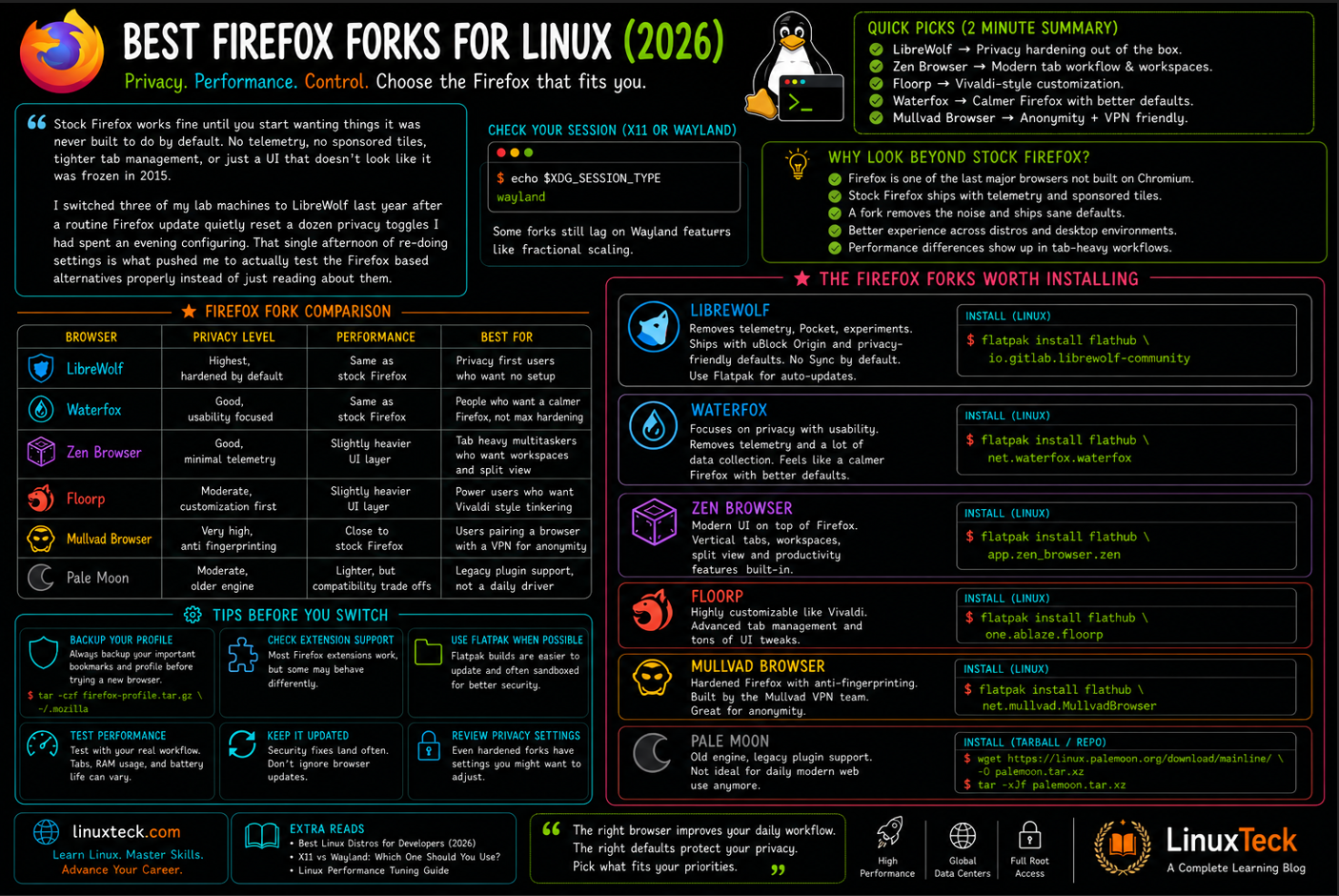
Firefox forks for Linux exist because the default Firefox experience doesn't suit everyone. Firefox remains one of the most trusted browsers for Linux users thanks to its open-source foundation, strong extension ecosystem, and independence from Chromium. Still, some users want stronger privacy protections, others prefer better tab management, while many simply want a cleaner browser with fewer built-in services and greater control over how it behaves.
Fortunately, several excellent Firefox forks for Linux have emerged to fill those gaps. In this guide, we compare the best options for 2026, including LibreWolf, Waterfox, Zen Browser, Floorp, Mullvad Browser, and Pale Moon, helping you choose the right browser based on privacy, performance, customization, and everyday usability.
Examples
Quick Picks Before You Read Further
Quick Picks:
If you only have two minutes, here is the short version. LibreWolf if you want privacy hardening out of the box. Zen Browser if you want a modern tabbed workflow without leaving the Firefox engine. Floorp if you like Vivaldi style customization. Waterfox if you want a calmer, more traditional Firefox with better defaults. Keep reading for the reasoning, the install steps, and the mistakes people actually make.
If you are still deciding which distro to run any of these on, our roundup of distros for developers covers what ships with Firefox by default versus what you have to add yourself.
| Browser | Privacy Level | Performance | Best For |
|---|---|---|---|
| LibreWolf | Highest, hardened by default | Same as stock Firefox | Privacy first users who want no setup |
| Waterfox | Good, usability focused | Same as stock Firefox | People who want a calmer Firefox, not maximum hardening |
| Zen Browser | Good, minimal telemetry | Slightly heavier UI layer | Tab heavy multitaskers who want workspaces and split view |
| Floorp | Moderate, customization first | Slightly heavier UI layer | Power users who want Vivaldi style tinkering |
| Mullvad Browser | Very high, anti fingerprinting focus | Close to stock Firefox | Users pairing a browser with a VPN for anonymity |
| Pale Moon | Moderate, older engine | Lighter, but compatibility trade offs | Legacy plugin support, not a daily driver |
Why Look Beyond Stock Firefox At All
Firefox is still one of the last major browsers that is not built on Chromium, and that alone matters for engine diversity on the web. But the stock build ships with telemetry pings and sponsored shortcuts on the new tab page that a lot of Linux users switch off the first week they install it.
None of that is evil by itself. It is just noise for people who picked Linux specifically to reduce noise. A Firefox fork usually strips that layer out and ships sane defaults instead, so you are not repeating the same about:config trip every time you set up a new machine or reinstall your distro.
Performance is the other reason. Tab heavy workflows expose RAM handling differences fast, and how a browser behaves also depends on whether your desktop is running on X11 or Wayland, since some forks still lag on Wayland specific features like fractional scaling. Check which one you are on before chasing a scaling or hardware acceleration bug that turns out to just be a session type mismatch.
LinuxTeck
Firefox Forks for Linux Worth Actually Installing
LibreWolf
Note:
LibreWolf takes Firefox and removes telemetry and experiment cohorts, then adds uBlock Origin and privacy respecting search engines by default. It also disables Firefox Sync since the project treats cloud sync as an opt in decision, not a default one. If your priority is a browser that behaves like a hardened Firefox without you touching a single setting, this is usually the first one people land on.
One thing that caught me off guard on my own machines: the tarball build does not ship a built in auto updater. I only noticed because a security fix landed upstream and my install was still two point releases behind. Installing through Flatpak sidesteps this entirely since Flatpak handles the update cycle for you, which is the version I would point a beginner toward.
LinuxTeck
flatpak install flathub io.gitlab.librewolf-community
Application io.gitlab.librewolf-community installed successfully
Waterfox
Note:
Waterfox balances privacy with day to day usability rather than chasing maximum hardening the way LibreWolf does. It includes support for oblivious DNS style protections and clean link sharing that strips tracking parameters automatically, but keeps defaults closer to a familiar browsing experience. It also supports container tabs and vertical tabs, which is handy if you are coming from a Chromium browser and do not want to lose that workflow.
Zen Browser
Note:
Zen keeps the Firefox engine underneath but rebuilds the interface around vertical tabs, workspaces, and a split view for working with two pages side by side. It is the closest thing to a Vivaldi or Arc style workflow while still running on Gecko instead of Chromium.
On an eight year old laptop with a spinning disk in my test lab, Zen took noticeably longer to reach a usable window than LibreWolf did on the same hardware, close to two extra seconds on cold start. On any machine with an SSD it was not something I could feel. Worth checking if you plan to run it on older hardware.
LinuxTeck
flatpak install flathub app.zen_browser.zen
Application app.zen_browser.zen installed successfully
Floorp
Note:
Floorp leans hard into customization. You can move the top bar, hide the title bar, switch to tree style tabs, and pick from a wide set of UI themes. It also ships workspace containers so different projects can keep separate logins and settings, plus split tabs and mouse gesture support. If Vivaldi style tinkering appeals to you but you want to stay on the Firefox engine, this is the fork built for that.
Mullvad Browser
Note:
Mullvad Browser is built with the Tor Project and focuses on anti fingerprinting rather than routing traffic through relays. It makes every user look identical in terms of window size, fonts, and other identifying parameters, and pairs best with a VPN since it does not include one itself. It behaves close enough to regular Firefox day to day that the switch is not jarring.
Pale Moon
Warning:
Pale Moon forked off Firefox a long time ago and now runs its own Goanna engine instead of Gecko. That means some modern websites render oddly or break outright, since it is no longer tracking upstream Firefox web platform changes closely. Pick this one only if you specifically need legacy plugin support or a genuinely old school Firefox feel, not as a daily driver for modern browsing.
How to Pick Based on Your Workflow
If you spend most of your day inside a terminal and a handful of tabs, LibreWolf or Waterfox will feel invisible in the best way, they just get out of your way. If you juggle dozens of tabs across research, docs, and chat, Zen or Floorp are worth the slightly longer learning curve for the workspace and tab management gains.
For anyone treating their Linux desktop as a daily dev machine, it is worth pairing your browser choice with the rest of your toolchain. Our modern Linux tools roundup and the Linux for developers guide both cover adjacent picks that tend to sit well next to these browsers.
Privacy conscious users who are already hardening their systems should also glance at our list of Linux security tools, since a hardened browser paired with a loose firewall configuration only solves half the problem. The broader philosophy behind why these forks exist at all lines up closely with the free software definition that the open source community has been building on for decades.
If you are rolling one of these out across a lab or an office rather than a single desktop, most of them still honor Firefox's policies.json mechanism, dropped into /usr/lib/librewolf/distribution/policies.json or the equivalent path for the fork you picked. That is how you lock down settings like disabling extension installs or pinning a homepage across every seat without touching each machine by hand.
Installation Examples You Will Actually Use
Beginner
LinuxTeck
Downloading 118.4 MB / 118.4 MB
Application io.gitlab.librewolf-community installed successfully
LinuxTeck
LinuxTeck
Intermediate
LinuxTeck
yay -S librewolf-bin
installing librewolf-bin (release-current)
librewolf-bin installed
LinuxTeck
sudo dnf copr enable librewolf/copr
sudo dnf install librewolf
Package librewolf-<version>.x86_64 installed
LinuxTeck
sudo apt-get update
sudo apt-get install extrepo -y
sudo extrepo enable librewolf
sudo apt update
sudo apt install librewolf
librewolf is now installable
librewolf installed
LinuxTeck
wget https://cdn1.waterfox.net/waterfox/releases/<version>/Linux_x86_64/waterfox-<version>.tar.bz2
tar xjf waterfox-<version>.tar.bz2
sudo mv waterfox /opt/waterfox
waterfox/waterfox
waterfox/browser/
extracted 412 files
LinuxTeck
sha256sum waterfox-<version>.tar.bz2
LinuxTeck
flatpak remote-info --log flathub io.gitlab.librewolf-community
# roll back to that specific commit
flatpak update --commit=<commit-hash> io.gitlab.librewolf-community
Commit 7e0c44... 2026-06-28 09:41:15
Rolled back io.gitlab.librewolf-community to specified commit
Real World
LinuxTeck
librewolf -P work --no-remote &
zen -P personal --no-remote &
Launched profile: personal
LinuxTeck
ps aux --sort=-%mem | grep -iE "librewolf|zen|floorp|waterfox" | head
user 4903 0.3 5.8 librewolf
LinuxTeck
while read -r host; do
ssh "$host" "flatpak install -y flathub io.gitlab.librewolf-community"
done < hosts.txt
workstation02: Application io.gitlab.librewolf-community installed successfully
workstation03: Application io.gitlab.librewolf-community installed successfully
LinuxTeck
- name: Install LibreWolf via Flatpak
hosts: workstations
tasks:
- name: Install LibreWolf
community.general.flatpak:
name: io.gitlab.librewolf-community
state: present
remote: flathub
TASK [Install LibreWolf] ******************************************
changed: [workstation01]
changed: [workstation02]
changed: [workstation03]
Troubleshooting
Note:
If a Flatpak build refuses to launch, or a Snap fails silently after login, the fix is almost always to look at the logs instead of guessing. Run the browser in verbose mode first to see where it stalls, then check the systemd user journal if it exits with no visible error at all.
LinuxTeck
flatpak run --verbose io.gitlab.librewolf-community
Falling back to sandboxed X11 access
Warning: cannot connect to Wayland compositor, retrying under XWayland
LinuxTeck
journalctl --user -xe --since "10 min ago" | grep -i librewolf
librewolf.desktop[8821]: process exited with code 1
Common Mistake
Warning:
Downloading a fork from a random third party mirror instead of the project's own site or an official Flathub or Snap listing is the mistake that trips up the most people. Fake Waterfox and LibreWolf installers have circulated before, bundled with adware. Always install from Flathub, Snap Store, or the browser's own official domain, and check the checksum on anything downloaded as a tarball.
Conclusion
None of these forks are strictly better than Firefox, they just make different defaults for different priorities. Pick LibreWolf or Waterfox if privacy is the goal, Zen or Floorp if workflow and customization matter more to you. Once you have picked one, our Linux quick start guide is a good next stop for tightening up the rest of the desktop.
Drop me your feedback or comments. Feel free to share this article with others if you like it.
Thank you!
Questions I Get Asked About This All the Time
Will my Firefox extensions still work if I switch to a fork?
Yes for LibreWolf, Waterfox, Zen, and Floorp since they all use the standard Firefox extension format. Some forks pre-disable certain telemetry tied APIs, which occasionally breaks an extension that depends on them, but that is rare and usually fixable through the extension settings.
Can I import my bookmarks and passwords from Firefox directly?
Most of these forks include an import wizard on first launch that reads your existing Firefox profile directly, bookmarks, saved logins, and history included. Waterfox in particular makes this a one click step during setup.
Is it safe to run two Firefox based browsers on the same machine?
Yes, as long as each one uses its own profile directory, which is the default behavior when installed through Flatpak or Snap. Running two profiles of the same engine at once through the terminal, as shown above, works fine too.
Do these forks get security updates as fast as Firefox itself?
It varies by project. LibreWolf mirrors Firefox's own release versioning closely, so security fixes usually land within days of upstream. Waterfox runs its own G-series release cadence rather than mirroring Firefox ESR or rapid release builds step for step, so it maintains its own patching pipeline and can lag slightly behind on any given fix. Pale Moon runs its own engine entirely and patches on its own schedule, which is slower still and part of why it is not recommended as a daily browser.
Which of these actually saves RAM compared to stock Firefox?
LibreWolf and Waterfox tend to run closest to stock Firefox in memory usage since they keep the same engine and just strip background services. Zen and Floorp add UI layers for workspaces and split view, which adds a small overhead, usually not significant unless you are on very limited hardware.
Do I need to remove stock Firefox before installing a fork?
No. Flatpak and Snap installs are sandboxed from your system Firefox package, so both can coexist without conflict. If you installed a fork as a native package sharing the same binary name, that is the one case worth checking for conflicts first.
Explore LinuxTeck for practical guides covering Rocky Linux, RHEL, AlmaLinux, Ubuntu, Debian, Fedora, Linux administration, shell scripting, networking, and enterprise Linux technologies.