
🛡️ 100% NETWORK UPTIME SLA
🖥️ SIGNUP PROCESS VERIFIED
🎧 SUPPORT REPUTATION CHECKED
Should you actually spend your money on Vultr in 2026? Short answer, it depends on what you're building. Vultr is an unmanaged cloud VPS platform, you get full root access to a Linux server and handle the setup yourself. If you're comfortable running your own Linux box, Vultr is genuinely good value. If you want someone else to manage the server for you, or you might need a refund, you'll be happier somewhere else.
🌍 32+ Regions
🛡️ 100% Network SLA
⏱️ Hourly Billing
Best for: people who already know their way around a terminal and want cheap, global compute without a middleman.
Disclosure: the button above is an affiliate link. If you sign up through it, LinuxTeck may earn a commission at no extra cost to you.
Why Choose Vultr
- ✓ Developers deploying their own infrastructure
- ✓ Global or multi-region projects
- ✓ AI/ML teams needing GPU access
- ✓ Students and Linux learners
- ✕ You want managed WordPress hosting
- ✕ You've never touched Linux
- ✕ You expect phone support
- ✕ You want a guaranteed refund
Yes, I'd spend my own money on Vultr for the right project, cheap global compute with real GPU access. Just don't load up a big prepaid balance, and don't expect a billing or verification issue to move fast outside business hours.

Buy Vultr If… / Avoid Vultr If…
✓ Buy Vultr if…
✕ Avoid Vultr if…
Vultr at a Glance
| Category | Vultr |
|---|---|
| Best For | Developers deploying their own infrastructure |
| Best Use Cases | VPS hosting, Docker containers, Node.js and Laravel apps, GPU/AI workloads, Kubernetes, dev/staging environments, self-hosted apps, learning Linux |
| Starting Price | $2.50/mo (IPv6-only, limited regions), $3.50/mo for the same tier with a real IPv4 address, $5/mo for the more commonly used 1 GB plan |
| Managed or Unmanaged | Unmanaged, self-service |
| Server Management | Self-managed (Unmanaged) |
| Linux Friendly | Yes, full root access |
| Beginner Friendly | No, expects prior server admin experience |
| Global Regions | 32+ locations across 20 countries, per Vultr's own regions page |
| Support Rating | 3.5 / 5, technical ticket support is generally available around the clock; billing and trust/fraud reviews are handled during business hours |
| Refund Policy | None, all sales final |
| Compliance | SOC 2 Type II, ISO 27001/27017/27018, PCI-DSS |
| Overall LinuxTeck Rating | 4.3 / 5 |
Learning Curve: What Skills Do You Actually Need?
Linux Knowledge
4 / 5
████████████████░░░░ 80%
SSH
4 / 5
████████████████░░░░ 80%
Networking
3 / 5
████████████░░░░░░░░ 60%
Server Security
4 / 5
████████████████░░░░ 80%
System Administration
3 / 5
████████████░░░░░░░░ 60%
Vultr isn't built for complete beginners. It's built for people who are already comfortable managing their own infrastructure, or willing to learn fast. If none of the skills above feel familiar yet, that's not a dealbreaker forever, just know the first few weeks will involve a lot of documentation.
Real Deployment Timeline: What Onboarding Actually Looks Like
~2 min
Instant, or hours/days if flagged
~2 min
~5 min
~1 min
Hours to days
Most of this timeline is fast. The one unpredictable step is identity verification, for most people it's instant, but if your account gets flagged for extra review, that step alone can stretch to hours or even days. Plan your launch date around that possibility, not against it.
Before You Buy: What Actually Happens at Signup
Account creation itself is quick, email and password or a Google/GitHub login, nothing unusual. Where it gets more involved is verification. Vultr asks for a valid payment method (card, PayPal, sometimes crypto) up front, and that's normal for any cloud provider these days.
What's worth knowing before you hand over a card: a chunk of the complaints on review sites aren't about server performance at all, they're about Vultr's fraud and trust team occasionally following up after signup and asking for extra ID, and in some cases a photo of the card itself. It doesn't happen to everyone, but it happens often enough that it shows up repeatedly in reviews, so don't be shocked if it happens to you too.
- Promo credits: Vultr regularly runs signup credit offers, but they always require a valid payment method attached before the credit becomes usable, it's not a true no-card free trial.
- Refunds: Vultr's terms state plainly that they don't guarantee refunds on anything, prepaid fees included. Don't load up a big balance you might want back.
- Last verified date: August 3, 2026, against Vultr's own SLA and Terms of Service pages.
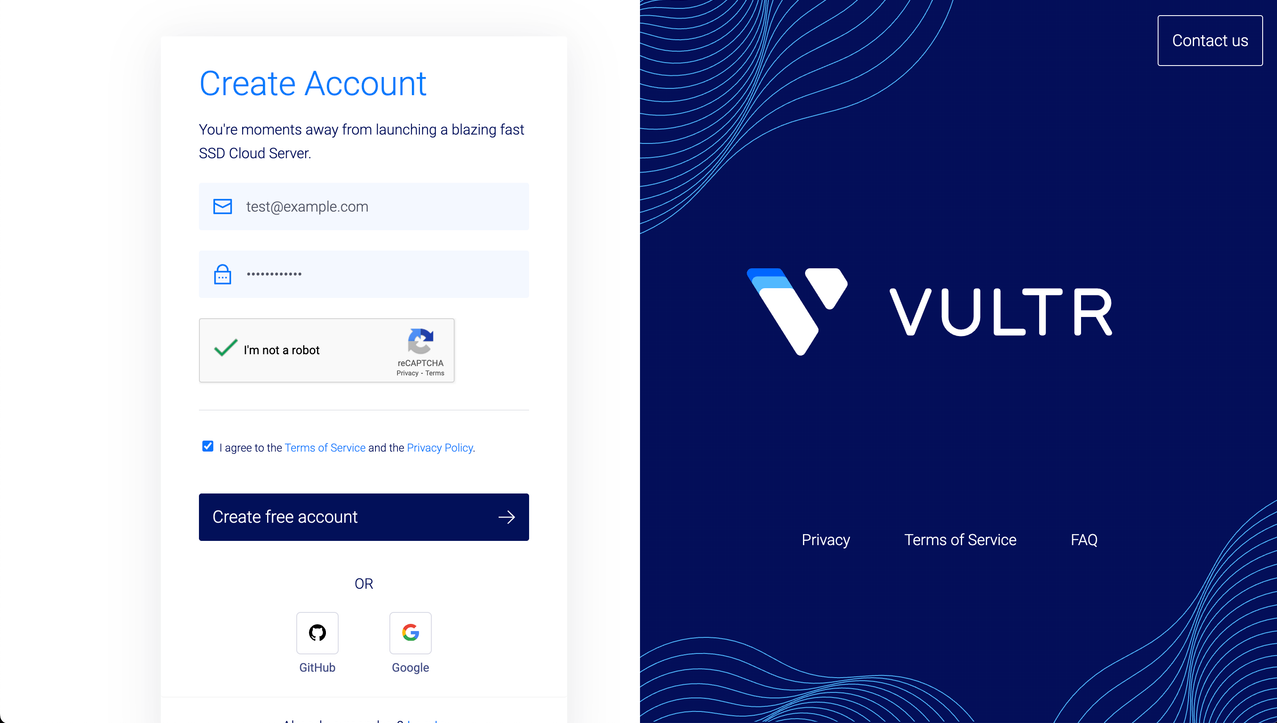
Vultr's signup page where you can create a free account before deploying your first cloud server.
The First Hour: Deploying Your First Server
This is the part where Vultr earns its reputation. Deploying a server is a handful of dropdowns, pick a data center out of 32+ locations, pick an OS or a one-click marketplace app, pick a plan, hit deploy. Within a couple minutes you've got a running instance with an IP address, ready to log into.
Access works the way you'd expect, no weird proxy layer in between. Firewall rules live in a separate panel and are simple to set up, allow a port, block a port, done. DNS management is built in if you want to point a domain straight at Vultr instead of using a third party. Snapshots are available if you want a quick rollback point before you start messing with configs.
Same story as the skills checklist above: there's no wizard walking you through securing the box or picking sane defaults. Know what you're doing, and this hour feels fast and clean. Don't, and you'll be tabbing over to documentation a lot.
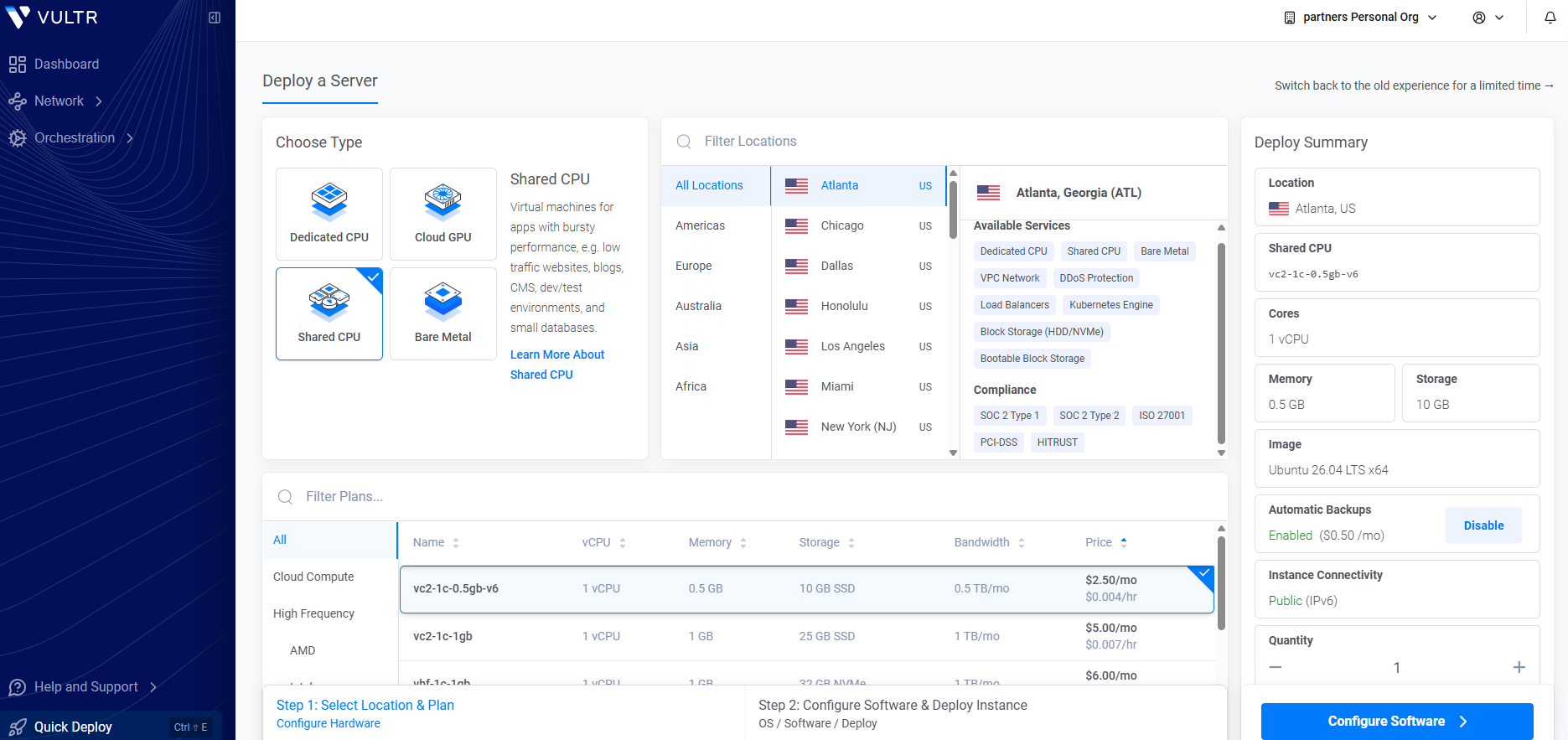
Vultr Deploy a Server dashboard showing the Shared CPU plan, OS version, server location selection, and deployment summary.
The First Month: What It Actually Costs and Feels Like
Your first invoice is where the sticker price and the real price start to diverge. Take the $28/mo Optimized Cloud Compute plan as a mid-tier example: automated backups tack on 20% of that, and DDoS protection is roughly another $10 a month per server. Turn both on and you're closer to $44/mo, not $28. That's not a hidden fee, it's just not the number on the pricing page.
Bandwidth is metered per server rather than pooled across your account, so if you're running several small instances, keep an eye on that, it adds up differently than on platforms that pool bandwidth. One more billing quirk worth knowing early: powering off an instance doesn't stop the meter, you're still charged until it's actually destroyed.
Performance in this first month is generally where Vultr does well, NVMe-backed plans feel responsive, and the dedicated vCPU tiers avoid the "why is my server randomly slow today" problem that shared plans can run into. I haven't run a formal benchmark suite on this myself, but that lines up with the independent NVMe I/O and Geekbench numbers other reviewers have published. Reliability has been solid too, Vultr backs this with a 100% uptime guarantee on network and host node availability, though that guarantee doesn't extend to the control panel, API, or DNS if those ever hiccup.
Support is the part that varies. Technical ticket support is generally available around the clock, but billing questions and trust/fraud compliance reviews are only handled during regular business hours, and community feedback on response time and helpfulness is mixed, some people get quick fixes, others describe slow back-and-forth on billing questions specifically.
Real Monthly Cost Summary
The advertised price gets you the base instance. What you'll actually pay once it's doing real work, backed up and protected, runs meaningfully higher. Budget for the second number, not the first.
Worked example, agency running 3 client sites: three High Frequency instances at $12/mo each ($36 total), backups on all three at 20% (~$7.20), and one shared DDoS-protected instance for the public-facing site (~$10) lands around $53/month, before any bandwidth overage. That's roughly $18/site, a more realistic number for the agency persona this review already targets than a single-server example gives you.
Long Term: Would I Still Recommend It After Six Months?
Yes, for the right person, and I say that from having watched this pattern play out on more than one budget cloud. Scaling up is straightforward, you resize an instance or deploy a bigger one next to it manually, and the API is solid enough that automation and infrastructure-as-code tools plug into it without drama. If you get into Kubernetes, the free control plane on VKE is a genuinely nice touch, you only pay for worker nodes.
The ecosystem around Vultr isn't as deep as the big three clouds, don't expect the same breadth of managed services or third-party integrations you'd get from AWS. But for straightforward compute, GPU workloads, or a fleet of app servers spread across regions, it holds up well past the first few months. The trade-offs you signed up for on day one, self-managed, business-hours support, no refunds, don't really change over time, they're just the deal.
Which Vultr Plan Should You Actually Choose?
Don't just default to the cheapest tier because it's cheapest. Match the plan to what's actually running on it, here's how I'd map it out.
Cards above start at the $5/mo tier since that's what most real projects end up on. There's also a $2.50/mo IPv6-only tier and a $3.50/mo version of the same 512 MB instance with a real IPv4 address, both fine for a quick test but tight on RAM for anything production-facing.
A newer option worth knowing about: VX1™ Cloud Compute
Vultr added a new compute line called VX1 in 2025, starting at $43.80/mo. It's aimed at cloud-native and enterprise workloads rather than budget VPS use, but it's worth knowing what it changes:
- Up to 82% better performance per dollar compared to comparable hyperscaler price-performance-optimized plans, per Vultr's own figures
- Uncapped hourly billing, unlike the older Cloud Compute tiers above, which cap monthly charges at 672 billed hours, VX1 bills every hour actually used with no cap
- 48% more energy efficient than Optimized Cloud Compute, per Vultr
None of the numbers above are independently verified by LinuxTeck, they're Vultr's own published figures. If you're sizing a production workload rather than a side project, it's worth comparing VX1 against Optimized Cloud Compute before you default to the older tier.
| Your Project | Plan | Why |
|---|---|---|
| Personal blog | Regular Cloud Compute | Light traffic doesn't need dedicated resources, save the money |
| WordPress site | High Frequency | NVMe storage noticeably helps database-heavy CMS platforms |
| WooCommerce store | High Frequency | Checkout and cart pages are database-heavy, same logic as WordPress |
| Laravel or Rails app | High Frequency | Framework overhead benefits from faster disk I/O |
| Docker containers | Regular Cloud Compute | Containers are lightweight enough that shared vCPU is usually fine to start |
| Node.js API | High Frequency | Consistent low-latency response matters more for APIs than for static sites |
| AI / ML workload | Cloud GPU | You need actual GPU hardware, no substitute for that |
| Enterprise or cloud-native workload | Bare Metal or VX1 | Bare Metal for no shared hardware at all; VX1 if you want uncapped hourly billing and better performance per dollar than the older tiers |
Best Alternative Based on Your Needs
| If your priority is... | Go with |
|---|---|
| Lowest-cost VPS with more regions and GPU | Vultr |
| Absolute lowest price per core | Hetzner |
| Managed cloud | Cloudways |
| Managed WordPress | Kinsta |
| Beginner-friendly cloud | DigitalOcean |
| Enterprise cloud | AWS |
Is Vultr Right for You?
| Who | Recommendation | Why |
|---|---|---|
| First website owner | NO | No hand-holding here, they'll fight the terminal instead of building their site |
| Small business owner | MAYBE | Fine if they have a developer, risky if they're managing it solo |
| WordPress beginner | NO | A managed WordPress host will save them weeks of frustration |
| Linux learner | YES | Cheap sandbox to practice on, hourly billing makes mistakes low-stakes |
| Developer | YES | This is exactly who Vultr is built for |
| Startup | YES | Good value while scaling, especially with a technical founder or team |
| Agency managing client sites | MAYBE | Works well if the agency standardizes server management, painful if not |
| Enterprise | MAYBE | Bare metal and GPU tiers are capable, but support model may not fit enterprise SLAs |
| Student | YES | Cheap, hourly billing, real cloud experience for a resume |
Developers testing infrastructureHourly billing means you can spin a server up for an afternoon and destroy it, paying pennies for the test.
Apps needing global reach32+ data centers means you can put compute close to users in places a lot of budget clouds simply don't reach.
Small AI/ML teamsCloud GPU instances are priced and available without an enterprise sales call first.
Buyers who might need a refundNot recommended. Vultr's terms are explicit that they don't guarantee refunds, prepaid fees included.
What I Like Most About Vultr
The region count is the real standout. A lot of budget clouds give you five or six locations. Vultr gives you 32+, across 20 countries, which actually matters if your users aren't all in North America or Western Europe. The GPU lineup is also notable, smaller teams doing AI work can get access without going through an enterprise sales process first. And the free Kubernetes control plane is a small thing that adds up if you're running several clusters.
What Could Be Better
Refund policy. There isn't one. For a service where things sometimes don't work out (wrong region, wrong plan, changed your mind), that's a real cost to the customer, not just a legal footnote.
Post-payment verification. Getting asked for extra documents after you've already paid and deployed a server is a frustrating pattern, and it's a big part of why negative reviews exist. It would land a lot better upfront, before money changes hands.
Support consistency. Technical ticket support is generally available around the clock, but billing and trust/fraud compliance reviews only move during business hours, so a billing hold or verification request on a weekend can sit until Monday.
Documentation gaps for beginners. The docs are solid for people who already know Linux, less so for someone trying to learn as they go.
What Surprised Me
Good surprise: the Kubernetes control plane being free. A lot of clouds charge a flat monthly fee just for that, Vultr doesn't.
Good surprise: how wide the region list actually is once you look past the usual US/EU spots, cities like Manchester, Osaka, Seoul, and Johannesburg aren't common on budget clouds.
Bad surprise: backups aren't included and cost a flat 20% on top, which isn't obvious until you're already configuring the server.
Bad surprise: the number of reviews specifically about post-signup document requests. It's not universal, but it's frequent enough that it shouldn't catch you off guard.
My Biggest Frustration
If I had to change one thing, it's the timing of identity verification. Asking for extra documents after someone has already paid and deployed a server puts the customer in a bad spot, money's out, work's already started, and now there's a delay hanging over it. Move that check earlier, before checkout, and most of the frustration in the reviews would disappear on its own. The infrastructure doesn't need fixing. The order of operations does.
When Should You Choose Vultr Instead of Something Else?
Choose Vultr when you want cheap, self-managed compute in a lot of regions and you're comfortable with a terminal.
Choose DigitalOcean when support responsiveness matters more than saving a couple dollars a month. See our DigitalOcean vs Vultr breakdown and full DigitalOcean review.
Choose Cloudways when you want cloud-level performance but don't want to touch server config at all. Our Cloudways vs Vultr comparison and Cloudways review cover this.
Choose Kinsta when you're running WordPress and want zero server admin, ever. Full details in our Kinsta review.
Choose AWS when you need deep managed-service breadth and your team has the budget and headcount to manage that complexity properly.
Choose Hetzner when raw price per core is genuinely your only criterion. It undercuts Vultr on compute cost, but with fewer regions and a thinner feature set, if GPU access or region count matter to you at all, Vultr is the better fit.
Community Opinion: What People Actually Say
People consistently praise server performance, pricing, and the sheer number of available regions. The infrastructure itself rarely gets criticized.
Most complaints center on billing surprises, post-signup verification requests, and the no-refund policy, not on server reliability.
The product is good. The customer-facing policies around it (refunds, verification timing, support hours) are what drag the overall experience down, and that's exactly where LinuxTeck would tell a friend to go in with eyes open.
Worth noting the SLA itself is narrower than it sounds too. It covers network and host node uptime, not the control panel, API, or DNS, per Vultr's published SLA.
Score Breakdown
Performance
4.5 / 5
██████████████████░░ 90%
NVMe-backed plans and dedicated vCPU tiers deliver consistently strong performance. The only soft spot is the entry-level shared plan, which can hit occasional noisy-neighbor slowdowns like most budget shared VPS does.
Ease of Use
4.5 / 5
██████████████████░░ 90%
This is ease of use for someone who already knows server admin, not beginner-friendliness: the dashboard and one-click app marketplace are clean and fast to work with, though there's no cPanel-style hand-holding.
Support
3.5 / 5
██████████████░░░░░░ 70%
Technical ticket support is generally available around the clock and gets the job done for most issues, but billing and trust/fraud compliance reviews are only handled during regular business hours. The aggregator numbers make the split concrete: Vultr sits at 4.3/5 on G2 (a technical audience rating the infrastructure) versus roughly 1.7/5 on Trustpilot (a broader audience weighing in mostly on billing and account issues). It's the one category that's merely fine rather than strong.
Features
4.5 / 5
██████████████████░░ 90%
32+ data center locations, SOC 2 and ISO 27001 compliance credentials, and a free-control-plane Kubernetes offering are genuinely competitive against much bigger clouds.
Pricing
4.5 / 5
██████████████████░░ 90%
Entry pricing is genuinely competitive, and even after factoring in backups and DDoS protection, the total cost still holds up well against the alternatives. The one thing to budget around isn't the price, it's the no-refund policy if you change your mind.
Overall
4.3 / 5
█████████████████░░░ 86%
Performance, ease of use, features, and pricing all land in the same strong range. Support is the single category that's merely average, technical tickets are generally handled around the clock, but billing and fraud-review responses are business-hours only, and that's the one thing pulling the overall number down from a near-perfect score.
Frequently Asked Questions
Does Vultr offer a free trial?
Not a permanent free tier, but new accounts often get a signup credit that works like a limited trial. The exact amount has varied across promotions, so check the current offer at signup rather than trusting an old number.
Can I get a refund from Vultr?
No. Vultr's terms of service state plainly that they don't guarantee refunds, and prepaid fees aren't returned if you cancel early.
Is Vultr good for beginners?
If "beginner" means new to cloud pricing but comfortable with a terminal, sure. If it means never having managed a server before, a managed platform will be a smoother start.
Does Vultr really guarantee 100% uptime?
They guarantee it for network and host node availability specifically, per-server, not across your whole account and not covering the control panel, API, or DNS.
Are backups included in the price?
No, automated backups cost an extra 20% on top of your instance price. It's not hidden exactly, but it's easy to miss if you only look at the base plan price.
How does Vultr compare to DigitalOcean?
Similar target audience, but DigitalOcean tends to score better on support in independent reviews, while Vultr wins on region count and GPU pricing. We go deeper on this in our DigitalOcean vs Vultr comparison.
How does Vultr compare to Hetzner?
Hetzner is cheaper on raw compute, period. What you give up is Vultr's region count and its Cloud GPU lineup. If price per core is genuinely all that matters to you, Hetzner wins. If you need presence in more countries or GPU access, Vultr is the better fit.
Does Vultr keep charging if I power off my server?
Yes. Powering an instance off stops it from running, but not the meter, you're billed until the instance is actually destroyed. This trips up a lot of first-time users who assume "off" means "not billing."
Is Vultr compliant with SOC 2 or ISO 27001?
Yes, Vultr holds SOC 2 Type II, ISO 27001, ISO 27017, and ISO 27018 certifications, along with PCI-DSS compliance, per Vultr's own Trust Center. Full compliance reports are available to customers through the Vultr console for eligible accounts.
Does Vultr support Windows Server?
Yes, Windows Server images are available on Cloud Compute plans alongside the usual Linux distributions, though most of what makes Vultr cheap (the Linux marketplace apps, the lower-tier pricing) is built around a Linux workflow.
Final Verdict: Would I Spend My Own Money on Vultr?
Developers, students, small AI teams, and anyone comfortable self-managing a server across many regions.
Non-technical site owners, anyone expecting phone support, or anyone who'd rely on a refund.
Vultr is a solid buy, but only for a specific kind of buyer, not a blanket recommendation for everyone reading this.
Buy it if you're a developer, sysadmin, or small technical team who's comfortable owning your own server, and you want cheap compute spread across more regions than almost anyone else in this price range offers. The infrastructure itself holds up, that part isn't in question.
Skip it if you're non-technical, you'd want a safety net if the purchase doesn't work out, or you need billing or account issues resolved fast outside business hours. There's no refund policy, and billing and trust/fraud reviews only move on weekdays, that's not a small footnote, it's a real constraint on who this is for.
That split is exactly why this lands at 4.3 and not a perfect score: strong infrastructure, strong pricing, and a genuinely useful feature set, held back by one category, support, that's merely average instead of excellent. It's not a top-tier pick if fast weekend billing or account help matters to you, and I wouldn't tell you otherwise. For the specific job of cheap, self-managed, globally distributed compute, though, it's one of the stronger options out there.
Vultr won't hold your hand. If you don't need it to, that's a fair trade for the price.
Should You Buy Vultr?
Buy Vultr if: you know Linux, you deploy your own infrastructure, and you want the best price-to-region ratio available.
Don't buy Vultr if: you want managed hosting, guaranteed refunds, or support you can call on the phone.
Pricing, SLA terms, and support reputation in this review were confirmed against Vultr's own SLA and Terms of Service pages plus independent review aggregators, as of August 2026.
Quick reminder: the button above is an affiliate link, and using it helps support LinuxTeck at no extra cost to you.

