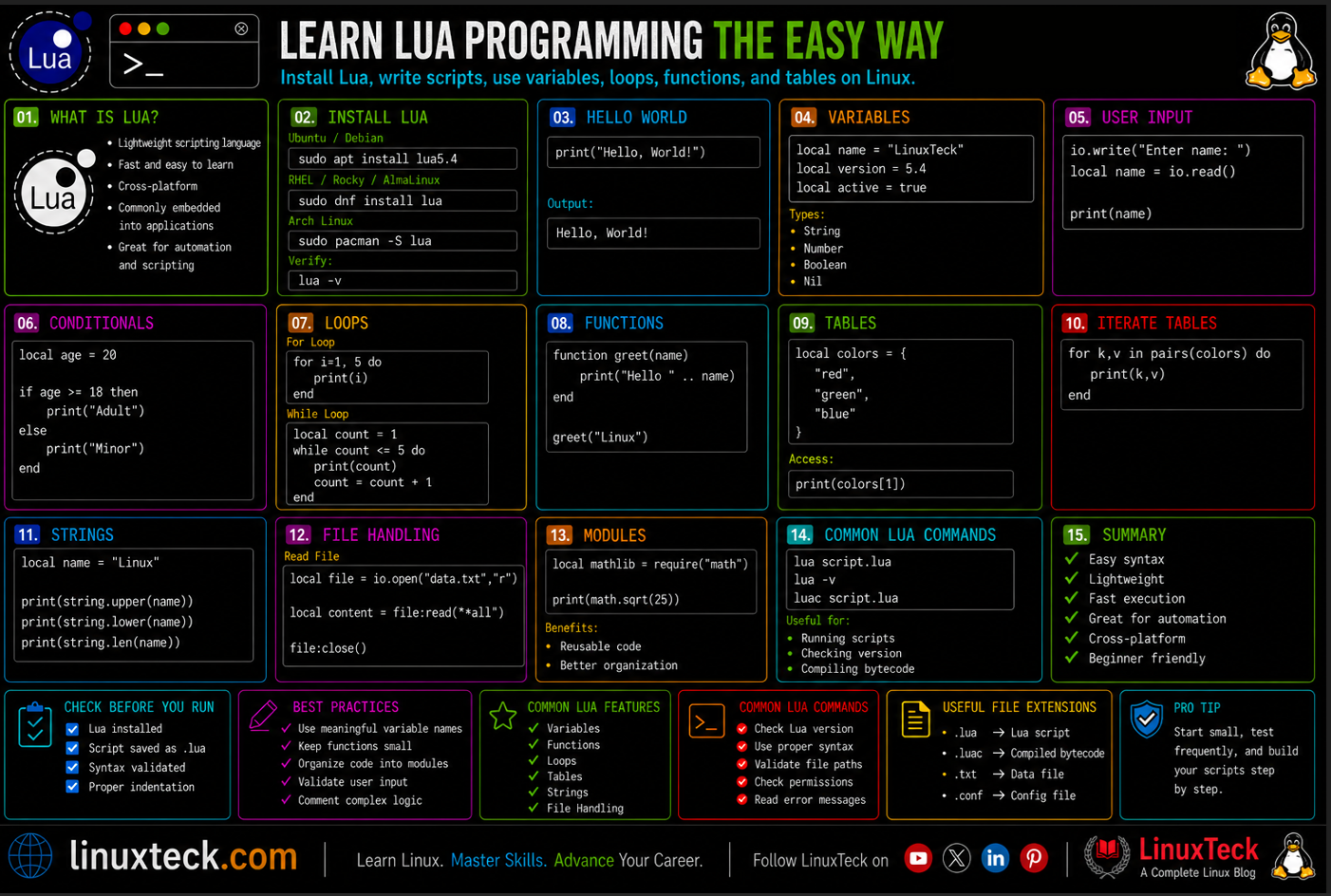
Lua is a small scripting language. It is fast, easy to learn, and runs inside a lot of software you already use. If you are on Linux and want to write scripts beyond bash, Lua is worth learning.
I came across Lua the first time when I was debugging a custom Nginx configuration at work. Someone had dropped a Lua script inside the server block and I had no idea what I was looking at. I spent an hour assuming it was some broken config syntax before a colleague pointed out it was a completely separate scripting language. That gap embarrassed me enough to actually learn it properly. If you are a Linux user who writes shell scripts, automates tasks, or works anywhere near game servers, embedded systems, or web infrastructure, Lua is worth understanding from the ground up.
This guide is for people who want real working knowledge, not just a definition and a Hello World example. If you have written at least a few bash scripts on Linux, you will find Lua surprisingly familiar in some ways and genuinely different in others.
Why This Actually Matters:
Lua is not just a game scripting tool. If you work with Linux infrastructure, you have likely already encountered Lua without knowing it:
- OpenResty embeds Lua inside Nginx to handle authentication, rate limiting, and routing logic
- Redis uses Lua scripts for atomic multi-step database operations
- Wireshark supports Lua plugins for custom packet dissection
- NodeMCU IoT firmware runs Lua on ESP8266 Wi-Fi chips
If any of those touch your work, you need to know this language.
The good news is that learning Lua programming on Linux is faster than you might expect. The language is intentionally small. You can go from knowing nothing to writing useful scripts in a few hours if you follow the right path. If you are also working through bash scripting automation on Linux, Lua will fit naturally alongside that skill set.
Examples
How to Learn Lua Programming on Linux: Installation First
Before anything else, you need to verify what version is available in your package manager and get it running. Most distributions ship Lua in their default repos, but the version varies. Lua 5.5.0 is the latest upstream release as of December 2025, with performance and memory improvements. However, standard package managers on Debian, Ubuntu, and RHEL-family systems still default to Lua 5.4, which is what you will install below. For learning and everyday scripting, 5.4 is completely fine and is what the vast majority of production tooling runs on.
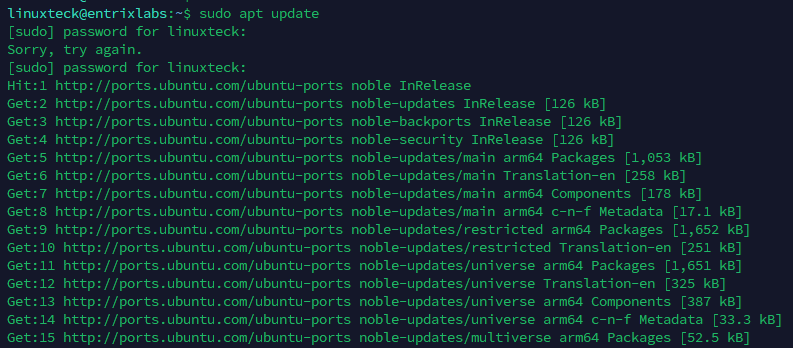
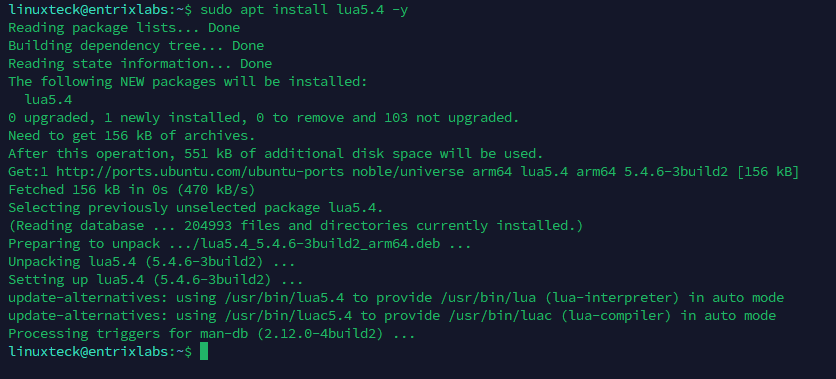
On Debian or Ubuntu based systems:
LinuxTeck.com
sudo apt update
# Install Lua 5.4 on Debian/Ubuntu
sudo apt install lua5.4 -y
# Verify installation and check version
lua5.4 -v

On RHEL, Rocky Linux, or Fedora:
LinuxTeck.com
sudo dnf install lua -y
# Check version
lua -v
Once installed, you have two ways to run Lua. You can open an interactive REPL session by just typing lua and hitting enter. Or you can write a script to a .lua file and run it directly. The interactive mode is good for testing small expressions. For anything beyond a few lines, use a file.
Note:
On some systems, the command is lua5.4 or lua5.3 rather than just lua. You can create a symlink with sudo ln -s /usr/bin/lua5.4 /usr/local/bin/lua if you want a consistent command name across your workflow.
Your First Lua Script: Writing and Running It from the Terminal
Let's skip the "open a text editor" preamble. You are on Linux. You know how to create a file. Here is how your first Lua script actually looks and runs.
LinuxTeck.com
print("Hello from Lua on Linux")
local name = "LinuxTeck"
print("Running on: " .. name)
local version = 5.4
print("Lua version approx: " .. version)
Save this as hello.lua and run it:
LinuxTeck.com
Running on: LinuxTeck
Lua version approx: 5.4
A couple of things worth noting from this first script. Lua comments use --, not #. String concatenation uses .., not +. And you did not need a shebang line. Lua scripts are not executed by the shell, they are passed to the Lua interpreter directly. That is a meaningful difference from bash.
You can make a Lua script directly executable on Linux by adding a shebang pointing to the Lua binary and chmod-ing it, but most Lua developers just call the interpreter explicitly. It is simpler and avoids path confusion across different systems.
Variables, Data Types, and Tables: What Lua Actually Thinks About Data
Lua is dynamically typed. You do not declare a type, you just assign a value. But there are a few things that will confuse you if you come from bash scripting, and one of them is the local keyword.
In Lua, variables are global by default. If you skip local, your variable leaks into the global scope and can cause subtle bugs in larger scripts. This is one of the most common mistakes beginners make. Always use local unless you have a specific reason not to.
LinuxTeck.com
local score = 100 -- number
local name = "admin" -- string
local active = true -- boolean
local nothing = nil -- nil (absence of value)
print(type(score)) -- number
print(type(name)) -- string
print(type(active)) -- boolean
print(type(nothing)) -- nil
string
boolean
nil
Now for tables. Tables are the single most important structure in Lua. Everything in Lua that needs to group data uses a table. Arrays, dictionaries, objects, modules, they all use the same table syntax. This is what makes Lua feel elegant once you understand it, but confusing at first if you expect separate types for lists and maps.
LinuxTeck.com
local services = {"nginx", "ssh", "cron"}
print(services[1]) -- nginx
print(services[2]) -- ssh
print(#services) -- 3 (length operator)
-- Tables as key-value (dictionary)
local server = {
hostname = "prod-web-01",
ip = "10.0.1.15",
port = 80
}
print(server.hostname) -- prod-web-01
print(server["port"]) -- 80
ssh
3
prod-web-01
80
One thing that trips up almost every bash user: Lua arrays start at index 1, not 0. This is a deliberate design choice in Lua. Do not assume zero-based indexing or you will spend a frustrating hour debugging an off-by-one error.
Control Flow and Functions: Writing Logic That Actually Does Something
Lua uses keyword-based syntax for control flow. No curly braces. Blocks close with end. If you come from bash, this will feel close enough to be readable right away, just different enough to catch you if you are not paying attention.
LinuxTeck.com
local cpu_usage = 87
if cpu_usage >= 90 then
print("CRITICAL: CPU very high")
elseif cpu_usage >= 75 then
print("WARNING: CPU elevated")
else
print("OK: CPU normal")
end
-- For loop
for i = 1, 5 do
print("Check " .. i)
end
Check 1
Check 2
Check 3
Check 4
Check 5
Functions in Lua are first-class values. You can store them in variables, pass them around, return them from other functions. This is more flexible than bash functions and opens up patterns like callbacks and closures when you need them.
LinuxTeck.com
local function get_disk_info(path)
local used = 42
local free = 58
return used, free
end
local used, free = get_disk_info("/var")
print("Used: " .. used .. "% | Free: " .. free .. "%")
Lua functions can return multiple values natively. No arrays needed, no output parsing. That alone makes Lua functions cleaner than most bash workarounds for returning multiple pieces of data.
Real Script Examples You Can Actually Use on a Linux System
This is where things get useful. Let's write scripts that do something you would actually run on a server or workstation.
Example 1: Reading a config file and printing key values
Lua reads files cleanly with its built-in io library. This example reads a simple key=value config file line by line.
LinuxTeck.com
-- Reads a simple key=value config file
local config = {}
local filename = "app.conf"
local file = io.open(filename, "r")
if not file then
print("ERROR: Cannot open " .. filename)
os.exit(1)
end
for line in file:lines() do
local key, value = line:match("^(%w+)%s*=%s*(%S+)")
if key then
config[key] = value
end
end
file:close()
print("Loaded config:")
for k, v in pairs(config) do
print(" " .. k .. " = " .. v)
end
host = localhost
port = 3306
user = dbadmin
Example 2: Iterating a table to generate a simple status report
LinuxTeck.com
local services = {
{ name = "nginx", status = "running" },
{ name = "mysql", status = "stopped" },
{ name = "postfix", status = "running" },
}
print("=== Service Status Report ===")
for i = 1, #services do
local svc = services[i]
local flag = svc.status == "running" and "[OK]" or "[FAIL]"
print(flag .. " " .. svc.name .. " is " .. svc.status)
end
[OK] nginx is running
[FAIL] mysql is stopped
[OK] postfix is running
Now the mistake-based example. This one catches almost every beginner.
Common Mistake:
Using + for string concatenation. If you come from Python, bash, or JavaScript, your instinct is to write "Host: " + hostname. In Lua, + is arithmetic only. Using it on strings throws a runtime error that can be confusing if you are not expecting it.
Wrong: print("Host: " + hostname) throws attempt to perform arithmetic on a string value
Fix: print("Host: " .. hostname) — use the .. operator for all string concatenation in Lua.
Where Lua Fits Alongside Bash on a Linux System
This is the practical question that most learning resources skip entirely. They explain Lua in a vacuum. But if you are a Linux user who already writes bash scripts, you need to know when to reach for Lua and when to stick with bash.
Bash is faster to write for quick, one-off tasks. A few lines of bash to rename files, check a service, or tail a log is always going to be faster than spinning up a Lua script. Bash is also the right choice when you need to chain system commands together heavily, since os.execute() in Lua works but is not as clean as a shell pipe.
Lua wins when your logic gets more complex. When you need proper data structures, cleaner error handling, readable conditionals across more than a dozen lines, or when you are writing something that other people need to read and extend later. Lua also wins inside applications. If you are configuring Nginx with OpenResty, writing a Redis script, or working with a game engine, Lua is the right tool and bash is not in the picture at all.
A practical rule: if your bash script has more than 50 lines and three nested if statements, you probably want Lua instead. The readability payoff is immediate. You can explore more about building complex automation flows in Linux bash scripting automation and use Lua to handle the logic-heavy parts that bash makes messy.
Note:
You can call system commands from Lua using os.execute("command") or io.popen("command") to capture output. This lets you mix Lua logic with shell commands when needed, giving you the best of both worlds for certain tasks.
One more real-world scenario worth mentioning: if you are writing configuration or plugin logic for any tool that embeds Lua (Redis, Nginx via OpenResty, Wireshark, Neovim), you have no choice. That environment expects Lua. Knowing the fundamentals covered in this guide means you can navigate those codebases confidently rather than treating them as black boxes. For developers working in that space, check out the overview at Linux for developers in 2026 for a broader picture of the tooling landscape.
The official reference for Lua syntax and standard library is maintained at lua.org/manual/5.4. It is worth bookmarking. The manual is concise, well-organised, and covers every built-in function with examples. Unlike many language references, it is actually readable.
Frequently Asked Questions
Do I need to know C to use Lua on Linux?
No. You can write perfectly useful Lua scripts without knowing any C. C knowledge only matters if you want to write Lua extensions in C or embed Lua inside a C application you are building. For everyday scripting and config work, pure Lua is all you need.
Why does my loop start at 1 instead of 0 and how do I deal with it?
That is just how Lua tables work. Array indices start at 1 by convention. The language does not technically stop you from using 0, but the # length operator and the standard library all assume 1-based indexing. Accept it early, adjust your loop boundaries, and you will stop hitting off-by-one errors.
I got an error about a global variable leaking. What happened?
You probably forgot to put local in front of a variable declaration. In Lua, variables without local are global and persist across function calls. This causes confusing bugs when a function modifies a variable it was not supposed to touch. Add local in front of every variable you declare inside a function or script scope.
How do I run a Lua script on a schedule, like a cron job?
The same way you would schedule any other script. Add an entry to your crontab pointing to the Lua interpreter and your script: 0 * * * * /usr/bin/lua /home/user/myscript.lua. If you use the lua5.4 binary name on your system, make sure your cron entry reflects that exact path. You can check the path with which lua or which lua5.4 first.
Can I use Lua to process command-line arguments like a bash script?
Yes. Lua provides the arg table for command-line arguments. arg[0] is the script name, arg[1] is the first argument, and so on. So lua myscript.lua hello world gives you arg[1] = "hello" and arg[2] = "world". This works the same way as $1 and $2 in bash. One edge case to watch: if you pipe a script into Lua via stdin (e.g. cat script.lua | lua), arg[0] will be nil. Any string operation on it will crash immediately. Guard against this with a valid check: if arg and arg[0] then print("Script: " .. arg[0]) end
How do I debug a Lua script when something goes wrong?
For quick debugging, print() is your first tool. Sprinkle prints to track values through your script. For something more structured, use io.stderr:write("debug: " .. tostring(val) .. "\n") to write debug output to stderr separately from normal output. For larger scripts, ZeroBrane Studio on Linux provides a proper debugger with breakpoints. There is no built-in bash -x equivalent, but the Lua debug library provides runtime introspection if you need to go deeper.
Summary
Now that you have Lua installed, your first scripts running, and a working understanding of tables, functions, and control flow, you have a real foundation to build on. Learning Lua programming on Linux opens up a range of tools and environments that you previously had to treat as opaque. Nginx configs with embedded logic, Redis scripts, Neovim configurations, game server mods, IoT firmware, these are all places where Lua knowledge translates directly into practical capability.
The next logical step is to pick one real environment where Lua is used, whether that is writing a custom Nginx filter, scripting a Redis operation, or building a Neovim plugin, and apply what you know in context. Syntax learned in isolation fades. Syntax used to solve a real problem sticks.
Related Articles
- What Is Bash Scripting in Linux: A Beginner's Foundation (Part 1 of 34)
- Linux Bash Scripting Automation in 2026
- Bash Script Hello World: Your First Shell Script Explained (Part 4 of 34)
- Linux Shell Scripting Command Cheat Sheet
- Linux for Developers in 2026: Tools and Workflow Guide
Learn step-by-step how to automate Linux tasks with real-world scripts and practical examples.