Perl has been part of Linux and Unix administration for decades, and it is still used for text processing, log analysis, reporting, and system automation. For shell users, the main advantage is simple: Perl can handle tasks that become difficult to maintain when a Bash script grows into a long chain of grep, awk, and sed commands.
This guide is written for Linux users who are already comfortable working in the shell. If you understand variables, loops, conditions, pipes, and basic Bash scripting, you already have much of the foundation needed to start with Perl. The main step is learning Perl's syntax and understanding where it fits into your existing Linux workflow.
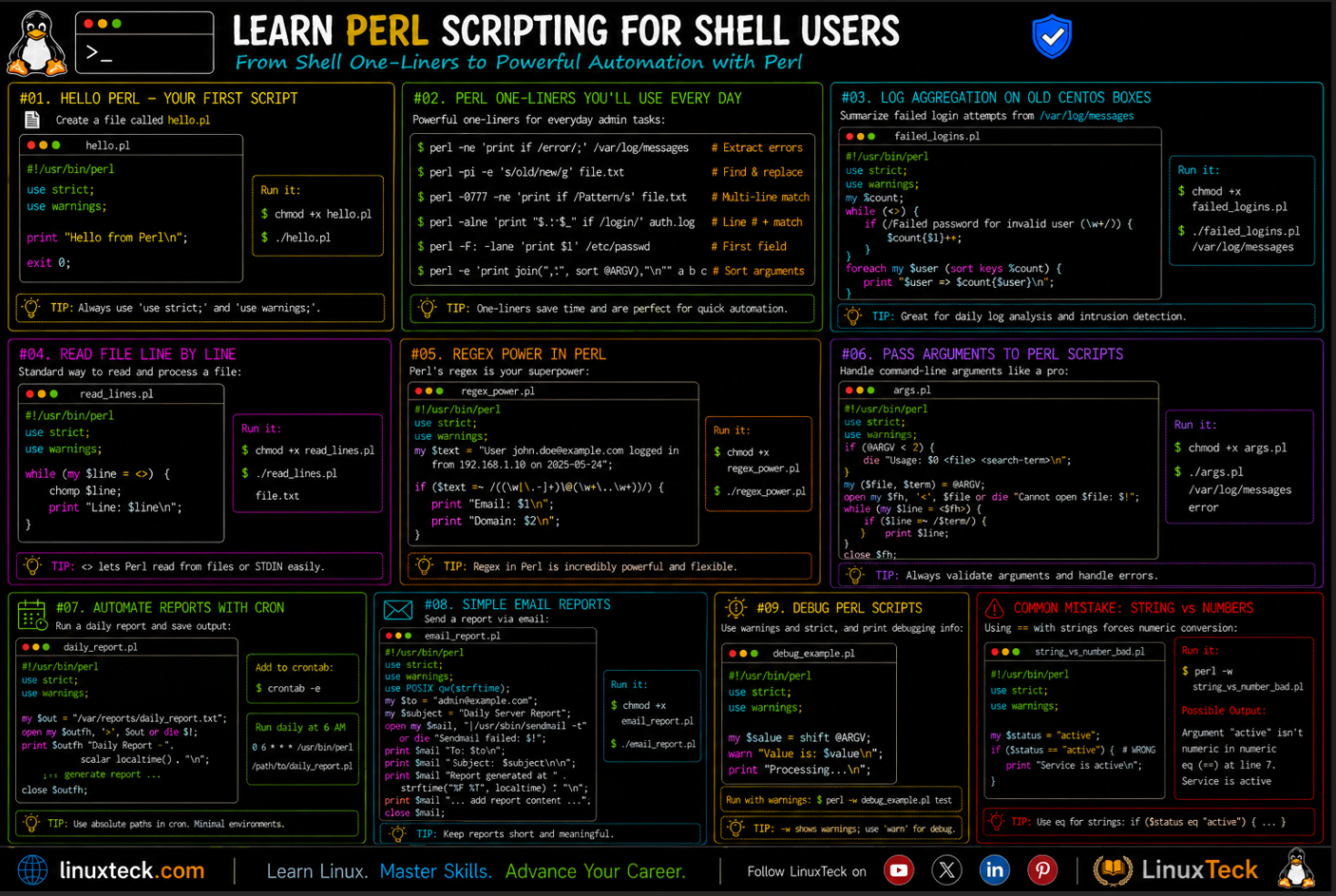
In this guide, you will learn how to write and run Perl scripts, work with variables and command-line arguments, read and process files, analyze logs, use regular expressions, and avoid common mistakes. By the end, you should be able to read existing Perl scripts, write practical automation scripts of your own, and decide when Perl is a better choice than another long shell pipeline.
A Scenario You Probably Recognise:
You are maintaining a bash script that greps a log file, pipes the result into awk, pipes that into sed, and pipes that into sort just to get one report out. It works, technically. Nobody wants to touch it. Every time someone adds a new condition, one more pipe gets bolted on.
- The script is now nine lines of pipes for a task that is really "read this file and count that pattern"
- Debugging it means running each pipe stage separately to find where it broke
- Whoever inherits it next has to reverse-engineer five different tools at once
That exact job takes about ten lines of Perl, and it reads top to bottom like a normal program.
If you are already solid on the basics of bash scripting, moving into Perl is less of a jump than it looks. A lot of the logic transfers directly, only the syntax around it changes.
Why Perl Scripting for Shell Users Still Matters
Perl was built to solve the exact problem shell users run into constantly: text is messy and awk, sed, and grep only take you so far before you are chaining five commands together to do one job. Larry Wall wrote Perl specifically because awk was not enough for the reporting work he needed to do, so he borrowed ideas from awk, sed, and C and built something that could do all of it in one language.
That history matters because it means Perl is not some unrelated academic language you have to learn from zero. It picks up almost exactly where your sed and awk habits leave off, and it gives you real variables, real control flow, and real error handling on top.
You will still use bash for the glue work, kicking off processes and chaining commands. Perl earns its keep the moment the text processing itself gets complicated enough that a one-liner stops being readable.
Getting Perl Running Without Turning It Into a Project
Most Linux distributions ship with Perl already installed, so there is a good chance you do not need to install anything at all. A quick check confirms it.
LinuxTeck.com
use strict;
use warnings;
# print a message to the terminal
print "Hello from Perl\n";
Save that as hello.pl, run chmod +x hello.pl the same way you would for a bash script, then run it with perl hello.pl or ./hello.pl if the shebang points at the right interpreter. Nothing about permissions changes here, it is the exact habit you already have.
Note:
use strict; and use warnings; are not decoration. They force you to declare variables properly and they will shout at you the moment you make a typo instead of silently doing the wrong thing. Every script in this article uses both, and yours should too.
The Part That Actually Looks Different: Sigils
This is the part that throws most shell users on day one. In bash, a variable is just a name, $name whether it holds one word or a whole array. Perl uses a different symbol depending on what kind of data the variable holds.
$ means a single value, a scalar. @ means a list of values, an array. % means a set of key and value pairs, a hash. Once that clicks, reading Perl gets a lot less intimidating, because the symbol is basically telling you what shape the data is before you even look at the rest of the line.
LinuxTeck.com
use strict;
use warnings;
my $name = "linuxteck";
my @tools = ("bash", "awk", "sed");
print "Welcome, $name\n";
print "Tools: @tools\n";
Tools: bash awk sed
Notice that double quotes let the variables interpolate straight into the string, no separate echo and string concatenation needed. That habit alone removes a lot of the quoting pain that shows up in longer bash scripts.
Scripts Worth Actually Typing Out Yourself
Reading syntax only gets you so far. These are small enough to run in a couple of minutes but they cover the situations you will actually hit.
Reading a file line by line, the same job as a bash while read line loop:
LinuxTeck.com
use strict;
use warnings;
open(my $fh, "<", "access.log") or die "Cannot open file: $!";
while (my $line = <$fh>) {
chomp $line;
if ($line =~ /error/i) {
print "Found: $line\n";
}
}
close($fh);
Found: 2026-07-04 10:14:51 disk error write failure /dev/sda1
Reading arguments, the equivalent of $1 and $2 in a bash script:
LinuxTeck.com
use strict;
use warnings;
my $user = $ARGV[0];
my $count = $ARGV[1];
if (!$user || !$count) {
print "Usage: perl greet.pl <user> <count>\n";
exit 1;
}
for (my $i = 1; $i <= $count; $i++) {
print "Hello $user, run number $i\n";
}
Hello deepak, run number 2
Hello deepak, run number 3
A real-world one, the kind of script that actually replaces a chain of piped shell commands. This counts errors per service straight out of a log file:
Note:
The log path below targets RHEL-based systems like the CentOS box mentioned earlier, where /var/log/messages is the standard syslog file. On Debian or Ubuntu the equivalent is usually /var/log/syslog, and on a fully systemd-managed host that log may be routed through journalctl instead of sitting in a flat file at all. Adjust the path to match whatever your distro actually writes to.
LinuxTeck.com
use strict;
use warnings;
my %error_count;
open(my $fh, "<", "/var/log/messages") or die "Cannot open log: $!";
while (my $line = <$fh>) {
if ($line =~ /(error|failed)/i) {
my ($service) = $line =~ /(\w+)\[\d+\]/;
$service ||= "unknown";
$error_count{$service}++;
}
}
close($fh);
foreach my $service (sort keys %error_count) {
print "$service: $error_count{$service} errors\n";
}
sshd: 5 errors
unknown: 1 errors
That one script does the job of a grep, an awk field extraction, and a sort-and-count pipeline, in a form you can actually add conditions to later without it turning into spaghetti.
Common Mistake:
Shell users almost always write this on their first real Perl script, because == works fine for string comparison in a bash [ ] test:
LinuxTeck.com
use strict;
use warnings;
my $status = "active";
if ($status == "active") {
print "Service is active\n";
} else {
print "Service is not active\n";
}
Service is active
It happens to print the right thing here, purely by accident, but Perl is warning you that it treated both sides as numbers, which they are not. == is for numbers. Strings need eq. Swap that one line for if ($status eq "active") and the warning disappears along with the risk of it silently doing the wrong comparison somewhere less obvious.
Catching Problems Before They Reach Production
You already know the bash habit of running a script with bash -x to see every command as it executes. Perl has a similar reflex, perl -c script.pl checks the syntax without actually running anything, which catches a surprising number of typos before they cost you a debugging session at 2am.
use warnings; does most of the heavy lifting after that. It flags uninitialized variables, numeric comparisons on strings like the one above, and a handful of other classic mistakes, right at the point they happen instead of three functions later where the actual symptom shows up.
Note:
If a script dies with die "message: $!", that $! is the actual system error, permission denied, file not found, whatever it is. Print it. Do not swallow it the way a lot of quick bash scripts swallow exit codes with no message at all.
Deciding Which One To Reach For
Nobody is asking you to replace bash. Bash is still the right tool for kicking off processes, chaining commands together, and gluing your system together day to day. Perl earns its place the moment you are parsing text with more than one condition, building a report, or reading a config format that a plain grep and sed pipeline keeps fighting you on.
A decent rule that has held up for me over the years: if a bash one-liner needs a second pipe to fix what the first pipe got wrong, it is probably a five-minute Perl script instead. You keep the shell for orchestration and let Perl handle the actual data wrangling, and the whole thing stays easier to read six months from now when you have forgotten why you wrote it.
The scripts here also drop straight into a cron job or a shell scripting workflow you already have, calling perl /path/to/script.pl the same way you would call any bash script from a crontab entry.
Questions I Get Asked About This All the Time
Do I really need "use strict" and "use warnings" on every single script?
Yes, even for a five-line throwaway script. They cost you nothing and catch typos before they turn into confusing bugs later. Skipping them on a "quick" script is exactly how the quick script ends up being the one that breaks silently.
Why did my script just die instead of printing something like bash would?
Perl's die is closer to bash's exit 1 combined with an error message, it stops the script immediately. If you want it to keep going and just log the problem, wrap the risky part in an eval block instead of letting die stop everything.
Can I call a Perl script from cron the same way I call a bash script?
Yes, exactly the same way. Give it a proper shebang line, make it executable with chmod +x, and point cron at it. Just remember cron runs with a much smaller environment. Perl's own file functions like open talk to the kernel directly and do not care about PATH at all, but if your script shells out to an external command with backticks or system(), use the full path to that binary, for example /usr/bin/curl instead of just curl.
Why does comparing two numbers with "eq" give me a weird result?
Because eq is a string comparison, so 10 eq "10.0" is false since the text does not match, even though the numbers are equal. Use == for numbers and eq for strings, and this stops being confusing pretty quickly once you get the habit down.
Is it fine to mix a Perl one-liner into the middle of a bash pipeline?
Perfectly fine, and pretty common. Something like cat file.log | perl -ne 'print if /error/' works exactly the way an awk or sed step would. You do not need to rewrite the whole pipeline in Perl just to use it for one stage.
Do I need chmod +x on a Perl script the same as a bash script?
If you want to run it as ./script.pl, yes, same as bash. If you are always going to run it as perl script.pl, the execute bit does not matter because you are handing it to the interpreter directly rather than executing the file itself.
Summary
Now that you have a few of these running, the next honest step is picking one messy bash pipeline you already maintain and rewriting just that one in Perl. You will feel the difference immediately. This kind of perl scripting for shell users is not about abandoning bash, it is about knowing when to hand the job to the tool that was built for it.
For the parts this article did not cover, regular expressions in depth, file handling edge cases, modules from CPAN, the official perlintro documentation is worth keeping open in a tab while you practice.
Related Articles
- Learn Lua Programming on Linux
- Bash Functions: Writing Reusable Code (Part 21 / 34)
- Bash If Statement Complete Guide With Examples (Part 11 / 34)
- How Bash Uses Grep for Text Processing (Part 23 / 34 )
- Linux Shell Scripting Command Cheat Sheet
- Shell Scripting Environment Setup Guide Part 3 of 34
Learn step-by-step how to automate Linux tasks with real-world scripts and practical examples.