sed extract text between markers

How do I extract config values from between BEGIN and END markers?

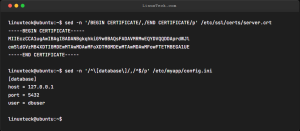
Try: sed -n '/BEGIN CERTIFICATE/,/END CERTIFICATE/p' /etc/ssl/certs/server.crt Info: sed -n suppresses automatic printing. The pattern '/START/,/END/p' prints all lines between two matching delimiters (inclusive). Examples: $ sed -n '/^\[database\]/,/^$/p' config.ini  # Extract section until empty line $ awk '/BEGIN/,/END/' file.txt  # Equivalent using awk $ sed -n '/ERROR/,+5p' logfile  # Print […]

Read More
Linux SSH Ed25519 key generation command in terminal

My SSH key uses old RSA. How do I switch to a modern strong algorithm?

Try: ssh-keygen -t ed25519 -a 100 -f ~/.ssh/id_ed25519 -C "linuxteck@ubuntu-2026" Info: Ed25519 provides faster, more secure keys than RSA. -a 100 increases KDF rounds to strengthen passphrase protection against offline brute-forcing. Examples: $ ssh-copy-id -i ~/.ssh/id_ed25519.pub user@server  # Copy public key to server $ ssh-keygen -y -f ~/.ssh/id_ed25519  # Print public […]

Read More
Tail Linux logs with colored output using grep

How do I tail a log file with colored output for errors?

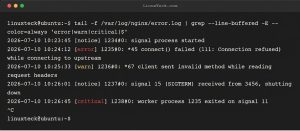
Try: tail -f /var/log/nginx/error.log | grep --line-buffered -E --color=always 'error|warn|critical|$' Info: --color=always highlights matching text. The |$ pattern matches every line so non-matching lines still display. --line-buffered ensures real-time output. Examples: $ tail -f app.log | grep --line-buffered --color=always -E 'ERROR|WARN|$' $ journalctl -f | grep --line-buffered --color=always -E 'Failed|Error|$' $ […]

Read More