Choosing the right Linux distribution is one of the most important decisions for developers. While many distributions focus on delivering the latest software as quickly as possible, Debian takes a different approach by prioritizing stability, reliability, and long-term maintainability. That philosophy has made it one of the most trusted operating systems for development work, production servers, cloud platforms, and countless downstream Linux distributions.
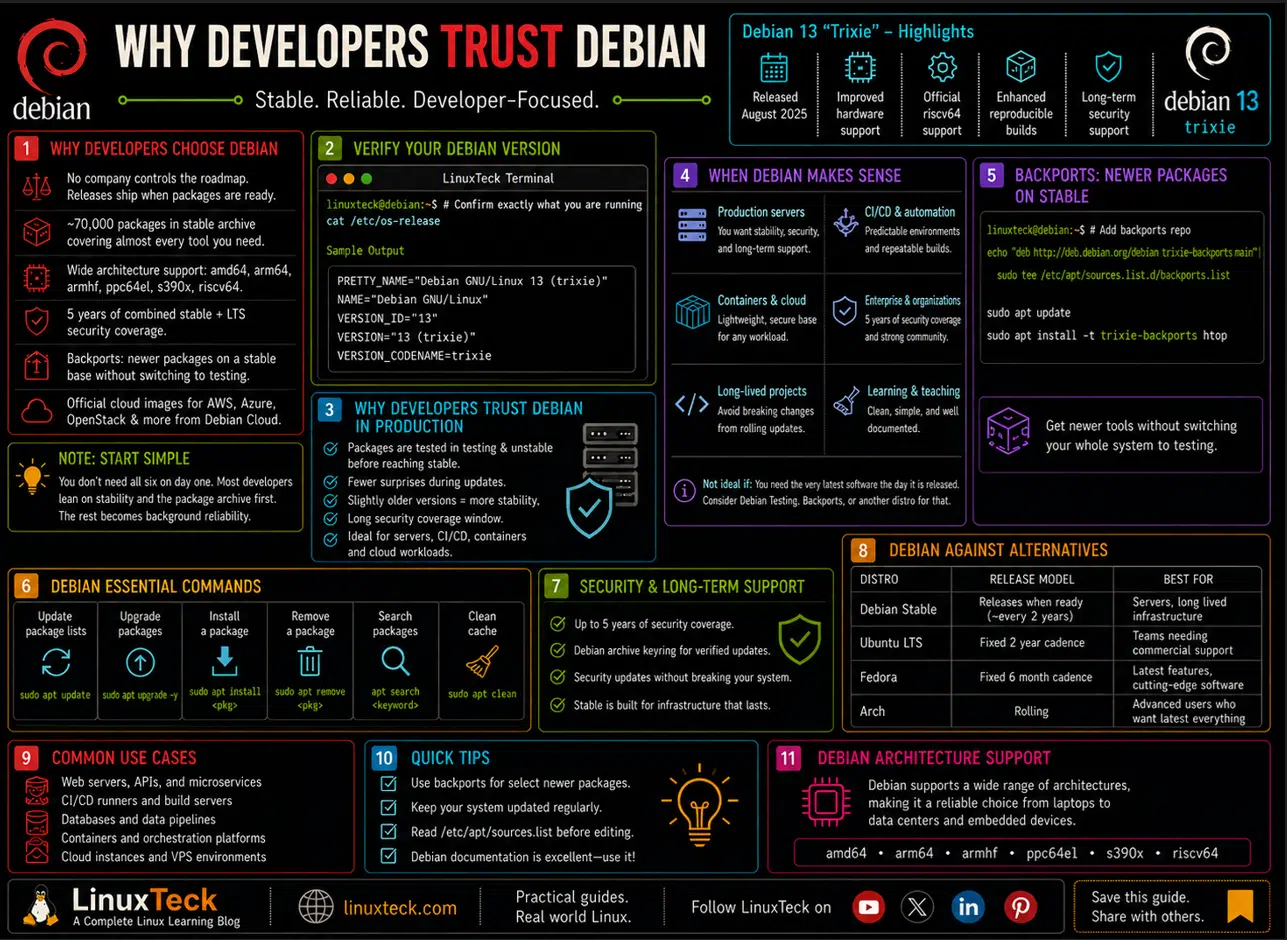
Debian 13 "Trixie", released in August 2025, continues that tradition with improved hardware support, official riscv64 support, enhanced reproducible builds, and long-term security updates. Rather than chasing every new software release, Debian focuses on providing a stable foundation that developers and organizations can depend on for years.
In this guide, you'll learn why Debian remains a preferred choice for developers, explore its strengths and trade-offs, understand when it makes sense over alternatives like Ubuntu or Fedora, and discover practical commands and best practices for using Debian in development and production environments.
Before exploring these topics, it's a good idea to verify the Debian version running on your system:
LinuxTeck
cat /etc/os-release
NAME="Debian GNU/Linux"
VERSION_ID="13"
VERSION="13 (trixie)"
VERSION_CODENAME=trixie
Why Developers Keep Picking Debian:
- No company sets the roadmap, so releases ship when packages are ready instead of when a sales calendar says so. See our Debian vs Ubuntu comparison for how that plays out against its most popular downstream.
- Roughly 70,000 packages in the stable archive alone, covering nearly every language runtime and database you would reach for.
- Official support for a genuinely wide set of architectures, including amd64, arm64, armhf, ppc64el, s390x, and now riscv64.
- Five years of combined stable and LTS security coverage, which matters a lot more once you are running production infrastructure instead of a laptop.
- Backports let you pull a handful of newer packages onto a stable base without switching your whole system to testing.
- Official cloud images published by the Debian Cloud team for AWS, Azure, and OpenStack, plus generic and nocloud images for everything else, so the box you develop on locally matches what actually runs in production.
You do not need to care about all six of these on day one. Most developers end up leaning on two or three, usually the stability and the package archive, and the rest becomes background reliability they stop thinking about after the first month.
Debian Is Perfect for Developers, So Where Is the Catch?
Short answer: yes, for most day to day development and especially for anything headed to production. Debian is perfect for developers who want predictable behavior, long security support, and a package manager that does exactly what you tell it to, without the drama of a rolling release. It is not the right pick for someone chasing the newest language version the day it lands, and the section further down on tradeoffs covers exactly where that shows up.
Why Developers Trust Debian in Production
Rolling release distros hand you the newest packages the moment they are cut, but you also inherit whatever ships broken with them. Debian takes the opposite approach on purpose. A package only reaches stable after spending real time in testing and unstable first, getting shaken out by people who deliberately run less predictable branches so production systems do not have to.
The tradeoff is that stable Debian runs slightly older package versions than something like Fedora or Arch. Most developers treat that as a feature rather than a limitation, especially on a server where the last thing you want is a library silently jumping a major version during a routine update:
LinuxTeck
sudo apt update && sudo apt upgrade -y
Building dependency tree... Done
Calculating upgrade... Done
14 packages upgraded, 0 newly installed, 0 to remove.
Need to get 22.4 MB of archives.
Run that on a Debian stable box and it rarely surprises you. Run the equivalent on a rolling release and you occasionally get a broken display driver or a snapped dependency chain instead, which is exactly why production teams keep leaning on Debian for anything customer facing.
A Package Archive That Covers Almost Everything
Debian's stable archive holds close to 70,000 packages, spanning nearly every language runtime, database engine, and build tool a working developer reaches for. That scale exists because of the deb packaging format and decades of maintainers keeping dependency trees clean instead of letting them rot.
Architecture Support
Hardware support is just as wide. Beyond the usual amd64 and arm64 targets, Debian 13 officially added riscv64 to the list, alongside continued support for armhf, ppc64el, and s390x. It is also the default choice for a huge share of Raspberry Pi and single board computer projects, so if you are building anything embedded, you are not switching distros halfway through the project:
LinuxTeck
apt-cache policy nginx
Installed: (none)
Candidate: 1.26.3-3+deb13u7
Version table:
1.26.3-3+deb13u7 500
500 http://deb.debian.org/debian trixie/main amd64 Packages
For quick dependency checks and version pinning, apt and dpkg are still some of the most predictable tooling in the entire Linux world, which is a big part of why so many other distros build directly on top of them in the first place.
Backports Solve the Freshness Problem
The most common complaint about Debian stable is that packages feel a version or two behind. Backports exist specifically to fix that without forcing you onto testing or unstable. You get a small, curated set of newer packages rebuilt against the stable base, so the rest of your system keeps its usual guarantees:
LinuxTeck
echo "deb http://deb.debian.org/debian trixie-backports main" | sudo tee /etc/apt/sources.list.d/backports.list
sudo apt update
sudo apt install -t trixie-backports <package-name>
Reading package lists... Done
The following packages will be upgraded:
<package-name>
1 upgraded, 0 newly installed, 0 to remove.
That one line gets you close enough to current without ever putting your base system's stability on the line, which is usually a better trade than jumping to testing just to get one library update. I keep backports enabled permanently on my own dev laptop for exactly this reason, it is the one repo I never end up regretting.
The Mistake Almost Every New Debian Developer Makes
Mixing stable with testing or unstable to grab one newer package feels harmless right up until apt starts pulling in half your system from a different release branch:
Warning:
Adding a testing or sid repository next to stable without pinning it lets apt quietly resolve far more than the one package you wanted, and it can leave the system in a mixed state that is genuinely painful to unwind later.
The actual fix is apt pinning, not just adding the repo and hoping for the best:
LinuxTeck
printf 'Package: *\nPin: release a=testing\nPin-Priority: 100\n' | sudo tee /etc/apt/preferences.d/testing-pin
Pin: release a=testing
Pin-Priority: 100
That pin keeps testing packages available on request without letting them win a dependency fight against stable, which is the entire point of running stable in the first place. If you are setting this up on a fresh box, our server hardening checklist is worth running through right after, before anything customer facing touches that machine.
Containers and Cloud Images Are a First Class Citizen
Debian is one of the most common base images across container registries for a reason. Docker's official repos support it directly, and Debian's own slim variants keep image sizes small without stripping out anything you actually need for a build pipeline. The official Debian images on Docker Hub are published as multi-architecture manifests, which matters if your CI runs on a different architecture than your production fleet:
LinuxTeck
docker run --rm -it debian:trixie-slim bash
trixie-slim: Pulling from library/debian
Digest: sha256:9f8a1e...
Status: Downloaded newer image for debian:trixie-slim
root@a1b2c3d4e5f6:/#
Check our Docker management command cheat sheet if you are coming from a different base image and want the equivalent commands mapped out. On the backup side, the same predictability applies. A cron job or systemd timer running on Debian stable does not get quietly interrupted by a surprise kernel update mid run the way it sometimes does on a rolling release, and our Linux server backup solutions guide walks through setting that up properly.
Automating Security Updates in Production
A lot of the production trust Debian gets comes down to one unglamorous package: unattended-upgrades. It applies security patches on a schedule without you SSHing in every morning, and it is the single most common hardening step teams add right after the first boot on a server:
LinuxTeck
sudo apt install unattended-upgrades apt-listchanges
sudo dpkg-reconfigure --priority=low unattended-upgrades
sudo unattended-upgrades --dry-run --debug
Initial whitelisted packages:
Starting unattended upgrades script
Allowed origins are: ['origin=Debian,codename=trixie,label=Debian-Security']
No packages found that can be upgraded unattended and no pending auto-removals
That last line is what you want to see on a healthy box. Pair it with apt-listbugs if you want a warning before a package with a known release critical bug gets pulled in, and check apt list --upgradable on a schedule so nothing quietly piles up between patch windows.
Where Debian Falls Short
Debian is perfect for developers who value predictability and a long support runway, but that focus is not free. Package versions in stable can sit a year or two behind upstream by the time the next release lands, and while backports close some of that gap, it does not close all of it. If your workflow depends on being on the newest compiler or framework release the week it ships, Debian stable will feel like it is holding you back, and something with a faster cadence might suit you better. We weigh that tradeoff across several distros in our best Linux distros for developers roundup.
Proprietary drivers are the other common friction point, particularly NVIDIA hardware, since Debian's default repos stick strictly to free software. Debian splits its archive into components: main is fully free, contrib is free but depends on non-free software, and non-free plus non-free-firmware hold the proprietary drivers and blobs most laptops eventually need. Getting a proprietary driver working usually means adding those last two components to your sources list first, which is a deliberate extra step rather than something that happens automatically the way it does on some other distros.
Debian Against the Alternatives, at a Glance
| Distro | Release model | Support window | Best fit |
|---|---|---|---|
| Debian stable | Released when ready, roughly every 2 years | 5 years (3 full + 2 LTS) | Servers, long lived infrastructure |
| Ubuntu LTS | Fixed 2 year cadence | 5 years standard, up to 10 with Pro | Teams that want commercial support and hardware enablement |
| Fedora | Fixed 6 month cadence | About 13 months per release | Developers who want current toolchains on a laptop |
| Arch | Rolling | Continuous, no fixed EOL | Users who want the newest packages and accept more manual upkeep |
Running Debian Past Your Laptop
Cloud and Server Support
A lot of developers who trust Debian locally end up wanting the exact same base for staging environments, CI runners, or an always on dev server. Every major cloud provider (AWS, Azure, Google Cloud, and more) supports Debian images built for exactly that, so the environment you test on locally matches what actually runs in production instead of approximating it.
If you are shopping for that kind of VPS, our DigitalOcean vs Vultr comparison walks through pricing and performance for that exact use case, and both providers support Debian images out of the box.
Note:
If you are building out a full dev to production pipeline rather than just picking a server distro, our Linux DevOps career guide and essential Git commands guide are good next stops once Debian is installed and configured.
Conclusion
Debian earns its spot on developer machines and production servers the boring way, by staying predictable release after release and never letting a company's roadmap override what the community decides is ready. Pair that with a package archive and architecture support that covers nearly anything you would build, and it is easy to see why it keeps showing up years after flashier distros fade out. Drop me your feedback or comments below. Feel free to share this article with others if you like it.
Thank you for reading!
To explore all our Linux guides and tutorials, check out our Linux distro category archive.
Questions I Get Asked About This All the Time
Is Debian too outdated for serious development work?
No, Debian is not too outdated for serious development work. Stable ships slightly older versions on purpose, but backports, containers, and language specific version managers let you get newer runtimes without touching the base system. Most developers keep stable for the OS layer and manage app level dependencies separately anyway.
Should I use Debian stable or testing for daily development?
Stable if the machine touches anything production related or you cannot afford surprise breakage. Testing if you want newer packages on a personal dev laptop and do not mind the occasional rough edge. Skip unstable entirely unless you actively want to help find bugs before they reach testing.
Can I run Docker and Kubernetes tooling on Debian without issues?
Yes, Debian is one of the most common base images in container registries, and the official Docker repos support it directly. Kubernetes tooling like kubeadm and kubectl install cleanly through their own apt repos as well, no extra workarounds needed.
Why does apt sometimes want to remove packages I did not ask to remove?
That almost always means a dependency conflict, often from mixing repos across release branches without pinning. Check apt-cache policy on the conflicting package before confirming any removal apt suggests, and pin your release branches properly to avoid it happening again.
Is Debian a good choice for a personal cloud server or self hosted apps?
Very much so. Low resource overhead, a long security support window, and a package archive that covers nearly every self hosted app out there make it one of the most common choices for home labs and small VPS setups alike.
How is Debian different from the distros it is used to build, like Ubuntu?
Ubuntu takes Debian's package base and testing work, then layers its own release schedule, default software choices, and commercial support on top. Debian itself has no company behind it, a longer freeze and test cycle, and a governance model run entirely by its own contributors.
Explore LinuxTeck for practical guides covering Rocky Linux, RHEL, AlmaLinux, Ubuntu, Debian, Fedora, Linux administration, shell scripting, networking, and enterprise Linux technologies.
Support My Work
Thank you for reading and for being part of this journey. If this article saved you time, consider buying me a coffee. Every contribution helps me keep producing in-depth, practical Linux content for readers like you.

Thank you for your endless support