Debian and Ubuntu share the same DNA and completely different personalities. One's built to be left alone for years, the other's built to keep up. Here's which one actually fits your setup.
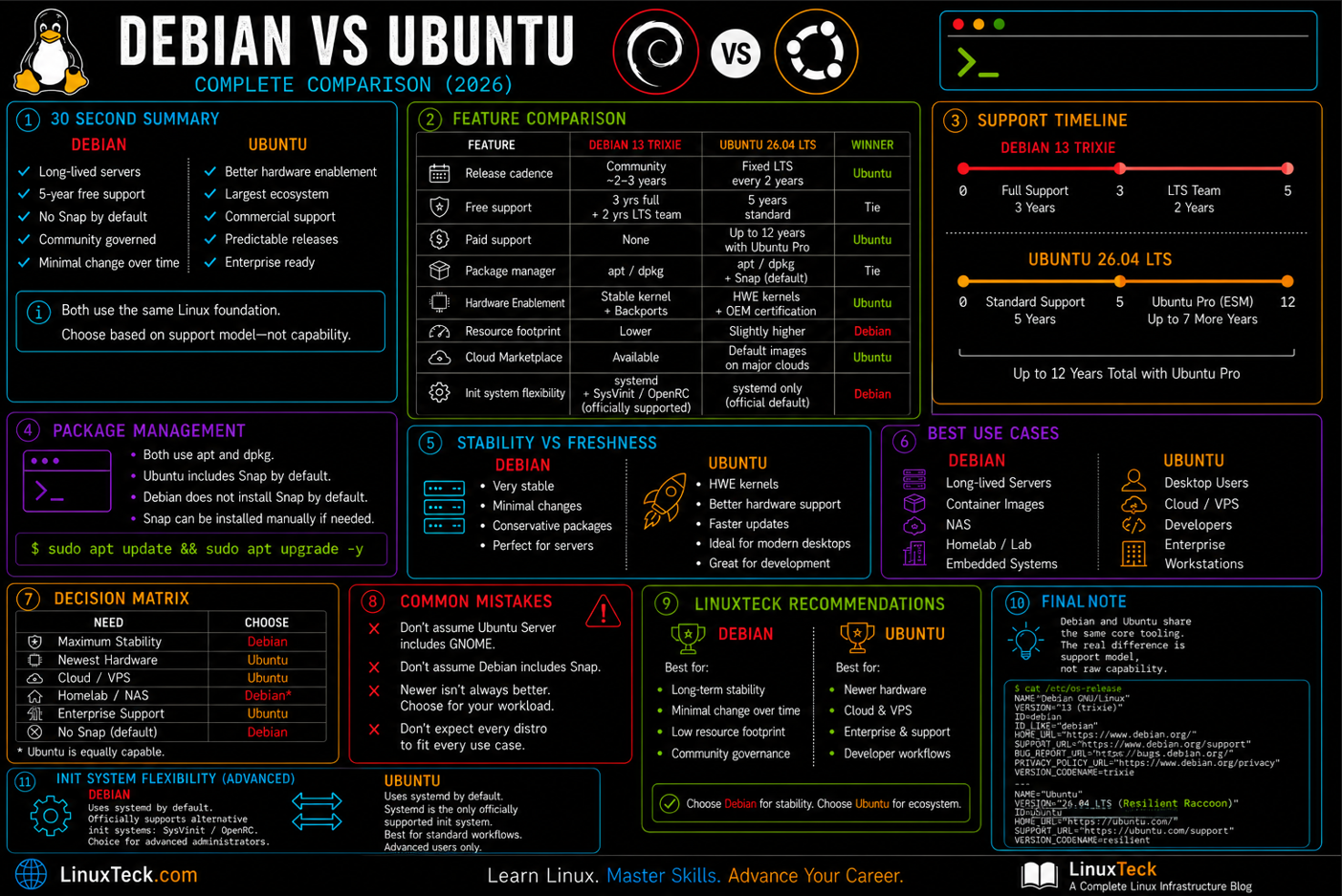
Choose Debian for long-lived servers, free extended support, and zero Snap.
Choose Ubuntu for new hardware, the largest community, and commercial support options.
Both share the same core tooling, the real decision is support model, not raw capability.
| Feature | Debian 13 Trixie | Ubuntu 26.04 LTS | Winner |
|---|---|---|---|
| Release cadence | No fixed schedule, ~2-3 years | Fixed, LTS every 2 years | Ubuntu |
| Free support window | 3 yrs full + 2 yrs LTS team | 5 yrs standard | Tie |
| Max support (paid) | No paid tier | 12 yrs with Ubuntu Pro | Ubuntu |
| Package manager | apt / dpkg | apt / dpkg + Snap | Tie |
| Hardware enablement | Stable kernel cadence, backports for newer hardware | HWE kernel stack, OEM certification program | Ubuntu |
| Resource footprint | Lighter on minimal installs | Slightly heavier by default | Debian |
| Cloud image defaults | Available, less default | Default on most providers | Ubuntu |
| Init system flexibility | Supports alternative init systems | Primarily systemd | Debian |
Choose Debian if...
- ✔ You want maximum stability with minimal drift
- ✔ It is a long-lived production server or container base
- ✔ You want to avoid Snap entirely
- ✔ You prefer community governance over a vendor
Choose Ubuntu if...
- ✔ You are installing on a desktop or new laptop
- ✔ You need day-one drivers for new hardware
- ✔ You are developing and want the biggest ecosystem
- ✔ Your org wants a commercial support contract
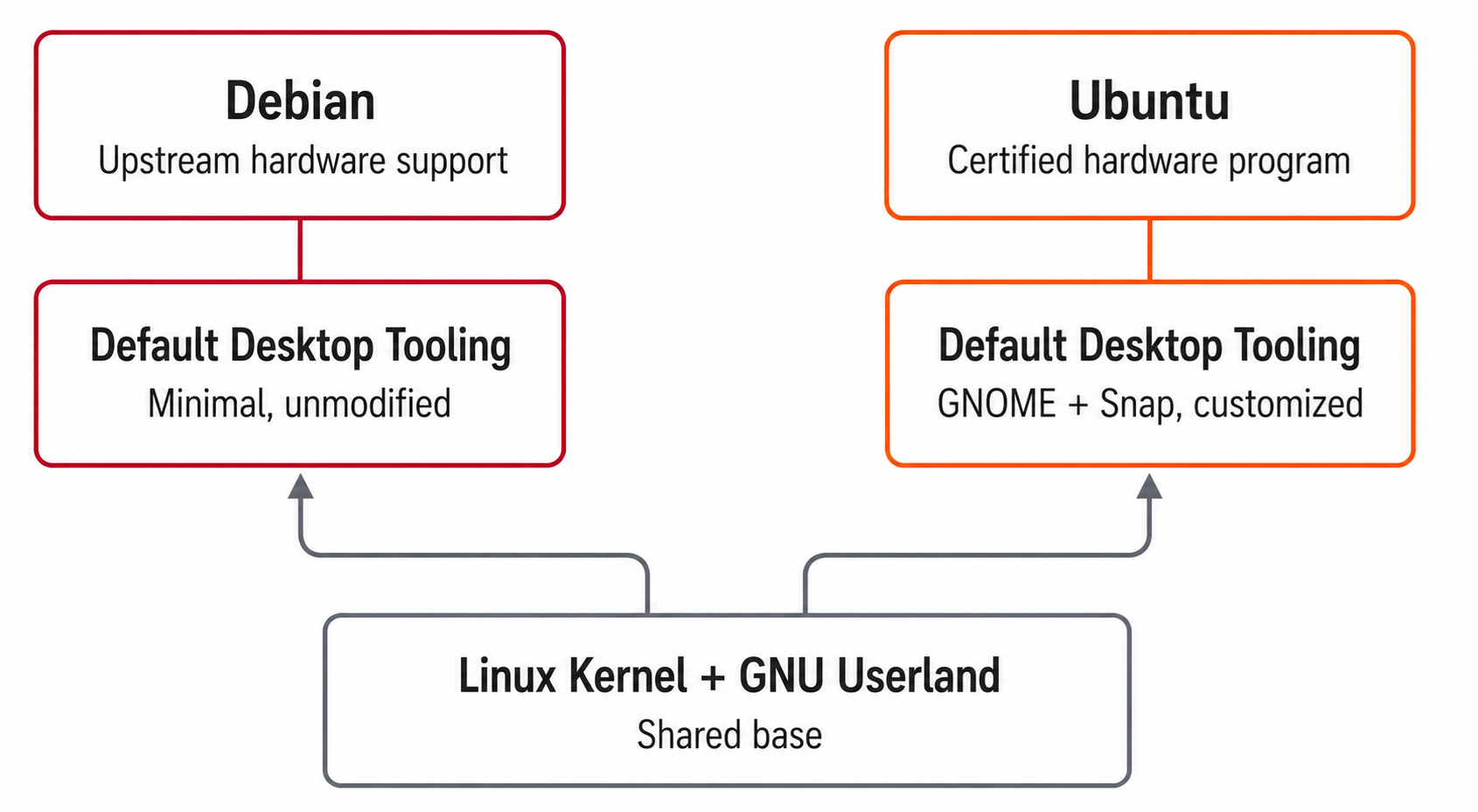
Both trace back to the same GNU project tooling underneath. The real split is who maintains the release, how fast packages move, and what you are willing to trade for that speed.
Release Cycle & Support Lifecycle
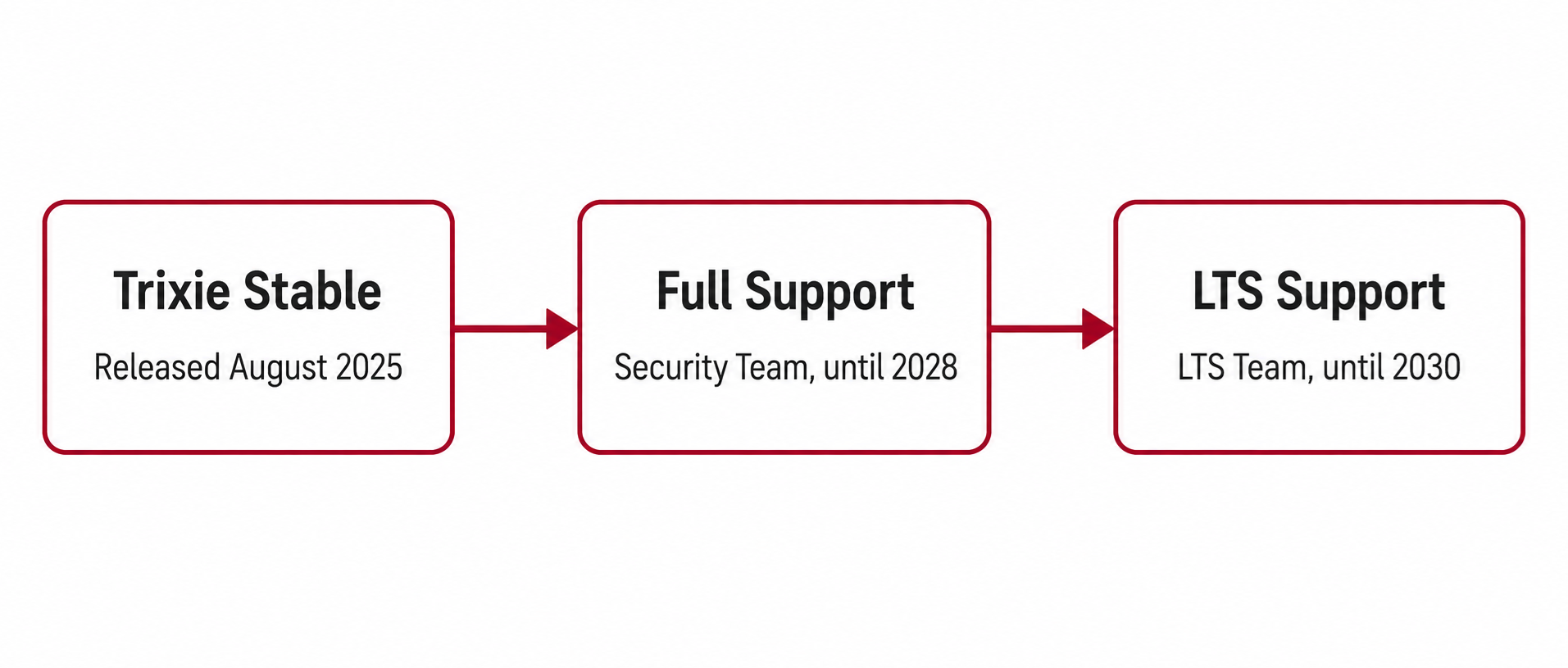
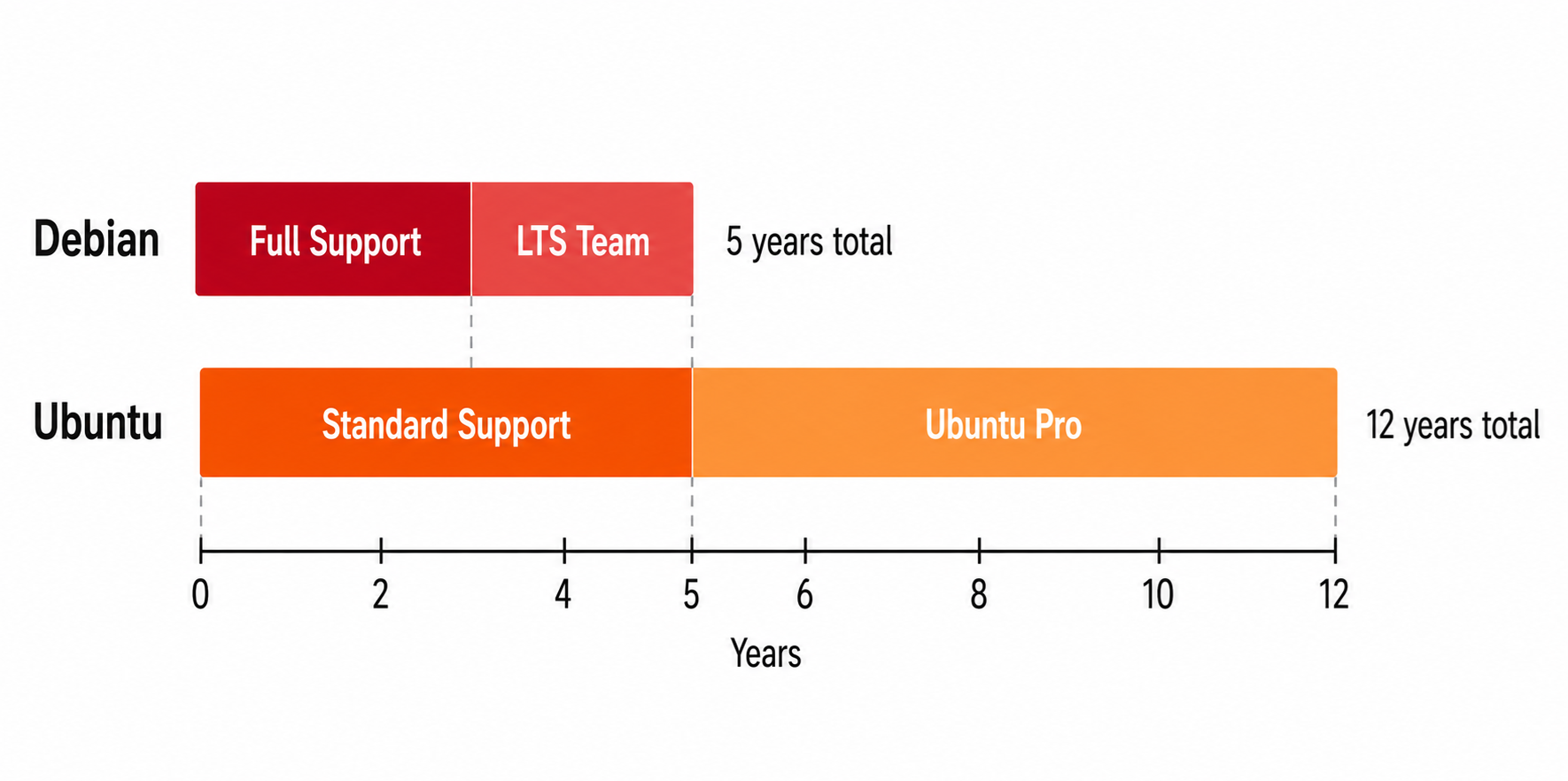
Debian does not run on a calendar. A new stable release ships when the release team decides it is ready, historically every two to three years. Trixie became stable in August 2025 and gets full support until August 2028, then two more years under the Debian LTS team.
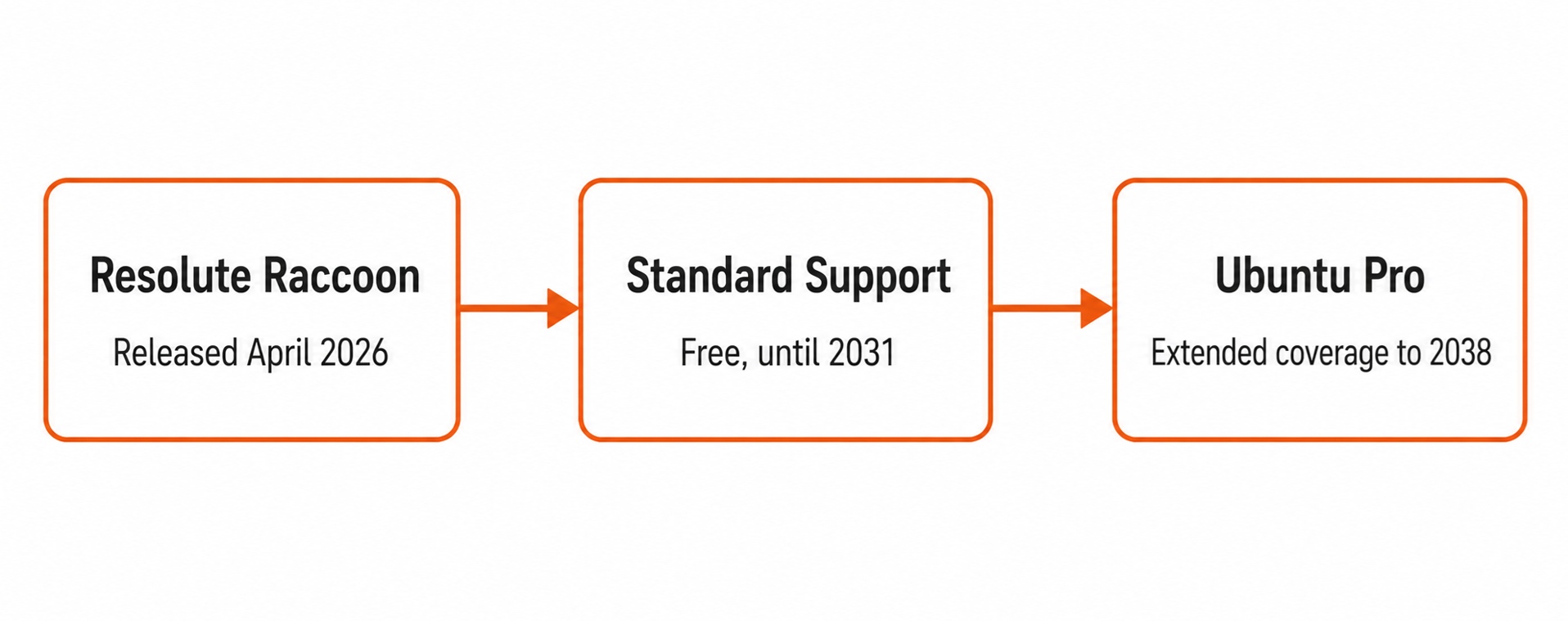
Ubuntu ships every six months, with an LTS every two years in April. Resolute Raccoon carries standard support through April 2031, and Ubuntu Pro extends that further to 12 years total.
Debian Pros
- Free 5 year total window, no contract
- No forced feature churn between releases
Debian Cons
- No fixed release date to plan around
- No paid tier past year 5
🏆 Winner: Ubuntu
For lifecycle planning, the fixed schedule and a real paid path to 12 years give enterprises something to build a migration calendar around. Debian still wins on cost if you never need support past 5 years.
💡 Did You Know?
Ubuntu's 12 year Legacy Support tier is a relatively recent addition, standard LTS coverage was capped at 5 years for most of Ubuntu's history.
Related reading: compare this against how RHEL handles its own lifecycle if Red Hat is also on your shortlist.
Package Management: Same Tools, Different Defaults
Both distros run on dpkg and apt, so command muscle memory carries over completely. In my own homelab, switching between the two feels identical day to day, the only friction shows up once Snap enters the picture.
LinuxTeck.com
cat /etc/os-release
VERSION="26.04 LTS (Resolute Raccoon)"
ID=ubuntu
ID_LIKE=debian
VERSION_ID="26.04"
VERSION_CODENAME=resolute
💡 Did You Know?
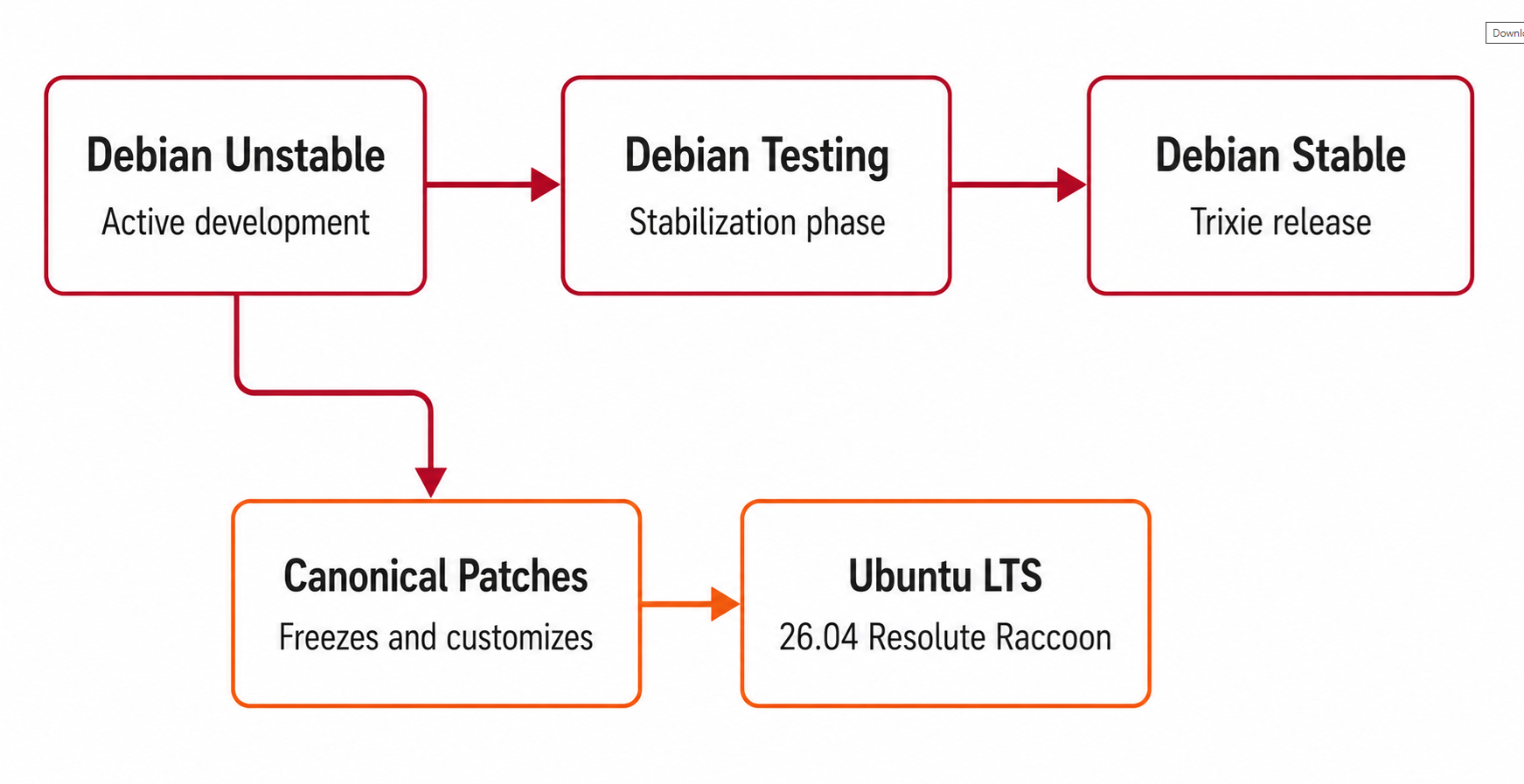
That ID_LIKE=debian line is the whole story in one field. Ubuntu imports most of its package base from Debian Unstable before Canonical patches and freezes it.
LinuxTeck.com
sudo apt update && sudo apt upgrade -y
Building dependency tree... Done
Calculating upgrade... Done
0 upgraded, 0 newly installed, 0 to remove and 0 not upgraded.
Where it changes is Snap. Ubuntu ships snapd by default and increasingly wraps its own packages, like Firefox, as snaps instead of debs.
LinuxTeck.com
snap list
core24 20260410 1612 latest/stable canonical✓ base
firefox 148.0 480 latest/stable mozilla✓ -
snapd 2.68 21759 latest/stable canonical✓ snapd
⚠ Common Mistake
Running snap list on a minimal Debian Trixie install throws command not found unless you install snapd yourself. Do not assume Snap availability in scripts meant to run on both distros.
🏆 Winner: Tie, leaning Debian for purists
The commands you already know work identically on both. The only real fork in the road is whether you want Snap in the picture at all.
Stability vs Freshness
Debian stable freezes package versions early and only backports security fixes for the rest of that release's life. That is why a production mail relay on Debian can go two years with barely a hiccup.
Ubuntu takes a middle path. Interim releases chase newer packages every six months, while LTS releases freeze similarly to Debian but start with a newer kernel baseline through the Hardware Enablement stack.
🏆 Winner: Depends on the workload
Debian wins for infrastructure that should not change for years. Ubuntu wins if you want that same stability without falling two years behind on hardware and kernel support.
Advanced Users: Init System Flexibility
Both distros run systemd by default, that will not change for the vast majority of desktop and server installs. Where they differ is policy: Debian officially supports alternative init systems, including sysvinit and OpenRC, as documented project policy, so admins who want to run something other than systemd have a supported path. Ubuntu is designed, tested, and supported primarily around systemd, and swapping it out is not an officially supported configuration. This is not a claim that alternative init systems are better, it is a niche flexibility some administrators intentionally choose Debian for, and it will not matter to most readers here.
Desktop & Hardware Support
If you are installing on a laptop bought in the last twelve months, Ubuntu is usually the smoother path. Canonical works directly with vendors like Dell and Lenovo, and new chipsets tend to get day-one kernel support.
Our Ubuntu installation walkthrough covers the GUI installer screen by screen. Both distros ship a Microsoft CA-signed shim loader out of the box, so Secure Boot works with zero changes on a standard install, the only extra step is enrolling your own MOK (Machine Owner Key) for third-party drivers like NVIDIA's.
🏆 Winner: Ubuntu
Ubuntu benefits from HWE kernels and OEM certification, which get new hardware working sooner after release. Debian gets there too, through stable releases and backports, it just takes longer to land.
Server, Cloud & Production Use
Cloud marketplaces overwhelmingly default to Ubuntu images. AWS, Azure, and GCP all treat it as close to a first class citizen. In real deployments I have run, Debian images exist on every provider too, they are just rarely the default click.
For VPS hosting without a strong preference, Ubuntu's larger community usually means faster answers when something breaks at 2 AM. Run a proper hardening checklist before either touches production traffic.
Warning:
Do not assume Ubuntu Server ships the same defaults as Ubuntu Desktop. Server installs skip GNOME entirely, which is good for resource usage but means some GUI-dependent guides simply will not apply.
🏆 Winner: Ubuntu, for marketplace availability and ecosystem depth
Ubuntu's edge here is availability, it is the pre-built default image on most cloud marketplaces, with more vendor documentation written against it. Debian images are available on every major provider too, and its smaller footprint stays competitive on resource-constrained VPS plans.
Security & Governance
Debian's security process runs in two phases. The Debian Security Team handles the first 3 years directly, then the separate Debian LTS Team takes over, staffed by volunteers and sponsors like Freexian.
Ubuntu's security process is faster to respond in practice because Canonical staffs it directly, part of what fueled the ongoing trust conversation around Ubuntu this year. Read up on what is actually targeting Linux servers in 2026 before finalizing a hardening plan.
🏆 Winner: No clear winner
Debian answers to volunteers and a constitution, Ubuntu answers to a company with faster resourcing. Pick based on which trade-off you trust more.
Debian vs Ubuntu: Decision Matrix & Recommendations
Skip the subjective scoring, here is what to pick based on what you actually need.
| If you want... | Recommendation |
|---|---|
| Maximum stability | Debian |
| Latest packages and kernels | Ubuntu |
| Gaming | Ubuntu |
| Production servers (long-lived) | Debian |
| Home lab / NAS | Debian |
| Cloud deployments | Ubuntu |
| Development machine | Ubuntu |
| Enterprise with support contract | Ubuntu |
| Desktop / new laptop | Ubuntu |
Beginners
Start with Ubuntu, see our Linux quick start guide.
Developers
Ubuntu for flexibility, check our developer distro roundup.
Production Servers
Debian for long-lived boxes, Ubuntu if you want a support contract.
Home Labs
Debian for the free long LTS window and light footprint.
Cloud
Ubuntu, it is the default image on nearly every major provider.
Enterprise
Ubuntu Pro for 12 years of coverage, Debian if procurement allows volunteer support.
Who Should Choose Debian
- Long-term server or container base you rarely touch
- Teams that want to avoid Snap entirely
- Budget-conscious home labs and NAS builds
Who Should Choose Ubuntu
- New hardware, laptops, and desktops
- Teams that want a commercial support contract
- Cloud-first deployments and larger dev teams
⚠ Common Mistakes People Make
- Assuming Ubuntu Server ships with GNOME preinstalled, it does not
- Assuming Debian ships snapd by default, it does not
- Picking based on release recency instead of checking actual support windows
- Skipping the hardening checklist regardless of which distro is chosen
Questions I Get Asked About This All the Time
Is Ubuntu just Debian with extra branding?
Not quite. Ubuntu pulls most of its package base from Debian unstable, then Canonical adds its own patches, defaults, kernel enablement, and release schedule on top. The package format and core tooling are the same, but the release process and support model are entirely different projects.
Which one should I use for a home server or NAS build?
Debian is the more common pick, specifically for the long LTS window and low resource usage, since a home server often runs untouched for years. Ubuntu Server works just as well if you already know its ecosystem.
Can I remove Snap from Ubuntu and just use apt?
You can, and plenty of admins do exactly that on servers. Some default packages like Firefox ship as snaps, so you will need the deb equivalents from a PPA afterward. If avoiding Snap entirely matters, that is a point in Debian's favor.
Will my apt commands and scripts work the same on both?
Yes, for the most part. Anything built around apt, dpkg, or systemd behaves the same way. Scripts usually break around package name differences or assumptions about Snap being present.
Which one is faster in day to day performance?
The difference is small on identical hardware once both are configured the same way. Debian's minimal install runs fewer background services by default, which can feel snappier on low resource VPS plans.
Is Debian too outdated for a modern development machine?
Stable Debian will feel behind on bleeding edge runtimes or GPU drivers. Developers who like Debian's philosophy usually run Testing or backports instead, closing most of that gap.
Drop me your feedback or comments below, and feel free to share this article if it helped you decide. Thank you!
Related reading: RHEL vs Ubuntu Server · Filesystem comparison · Server hardening checklist. To find all the Ubuntu articles, click here.
Explore LinuxTeck for practical guides covering Rocky Linux, RHEL, AlmaLinux, Ubuntu, Debian, Fedora, Linux administration, shell scripting, networking, and enterprise Linux technologies.