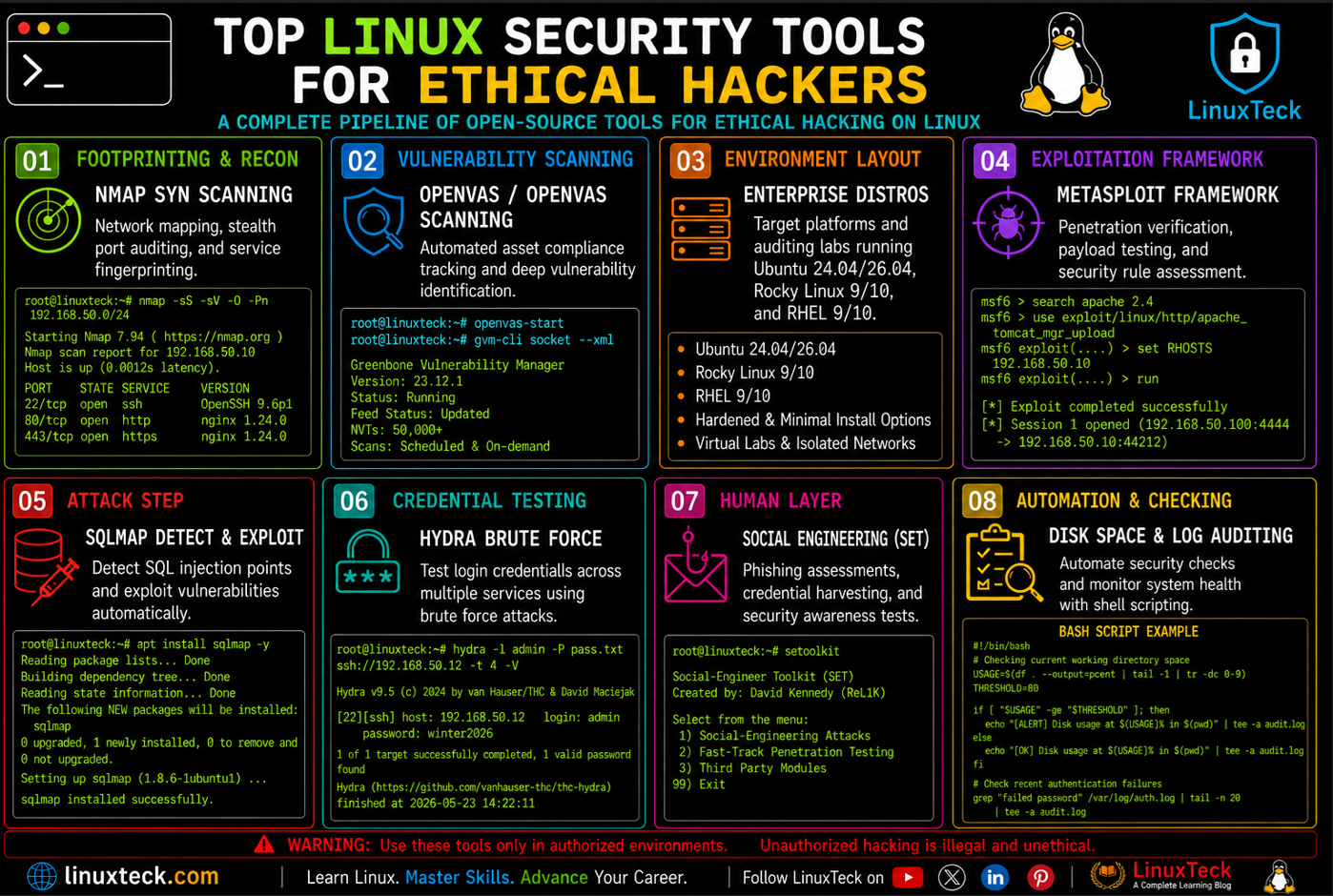
Choosing the right Linux security tools for ethical hackers is the difference between a clean assessment and a production incident. Modern security work demands a structured approach that combines reconnaissance, vulnerability identification, validation, network analysis, credential testing, and post-assessment reporting. Picking the right tool for each phase significantly improves assessment accuracy while reducing operational risk to production systems.
Linux remains the preferred platform for security professionals due to its extensive ecosystem of open-source security tools, flexible automation capabilities, and native support for network analysis and penetration testing workflows. From host discovery with Nmap to vulnerability assessment with OpenVAS, exploitation validation with Metasploit, and traffic inspection with Wireshark, Linux provides everything needed to perform comprehensive security evaluations.
In this guide, we explore the most widely used ethical hacking tools for Linux in 2026, including installation procedures across Ubuntu, Kali Linux, Rocky Linux, RHEL, Fedora, and Arch Linux. You will learn where each tool fits within a professional security assessment workflow, common deployment challenges, production-safe practices, and the mistakes that frequently turn routine testing activities into avoidable incidents, many of which mirror the broader Linux security threats shaping 2026.
| Metric | Value | Source | Relevance |
|---|---|---|---|
| Breaches involving a human element | 68% | Verizon DBIR 2026 | Justifies social engineering testing alongside technical scanning |
| Breaches involving credential abuse | 22% | Verizon DBIR 2025 | Direct driver for hash auditing and password policy testing |
| Average global cost per breach | $4.44M | IBM Cost of a Data Breach Report | Makes the case for scheduled vulnerability scanning over reactive response |
| NVTs in the OpenVAS feed | 50,000+ | Greenbone Community Feed | Scale you cannot replicate manually across a fleet of hosts |
What This Guide Covers:
This walks through the core Linux security toolset for ethical hacking in 2026, set up steps across Ubuntu, Kali, Rocky/RHEL, and Arch, the failure modes that actually cause incidents, a post scan validation script, compliance and hardening commands, a maintenance schedule, and the questions that come up in real engagements.
Most of these tools are free and open source, which means cost is rarely the blocker. The blocker is almost always sequencing, scope, and knowing which distro quirks will bite you mid engagement. A scan that runs clean on Kali can behave differently on a hardened RHEL box with SELinux enforcing, and that difference is exactly where beginners get stuck.
If you already run basic reconnaissance commands daily, this builds on that foundation with the tooling layer security teams use once recon is done and the real testing starts. We will keep it grounded in what actually happens during an engagement, not a marketing description of what each tool claims to do.
Core Linux Security Tools for Ethical Hackers Compared
Use this table to figure out which tool fits which phase of an engagement before you touch a terminal. Categories are not interchangeable; running Hydra when you needed OpenVAS wastes a scan window you usually do not get back. For the full flag reference beyond what is covered here, the official Nmap man page on man7.org is the authoritative source.
| Tool | Category | Best For | Learning Curve | Notes |
|---|---|---|---|---|
| Nmap | Reconnaissance | Host discovery, port scanning, service fingerprinting | Low | Foundation of almost every engagement, NSE scripts add depth |
| OpenVAS / Greenbone | Vulnerability scanning | Fleet-wide CVE detection with CVSS scoring | Medium | Heavy on RAM during feed sync, plan for 4GB+ free |
| Metasploit Framework | Exploitation | Validating whether a finding is actually exploitable | Medium | Needs PostgreSQL running for database tracking of sessions |
| Wireshark | Network analysis | Proving cleartext credentials or unencrypted traffic | Medium | Filters are mandatory, raw capture is useless noise |
| OWASP ZAP | Web application testing | Automated scanning of login forms, APIs, input fields | Low | Findings need manual verification before reporting |
| SQLmap | Database exploitation | Confirming and exploiting SQL injection | Medium | Requires understanding SQL first, the tool will not teach it to you |
| Hydra | Credential testing | Brute force testing against SSH, FTP, HTTP login forms | Low | Check lockout policy first or you will lock real accounts |
| Hashcat | Password auditing | Measuring real world crackability of stored hashes | Medium | GPU acceleration changes results by orders of magnitude |
| Aircrack-ng | Wireless auditing | Testing WPA2/WPA3 handshake strength | Medium | Needs a wireless adapter that supports monitor mode |
Tip:
Nmap, OpenVAS, and Metasploit cover roughly 80% of a standard internal pentest workflow. Learn that chain first before branching into wireless or web-specific tools, since the recon to validation pipeline stays the same regardless of target type.
Environment and Prerequisites
Not every distro handles these tools the same way. Kali ships most of them preinstalled and configured for testing out of the box. Ubuntu and Rocky/RHEL need manual setup and, in RHEL's case, an active EPEL repository for several packages.
| # | Environment / Distro | Type |
|---|---|---|
| 1 | Kali Linux 2026.1 | Purpose-built pentest distro |
| 2 | Ubuntu 24.04 / 26.04 LTS | General purpose, manual tool install |
| 3 | Rocky Linux 9 / 10, RHEL 9 / 10 | Enterprise target environment, EPEL required |
| 4 | Fedora 44 | Bleeding edge testing of newer kernel and netfilter behavior |
| 5 | Arch Linux | Rolling release, AUR packages for niche tooling |
| Requirement | Details | Status |
|---|---|---|
| Written authorization | Signed scope document covering IP ranges, time windows, and rules of engagement | REQUIRED |
| Root or sudo access | Raw socket access for SYN scans and packet injection needs elevated privileges | REQUIRED |
| PostgreSQL service | Backend database for Metasploit session and host tracking | REQUIRED |
| Monitor-mode wireless adapter | Only needed for Aircrack-ng style wireless testing | OPTIONAL |
| GPU with CUDA/OpenCL | Speeds up Hashcat by 10 to 100 times over CPU-only cracking | OPTIONAL |
| Isolated lab network | Separate VLAN or VM segment for exploit testing before touching production scope | REQUIRED |
Warning:
Running any of these tools against systems you do not own or do not have explicit written authorization for is illegal in most jurisdictions, regardless of intent. Treat the scope document as the actual technical boundary of your engagement, not a formality.
Most of these prerequisites apply whether you are scanning a single host or an entire subnet. If you are new to the command line entirely, start with a pass through basic Linux commands so the syntax in this guide does not slow you down later.
How the Toolchain Fits Together
These tools are not used in isolation. A real engagement moves through layers, and each layer feeds the next. Skipping a layer is how beginners end up running exploits against systems they never properly mapped.
ETHICAL HACKING TOOLCHAIN - LAYER BY LAYER

  +-----------------------------------------------------+
  |  LAYER 1: RECONNAISSANCE                             |
  |  Nmap, theHarvester                                   |
  |  Output: live hosts, open ports, service versions      |
  +-----------------------------------------------------+
                        |
                        v
  +-----------------------------------------------------+
  |  LAYER 2: VULNERABILITY SCANNING                      |
  |  OpenVAS, Nikto, OWASP ZAP                             |
  |  Output: CVE list ranked by CVSS severity              |
  +-----------------------------------------------------+
                        |
                        v
  +-----------------------------------------------------+
  |  LAYER 3: VALIDATION AND EXPLOITATION                 |
  |  Metasploit, SQLmap                                    |
  |  Output: confirmed exploitable findings                |
  +-----------------------------------------------------+
                        |
                        v
  +-----------------------------------------------------+
  |  LAYER 4: CREDENTIAL AND ACCESS TESTING                |
  |  Hydra, Hashcat, Aircrack-ng                            |
  |  Output: password strength and auth weaknesses         |
  +-----------------------------------------------------+
                        |
                        v
  +-----------------------------------------------------+
  |  LAYER 5: HUMAN LAYER TESTING                          |
  |  Social-Engineer Toolkit                                |
  |  Output: phishing click rates, awareness gaps           |
  +-----------------------------------------------------+

  Common ports referenced across layers:
  22/tcp ssh   80/tcp http   443/tcp https   445/tcp smb   3306/tcp mysql
Engineer Note:
The output of each layer becomes the input scope for the next one. A scan that finds 40 open ports does not mean you run exploits against all 40. It means you now have 40 things to triage against the CVE database before touching Metasploit at all.
Step-by-Step Setup and First Scan
Step 0 - Confirm Authorization Before Touching a Terminal
Before any command runs, confirm the IP ranges and time window in your scope document match what you are about to scan. This step has no terminal output because it is a paperwork check, but skipping it is the single most common reason engagements turn into legal problems.
Step 1 - Install the Core Toolset
Kali ships these preinstalled. Ubuntu, Rocky, RHEL, and Arch each need a manual install with slightly different package names and repos.
Ubuntu 24.04 / 26.04 LTS
LinuxTeck.com
sudo apt update
# Install core tools in one pass
sudo apt install -y nmap wireshark hydra john sqlmap nikto
# Allow your user to capture packets without sudo each time
sudo usermod -aG wireshark $USER
Rocky Linux 9 / 10 - RHEL 9 / 10 - AlmaLinux 9 / 10
LinuxTeck.com
sudo dnf install -y epel-release
# Install the core set, wireshark-cli avoids pulling the full GUI stack
sudo dnf install -y nmap wireshark-cli hydra john sqlmap
# Nikto lives in EPEL specifically
sudo dnf install -y nikto --enablerepo=epel
Fedora 44
LinuxTeck.com
sudo dnf install -y nmap wireshark-cli hydra john sqlmap nikto
Arch Linux
LinuxTeck.com
sudo pacman -Syu nmap wireshark-cli hydra john
# sqlmap and nikto live in the AUR
yay -S sqlmap nikto
Step 2 - Run a Scoped Reconnaissance Scan
Start narrow. A full aggressive scan against an entire subnet on the first pass is how you trip IPS systems and generate noise nobody wants to triage. Service version detection at a moderate timing template is the right opening move.
LinuxTeck.com
nmap -sV -T2 --top-ports 100 192.168.50.0/24 -oN initial_scan.txt
Step 3 - Run a Vulnerability Scan Against the Confirmed Hosts
Feed only the hosts that came back alive into OpenVAS instead of scanning the entire range again. This keeps scan time down and avoids generating findings for dead IP space.
LinuxTeck.com
gvm-cli --gmp-username admin --gmp-password CHANGE_ME socket \
--xml "<create_target><name>web-fleet</name><hosts>192.168.50.12,192.168.50.18</hosts></create_target>"
Step 4 - Validate a Finding With Metasploit Before Reporting It
A CVE in a scan report is a claim, not proof. Confirm exploitability in your isolated lab segment, never directly against the live target unless your scope explicitly authorizes active exploitation.
LinuxTeck.com
msfconsole -q -x "search type:exploit cve:2026-1234; exit"
Production Pitfalls and Fixes
These are the failure patterns that actually show up in real engagements, not hypothetical edge cases from a documentation page.
Aggressive Timing Drops Legacy Devices
Environment: Mixed-age corporate VLANs with VoIP phones, print servers, or embedded devices alongside modern hosts.
Failure pattern: Running nmap -T4 or -T5 against a network with older embedded firmware can flood weak network stacks and crash devices that were never built to handle high packet rates.
LinuxTeck.com
nmap -sV -T2 --max-rate 50 192.168.50.0/24
Hydra Locks Out Real User Accounts
Environment: SSH or web login forms with account lockout policies enabled after a set number of failed attempts.
Failure pattern: A full speed dictionary attack with hydra -t 16 against a service with a 5-attempt lockout locks legitimate users out mid test, generating help desk tickets before the engagement even finishes.
LinuxTeck.com
hydra -l admin -P wordlist.txt -t 2 -W 30 ssh://192.168.50.12
OpenVAS Feed Sync Eats All Available Memory
Environment: Fresh OpenVAS/Greenbone installs on VMs provisioned with under 4GB of RAM.
Failure pattern: The initial NVT feed sync pulls over 50,000 vulnerability tests and the redis backend used by gvmd spikes memory usage hard enough to trigger the OOM killer on small VMs, silently killing the sync mid-process.
LinuxTeck.com
free -h
# Check the redis backend did not get killed mid sync
sudo systemctl status redis-server@gvmd
# Resync once you have 4GB+ free
sudo gvm-feed-update
SELinux Silently Blocks Metasploit Listener Ports on RHEL
Environment: Rocky Linux or RHEL boxes used as an attack platform with SELinux in enforcing mode.
Failure pattern: A reverse shell payload never calls back because SELinux denies the bind on a non-standard port, and the only trace is a denial buried in audit.log, not in Metasploit's own console output.
LinuxTeck.com
sudo ausearch -m avc -ts recent | grep denied
# Register the listener port under an allowed type
sudo semanage port -a -t http_port_t -p tcp 4444
Treating OWASP ZAP Findings as Confirmed Without Manual Review
Environment: Automated web application scans run against staging or production sites with default scan policies.
Failure pattern: ZAP flags a reflected XSS finding that is actually a false positive caused by a WAF echoing back sanitized input. Reporting it as confirmed without verifying the payload actually executes damages report credibility fast.
LinuxTeck.com
zap-cli quick-scan --self-contained -s xss http://192.168.50.18
# Export findings for manual verification before reporting
zap-cli report -o zap_findings.html -f html
Wireshark Capture Files Filling Disk on Long Captures
Environment: Multi-hour packet captures on busy network segments during traffic analysis testing.
Failure pattern: A full capture with no ring buffer or filter on a saturated 1Gbps link fills the disk in under an hour, and the capture process either crashes or, worse, locks up the testing VM entirely.
LinuxTeck.com
tshark -i eth0 -b filesize:100000 -b files:5 -w capture.pcap
Post-Engagement Validation Script
Run this after wrapping a scan phase to confirm your attack box is in a clean state before the next round and that nothing was left exposed from the test itself.
LinuxTeck.com
# post_scan_check.sh - validates attack box state after a test phase
echo "Checking for leftover Metasploit listeners..."
if ss -tlnp | grep -q 4444; then
echo "FAIL: listener still active on port 4444"
exit 1
else
echo "PASS: no leftover listeners"
fi
echo "Checking disk space on current working directory..."
USAGE=$(df . --output=pcent | tail -1 | tr -dc 0-9)
if [ "$USAGE" -gt 90 ]; then
echo "FAIL: disk at ${USAGE}% used, run from a directory with more free space"
exit 1
else
echo "PASS: disk at ${USAGE}% used"
fi
echo "All post-scan checks passed."
exit 0
Usage:
Save as post_scan_check.sh, run chmod +x post_scan_check.sh once, then run it at the end of every scan phase. A non-zero exit code means something needs cleanup before you hand the box to the next analyst or close the engagement window. If the conditional logic here looks unfamiliar, the Linux shell scripting interview questions guide covers the same patterns in more depth.
Security and Compliance
Compliance comes up more than beginners expect, especially in engagements touching regulated industries. These checks map to common audit frameworks.
PCI-DSS Scope Compatible
HIPAA Audit Trail Ready
SELinux Status Check (Rocky / RHEL)
LinuxTeck.com
sestatus
# Quick mode check
sudo getenforce
AppArmor Profile Status (Ubuntu)
LinuxTeck.com
sudo aa-status
Document both checks in your final report regardless of the outcome. Auditors increasingly want proof that mandatory access control was active during testing, not just confirmation that the scan ran. For a deeper walkthrough of hardening baselines before testing even starts, see the Linux server hardening checklist, and pair that with the Linux security command cheat sheet for quick reference during the engagement itself.
Monitoring and Maintenance Checklist
Tooling rot is real. A vulnerability scanner running on a six-month-old feed will miss every CVE disclosed since then. This schedule keeps the toolchain itself from becoming the weak point, and pairs well with whatever you already use from the best Linux monitoring tools for ongoing infrastructure visibility.
Frequently Asked Questions
Why did my Nmap scan come back with all ports showing filtered instead of open or closed?
That usually means a firewall or IPS is dropping packets silently rather than rejecting them. Try a different scan type like -sA for an ACK scan to see how the firewall responds differently, and confirm you are not scanning through a NAT boundary that is eating the responses.
Is it safe to run OpenVAS against a production network during business hours?
Generally no, not without a maintenance window. Full vulnerability scans generate meaningful traffic and can trigger false alarms in monitoring tools. Schedule full scans outside peak hours and use a reduced scan config for any daytime spot checks.
Why does Metasploit say my exploit module is not compatible with the target?
Check the exact service version Nmap reported against the module's documented target range. A lot of exploits only work against a narrow patch range, and a target that is one minor version off will reliably fail the check.
What is the safest way to practice these tools before running them on a client network?
Build an isolated lab with a hypervisor and intentionally vulnerable VMs, or use a dedicated practice platform built for this. Never point any of these tools at infrastructure you do not control or have written authorization for, even during practice. If you are also working toward a credential, the best Linux certifications for 2026 guide outlines which ones map to this kind of hands-on testing.
Why does Hydra report success on a login that I know is wrong?
Check the response string Hydra is matching against. Some login forms return a 200 status code even on failed attempts, and if your failure condition string is wrong, Hydra will misread every response as a success.
How long should a full OpenVAS scan take against a /24 network?
Expect anywhere from 1 to 4 hours depending on scan config depth and how many hosts respond. A full and fast config against a saturated network can run considerably longer, so always test scan duration against a smaller subnet first.
Do I need a GPU to use Hashcat effectively?
Not strictly, but CPU-only cracking is dramatically slower for anything beyond simple hash types. A mid-range consumer GPU will outperform a high-end CPU by a wide margin on common formats like NTLM or bcrypt.
Why did Wireshark stop capturing traffic on my interface mid test?
Check disk space first, since a full disk silently kills the capture process on many configurations. After that, confirm the interface did not drop out of promiscuous mode, which can happen after certain network manager restarts.
What is the real difference between SQLmap finding a vulnerability and it being exploitable in practice?
SQLmap confirming injection means the input is not sanitized. Whether it is exploitable depends on database permissions, whether stacked queries are allowed, and what data the application's database account can actually reach. Always validate impact before rating severity.
Should I use SET for an internal phishing test without telling anyone on the security team?
No. Social engineering tests need sign-off from whoever runs incident response, since a convincing phish can trigger a real incident response process that wastes hours chasing a test that was never a threat.
Conclusion
None of these tools are hard to install. Nmap, OpenVAS, Metasploit, Hydra, and the rest all run cleanly on Ubuntu 24.04/26.04, Rocky Linux 9/10, RHEL 9/10, and Kali with a handful of package commands. The actual skill being tested in this field is judgment, not installation, and that judgment shows up in scan timing, scope discipline, and knowing when a finding needs manual verification before it goes in a report.
The numbers keep pointing the same direction year over year. Credential abuse still drives roughly a fifth of breaches, the human element shows up in more than two thirds of them, and the average breach still costs well into the millions. None of that changes because a new scanner shipped a faster engine. What changes is how fast teams can find and validate the gap before someone else does.
Distro differences are narrowing too. SELinux and AppArmor both do the same job through different syntax, dnf and apt both pull the same upstream packages eventually, and EPEL on RHEL keeps closing the gap with what Kali ships preinstalled. The meaningful gap now sits between teams that document scope and validate findings, and teams that run a scanner and forward the raw output as a deliverable.
If you are setting up a testing environment for the first time, pair this with the Linux quick start guide for 2026 to get your base distro running cleanly, and review the RHEL vs Ubuntu Server comparison if you are still deciding which platform to standardize your lab on. It is also worth setting up proper Linux server backup solutions on any attack platform before you start running exploit chains against it. The next concrete step today is simple: pick one tool from this list you have not used hands-on yet, build a 30-minute lab scenario for it, and run it before you need it in a real engagement.
This guide covered the core Linux ethical hacking toolset for 2026, setup across Ubuntu, Kali, Rocky/RHEL, and Arch, real failure modes from production engagements, validation scripting, and compliance checks.
LinuxTeck's Enterprise Linux category focuses on production-ready Linux skills including:
vulnerability scanning, penetration testing, SELinux hardening, network security auditing, password auditing, and Linux compliance frameworks.