How do I find which process is slowly eating my RAM?
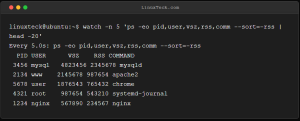
Try: watch -n 5 'ps -eo pid,user,vsz,rss,comm --sort=-rss | head -20' Info: watch runs the command repeatedly, showing memory trends. RSS shows physical memory in KB. If a process's RSS keeps growing, you have a leak. Examples: $ watch -n 1 'free -m' $ smem -tk -s rss # More accurate […]
Read More