Tail Linux logs with colored output using grep

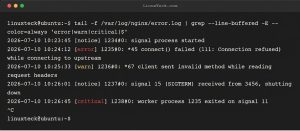
How do I tail a log file with colored output for errors?

Try: tail -f /var/log/nginx/error.log | grep --line-buffered -E --color=always 'error|warn|critical|$' Info: --color=always highlights matching text. The |$ pattern matches every line so non-matching lines still display. --line-buffered ensures real-time output. Examples: $ tail -f app.log | grep --line-buffered --color=always -E 'ERROR|WARN|$' $ journalctl -f | grep --line-buffered --color=always -E 'Failed|Error|$' $ […]

Read More
rsync sync servers with checksum and delete

How do I keep /var/www identical on two servers with minimal transfer?

Try: rsync -avz --checksum --delete /var/www/ linuxteck@backup:/var/www/ Info: --checksum compares file contents rather than timestamps to catch true changes. --delete removes destination files that no longer exist on the source. Examples: $ rsync -avz --dry-run /src/ user@host:/dst/  # Dry-run preview $ rsync -avz --exclude='*.log' --exclude='cache/' /src/ /dst/ $ rsync -avz --link-dest=/prev/backup […]

Read More
systemd-run resource limits for CPU and memory

How do I prevent a runaway script from consuming all resources?

Try: systemd-run --scope -p CPUQuota=25% -p MemoryMax=500M ./heavy_script.sh Info: systemd-run creates a transient cgroup with resource limits. Any process launched inside respects those limits. Great for testing or running untrusted code. Examples: $ systemd-run --scope -p CPUQuota=50% stress --cpu 8 $ systemd-run --user -p MemoryMax=1G firefox $ systemd-run --scope -p IOWeight=10 […]

Read More